At 2 a.m., the console showed the entire fleet protected. At 3 a.m., it still did. By then, though, half the machines had stopped sending it anything.
That is how many ransomware attacks start in 2026. The intruder does not try to slip past the security tool. It switches the tool off, clears the event logs, and only then moves on to encryption.
For anyone responsible for a large fleet, the question moves. Knowing whether the defense stops the attack is not enough. You need to know what you can still prove when it does not, and where that proof was kept.
Taking down the defense is now step one
On October 29, Cisco Talos published its incident response review for the third quarter of 2026. Ransomware and pre-ransomware made up 27% of engagements, up from a maximum of 20% across the previous four quarters.
The same report says attackers mostly chose to disable EDR, often by exploiting vulnerable drivers or by turning a WDAC policy (Windows’ own application control) against it.
And the leading weakness was insufficient logging, which left visibility gaps in over 40% of engagements, partly because deleting logs is a common attacker practice.
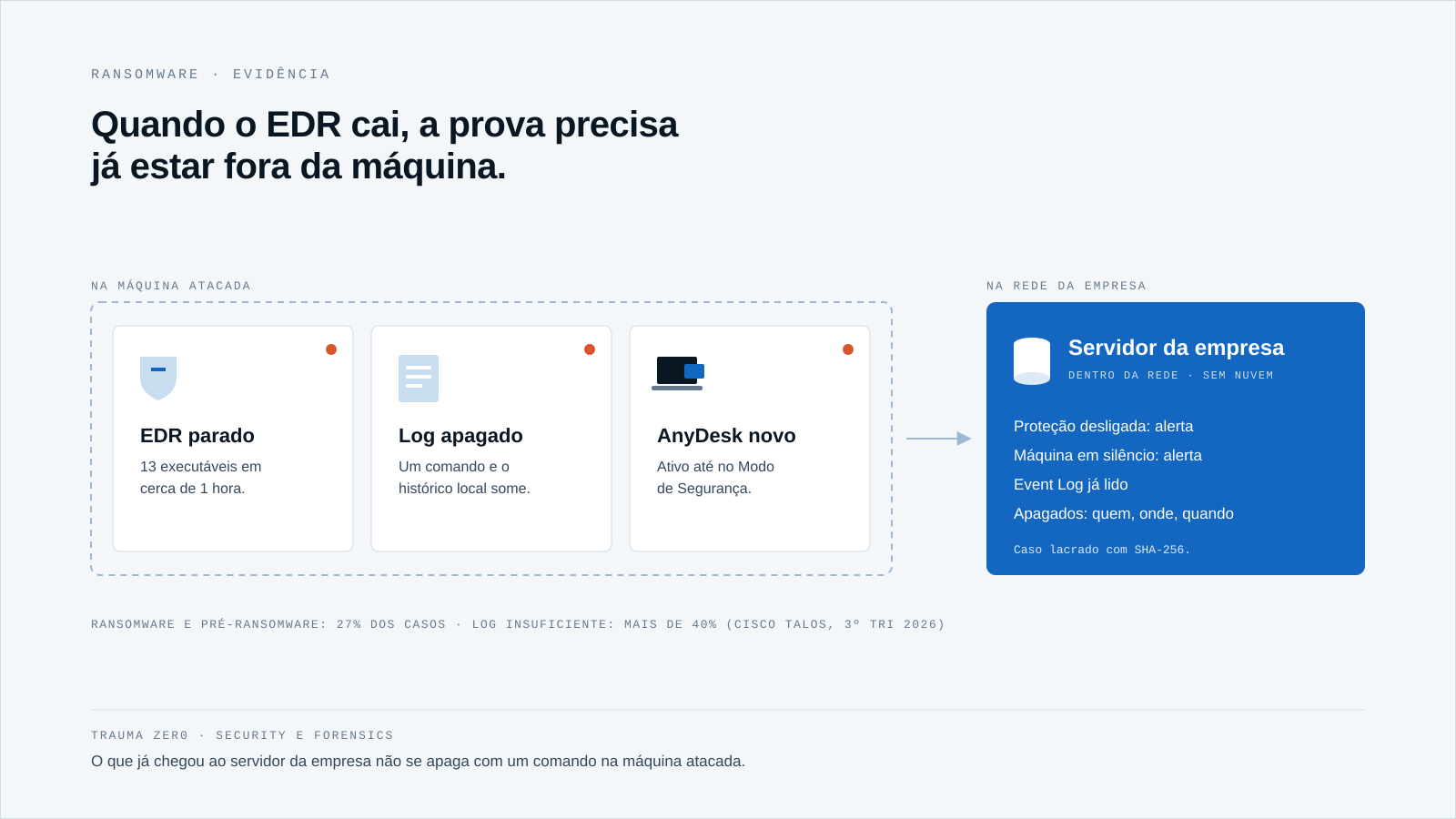
A week later, on November 5, Symantec’s threat hunting team described an October attack on a U.S. organization. Within roughly an hour, the attackers dropped at least 13 executables to terminate security services, 11 of them previously unseen, along with five known vulnerable drivers.
They also configured AnyDesk to keep running when Windows booted into Safe Mode, where protections usually stay out of the picture.
In that case, encryption was blocked. Even so, the organization still had to answer what happened before the block: on which machines, under which account, and for how long.
Why local evidence disappears with it
If the record lives only on the attacked machine, whoever controls the machine controls the record. Clearing the Windows event log takes one command, and an attacker with administrator rights needs nothing more.
A disabled EDR can be reinstalled in a day. The history it took down with it cannot.
The problem is not having EDR. It is making it the only witness, and keeping the testimony in the same place the attacker just took over.
With Trauma Zer0, the workstation agent sends what it collects to the company’s own server, inside the network. Tz0 Security reads the machines’ Event Log and shows it in the console: what has already reached the server does not depend on the local log still existing.
No agent is immune to someone with administrator rights on the machine, Trauma Zer0’s included. That is why what counts is the evidence that has already left the machine, and the silence it leaves when it stops reporting.
Five signals that usually come before encryption
Protection that stopped
A tool that gets killed rarely says goodbye. Tz0 Security’s behavior analysis flags machines where protection was being switched off, and service changes show when the antivirus service disappeared from a workstation or a server.
The security score checks, machine by machine, whether antivirus, firewall and EDR are active and up to date. An alert like this is a lead to investigate, not a verdict: sometimes it is maintenance nobody announced.
The machine that went quiet
An active workstation that stops sending events is suspicious in itself. Tz0 Security treats a silent machine as an alert, instead of leaving it as one more green line on the dashboard.
The remote access tool that showed up
AnyDesk set up for Safe Mode is persistence dressed as support software. In software changes, Tz0 Security filters out Windows’ own noise and puts what needs attention up front, such as a newly installed remote access tool, with date and machine.
The privilege that opened the way
To load a vulnerable driver, an attacker usually needs administrator rights first. Tz0 Security shows who works as a local administrator and which programs run with full privileges, and checks the fleet’s software against the CISA catalog of exploited vulnerabilities, flagging those used by ransomware.
Mass deletion
Backups and entire folders are usually the next target. Tz0 Forensics separates routine deletion (builds, cache, temp files) from the deletion that matters, rebuilds deleted files and identifies who removed a folder. On shared folders, every operation is kept with machine, person, time and path.
Prepare the proof before the incident
None of this works if you switch it on the day of the attack. Evidence exists if it was recorded at the time, or it does not exist. A few steps fit any fleet:
- List which records exist only on the workstation and which already reach a company server.
- Treat disabled protection and silent machines as alerts with an owner and a deadline, not as a status.
- Keep a list of approved remote access tools, so a new one stands out.
- Cut local administrator rights down to what the work actually requires.
- Write the collection rule and the retention period before switching on any tracking, with a defined purpose, as data protection law requires.
The clock matters too. Under Brazil’s LGPD, when personal data is involved, a company has three business days to explain what happened on the machine. And attackers usually stay longer than it seems, so it is worth checking whether your evidence retention covers the dwell time.
Paying the ransom or restoring the backup does not answer these questions either. Paying the ransom does not explain what happened; evidence kept off the machine does.
How Trauma Zer0 helps
- EDR taken down without warning → alerts for protection being disabled, antivirus service removed and silent machines in Tz0 Security → the team knows which machines were left undefended and since when, and decides what to investigate first.
- Logs wiped on the machine → Event Log readings and Tz0 Forensics collection kept on the company’s server → the incident timeline does not depend on the compromised machine.
- New remote access tool → software changes with the noise filtered out → persistence shows up as a dated change, per machine, instead of hiding among ordinary programs.
- Deleted folders and backups → deleted file reconstruction, authorship of the deletion and cases sealed with SHA-256 in Tz0 Forensics → exportable evidence for an internal inquiry or a legal case.
All of this runs installed on the customer’s own infrastructure. The data collected from workstations does not go to the cloud: it stays on the company’s server, under the policy the company itself wrote. Tz0 Forensics, as the most sensitive module, should only be switched on with a usage rule, scope and authorization in place.
If the console stays green, what can you still prove?
Workstation protection will keep being a target. What IT gets to choose is whether, on the day it falls, the only witness falls with it.
Explore Tz0 Security and Tz0 Forensics and book a demo built around your scenario. If you would rather test it in your real environment, request a Trauma Zer0 evaluation.