Trauma Zer0
EN

Platform  /  Tz0 Security

Module · policy enforcement

Tz0 Security

Security policy and DLP on the endpoint

Writing the security standard is the easy part. The real question is another one: how do you guarantee it is being followed on twelve thousand machines, right now, without someone checking them one by one?

Enforces the rule even with the workstation off the network · the evidence stays on your server

A workstation with a blue shield above it and a USB stick isolated on its own pedestal

USB port

The rule travels with the machine.

It makes no difference whether the machine is on the company network, at an employee’s home or on the road: the removable-media policy travels with it. A USB stick that is not on the list will not mount, and the attempt is recorded with machine, user and time.
tz0.suaempresa.local/security/criptografia
Tz0 console screenshot
Tz0 Security · web console

Console capture from an estate in production. Machine and person identification replaced; figures untouched.

What the module does

Seven fronts of control, a single agent.

Everything below is configured in the console and enforced by the agent on the workstation — with or without a connection to the server at the moment of the attempt.

Blocks and rules

Defines what may run, what may be installed and what may leave the machine — by group, by department or by workstation.

Hardware snapshot

Photographs the machine’s physical configuration and warns when a part is swapped, removed or appears out of nowhere.

Real-time visibility

What is happening on the estate right now — not what happened during last night’s inventory run.

Tracing for lost equipment

A laptop that went missing keeps reporting: where it surfaced, on which network, under which user.

Working-hours control

Sets the window in which each group may operate and records what was attempted outside it.

Application-layer firewall

The rule is not just port and IP: it is which program may talk, to whom and through where.

Integration with Windows policy

Lives alongside the GPO you already have instead of fighting it — and covers what the GPO cannot reach.

DLP support

Stops personal data leaving where it should not and records the attempt — the backbone of a defence in a data-protection audit.

How it works

From the written rule to the stored evidence.

The whole cycle runs inside your network. No step depends on an external service.

01 Define Created in the console, by group or by department. 02 Distribute The agent receives the policy and stores it locally. 03 Enforce The block happens on the workstation, online or not. 04 Record Attempt becomes an event with evidence attached. 05 Respond Alert, report and investigation. Step 03 does not depend on the server: a workstation off the network keeps enforcing the policy and syncs its events when it returns.

Evidence

Blocking is half of it. Proving is the other half.

In an audit, nobody asks whether the policy exists — they ask what happened on the 14th, who tried, what was blocked and where the record is. Every attempt becomes an event stamped with time, machine, user and the content that triggered the rule.

14:02:11Copy to USB stick blockedlegal department workstation · spreadsheet containing personal data
14:02:11Evidence attached to the eventfile hash, destination and policy applied
14:02:12Alert sent to the data protection officerDLP rule · high severity
14:07:40Remote session opened to investigateoperator identified · session recorded
15:20:00Incident report availableexportable for the internal case file

Console

The policy is written and enforced in the browser.
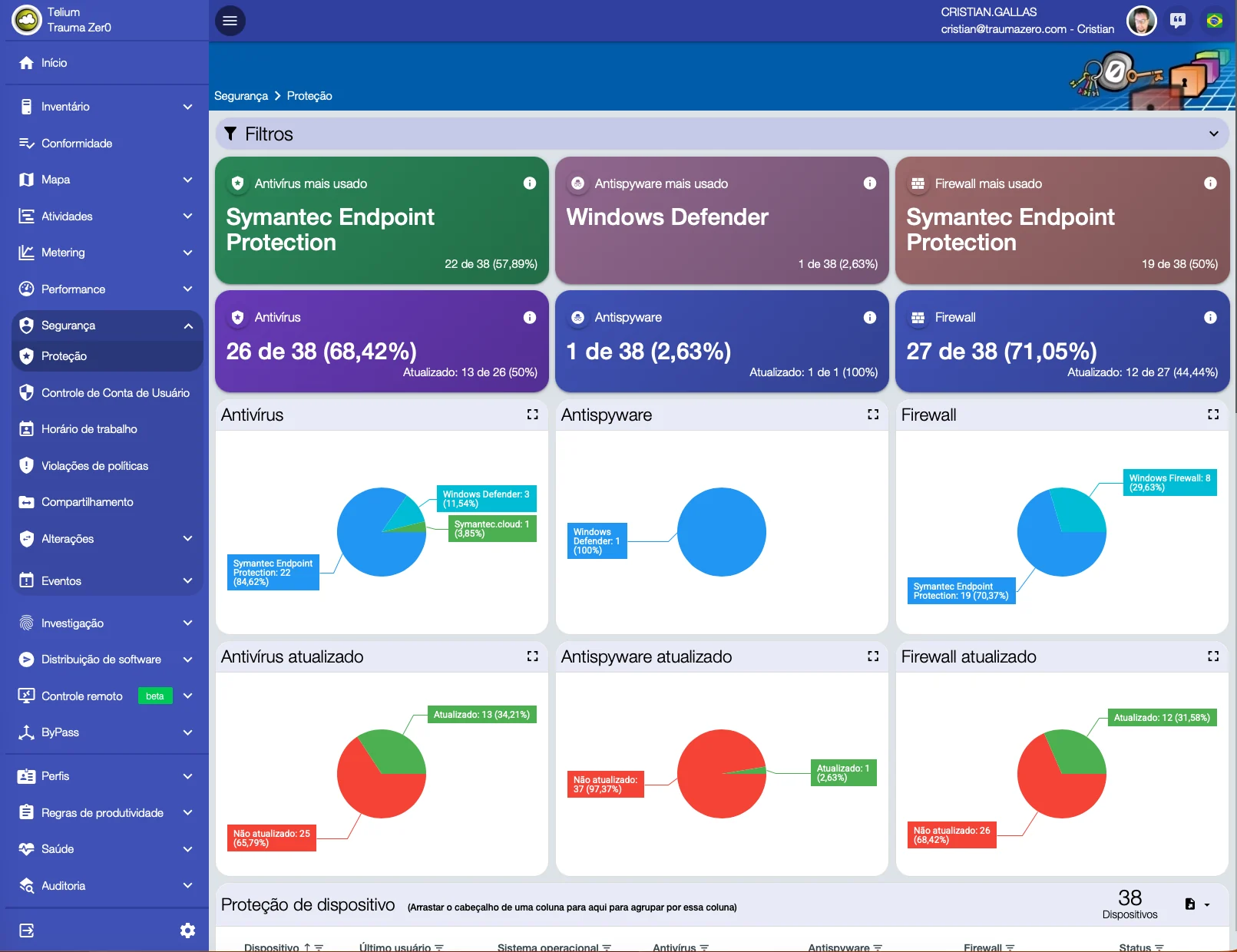
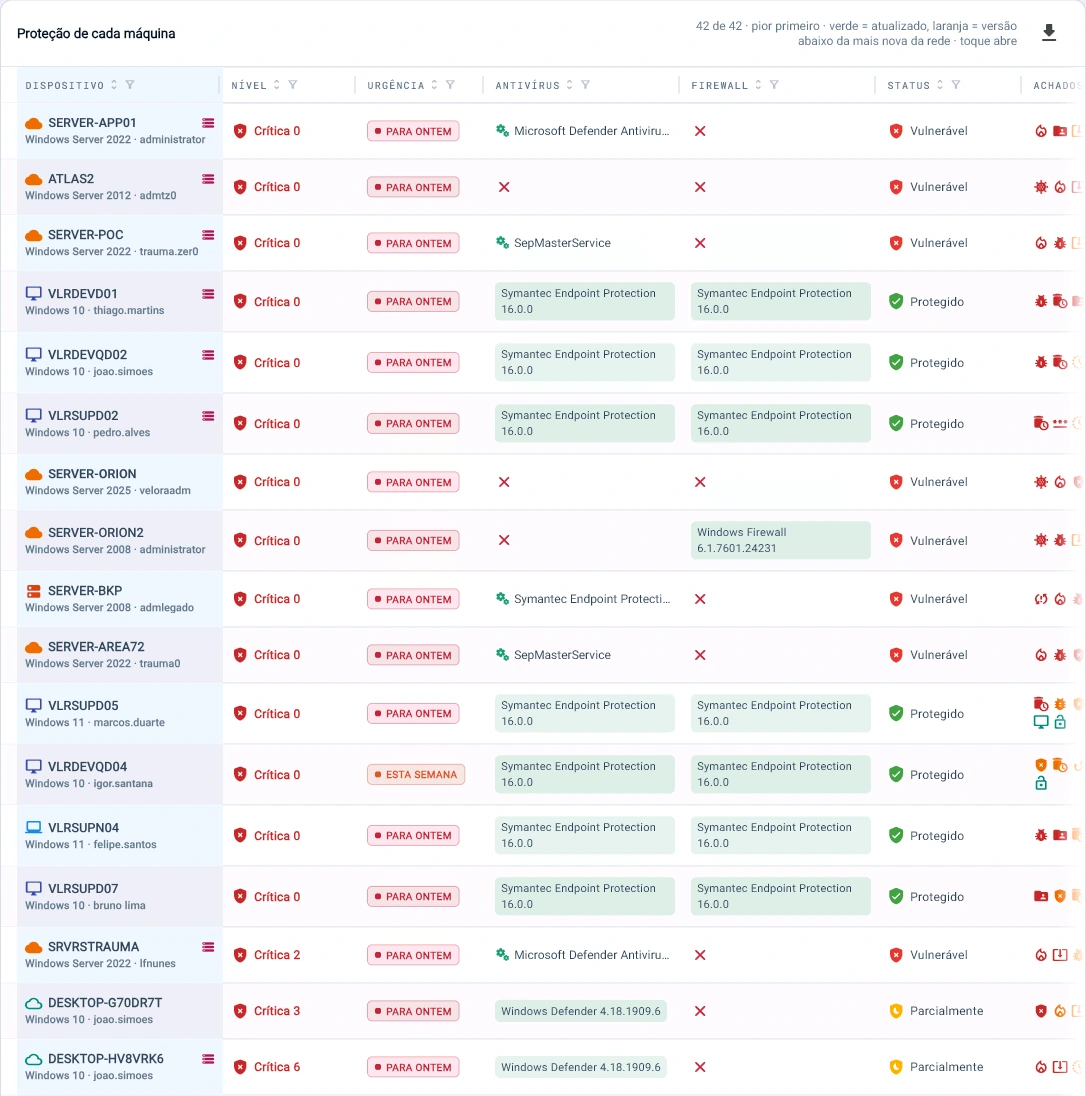
Protection screen in Tz0 Security, with estate-wide antivirus, antispyware and firewall coverage and how much of it is up to date
Is the estate protected? The answer is a number. Antivirus on 68.42% of machines, firewall on 71.05%, antispyware on 2.63% — and beside each one, how much is actually up to date. This is not what the policy says: it is what the agent found.
Tz0 console screenshot: Protection on every machine, worst first: a server with no antivirus and no firewall shows up at the top, marked “fix yesterday”
Protection on every machine, worst first: a server with no antivirus and no firewall shows up at the top, marked “fix yesterday”.
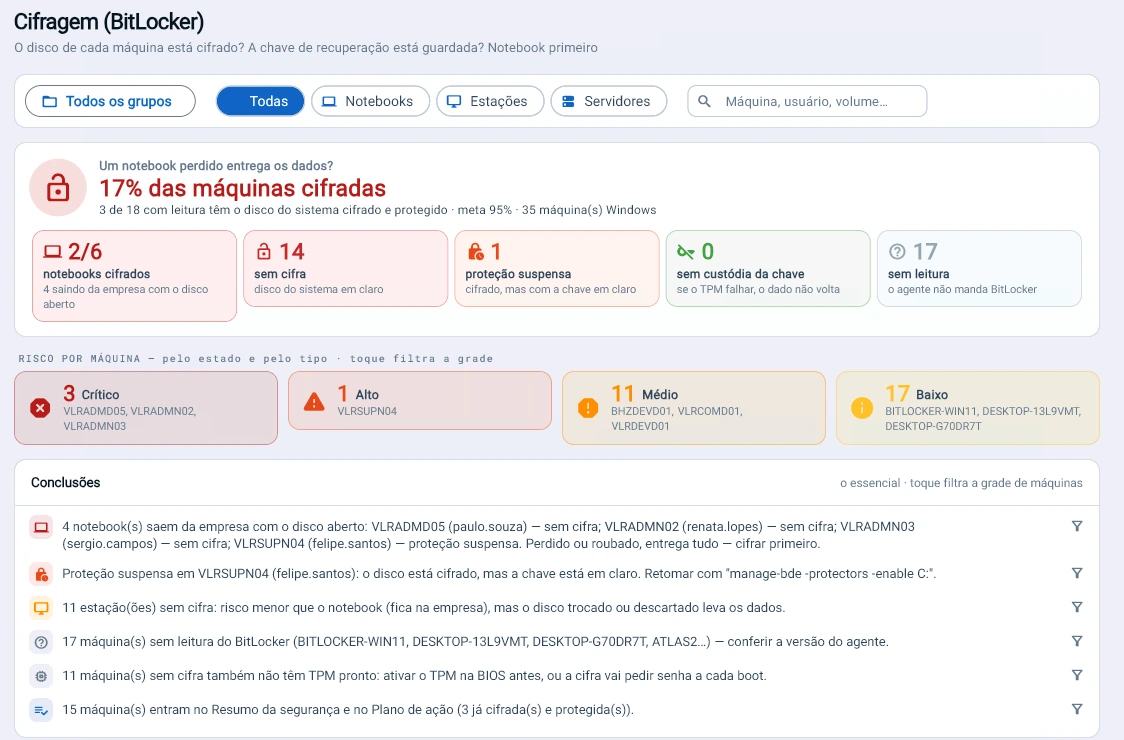
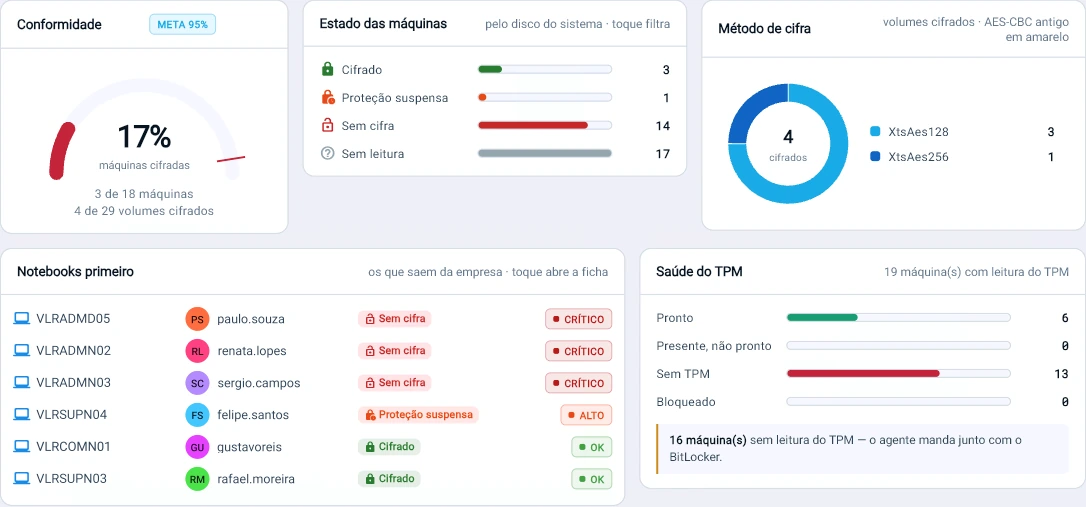
Tz0 console screenshot: Does a lost laptop give away the data?
Does a lost laptop give away the data? Only 2 of 6 laptops are encrypted, and 17% of machines against a 95% target. Tz0 says which one to encrypt first and the command to resume suspended protection.
Tz0 console screenshot: Laptops first: 3 leave the company unencrypted and 1 with protection suspended
Laptops first: 3 leave the company unencrypted and 1 with protection suspended. 13 machines have no TPM, and without it encryption asks for a password at every boot.
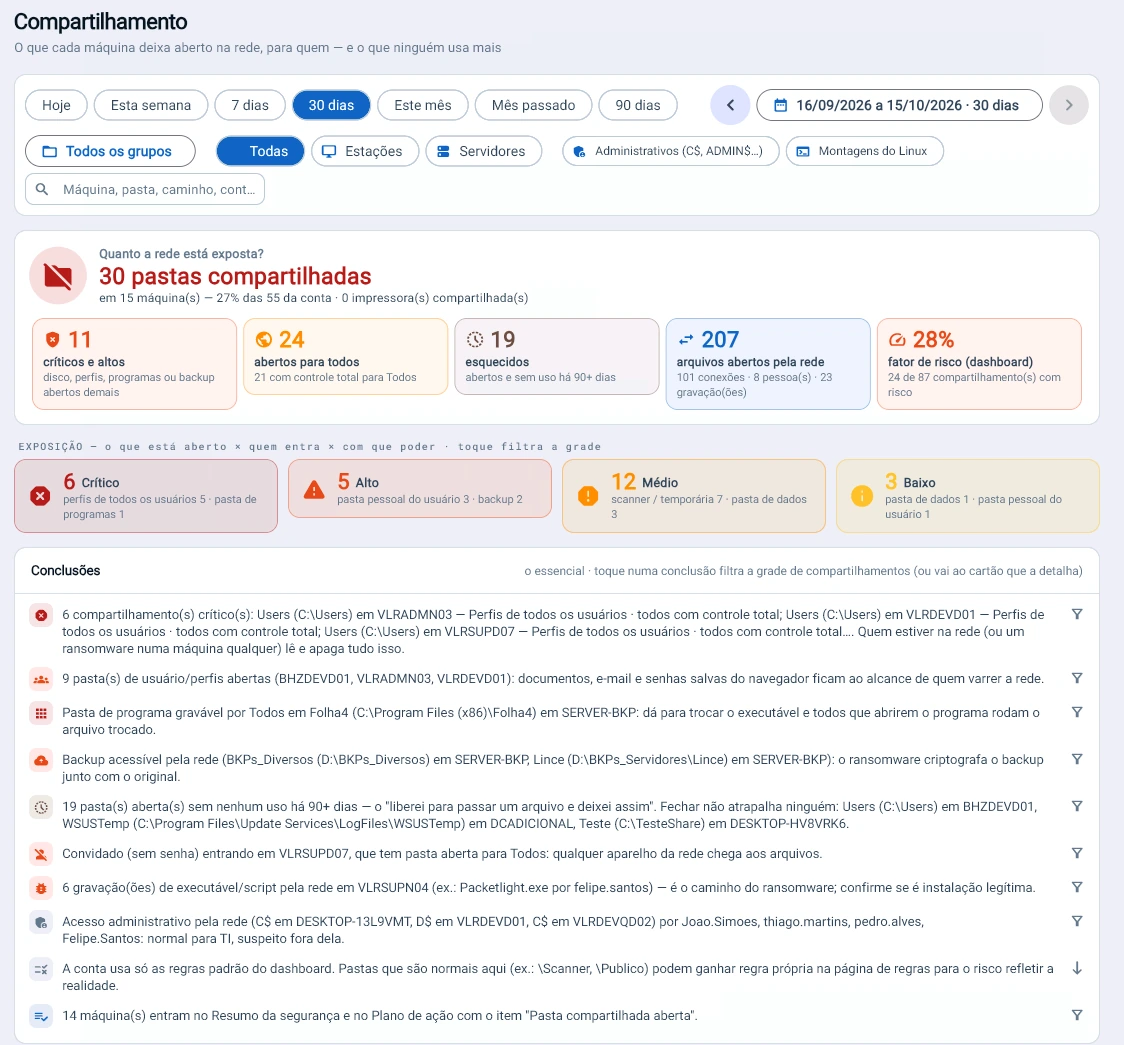
Tz0 console screenshot: 30 folders open on the network, 24 of them to Everyone
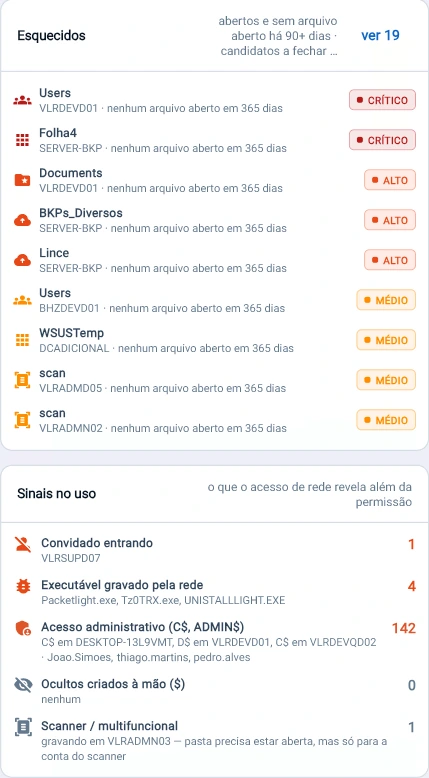
30 folders open on the network, 24 of them to Everyone. Tz0 shows what is exposed, what nobody has used in 90 days (19 folders) and where ransomware would reach first.
Tz0 console screenshot: An open, forgotten folder is a door with no owner
An open, forgotten folder is a door with no owner. 19 folders with no file opened in 365 days, 4 executables written over the network and 142 administrative accesses in 30 days.
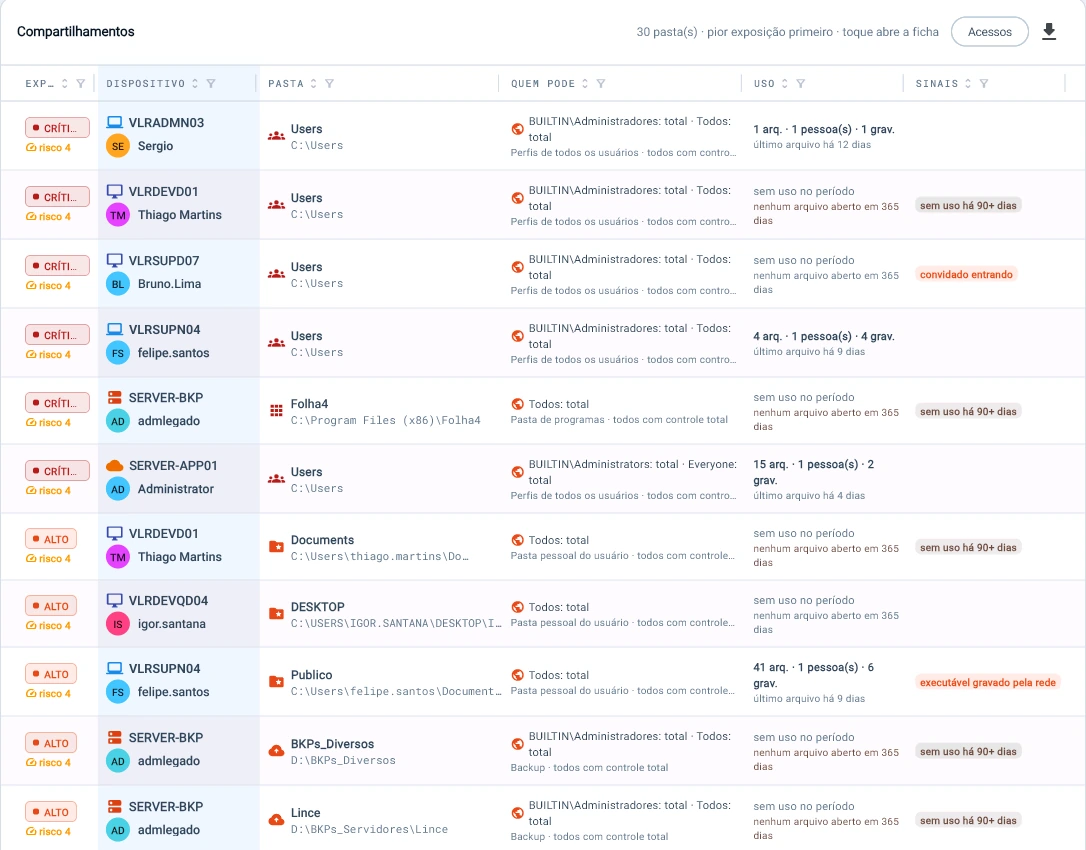
Tz0 console screenshot: Every folder with who can access it, how much it was used and what that use reveals: all user profiles with full control, and not a single file opened in 365 days
Every folder with who can access it, how much it was used and what that use reveals: all user profiles with full control, and not a single file opened in 365 days.
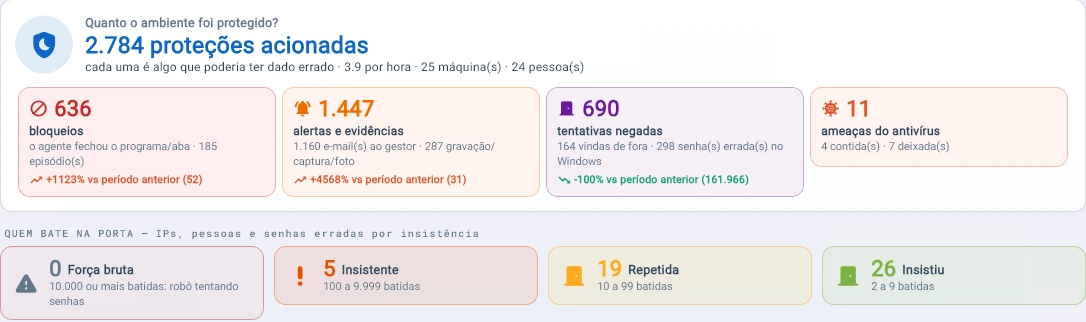
Tz0 console screenshot: 2,784 protections in 30 days: 636 blocks, 1,447 alerts and evidence records, 690 denied attempts and 7 threats the antivirus only logged and let through
2,784 protections in 30 days: 636 blocks, 1,447 alerts and evidence records, 690 denied attempts and 7 threats the antivirus only logged and let through.
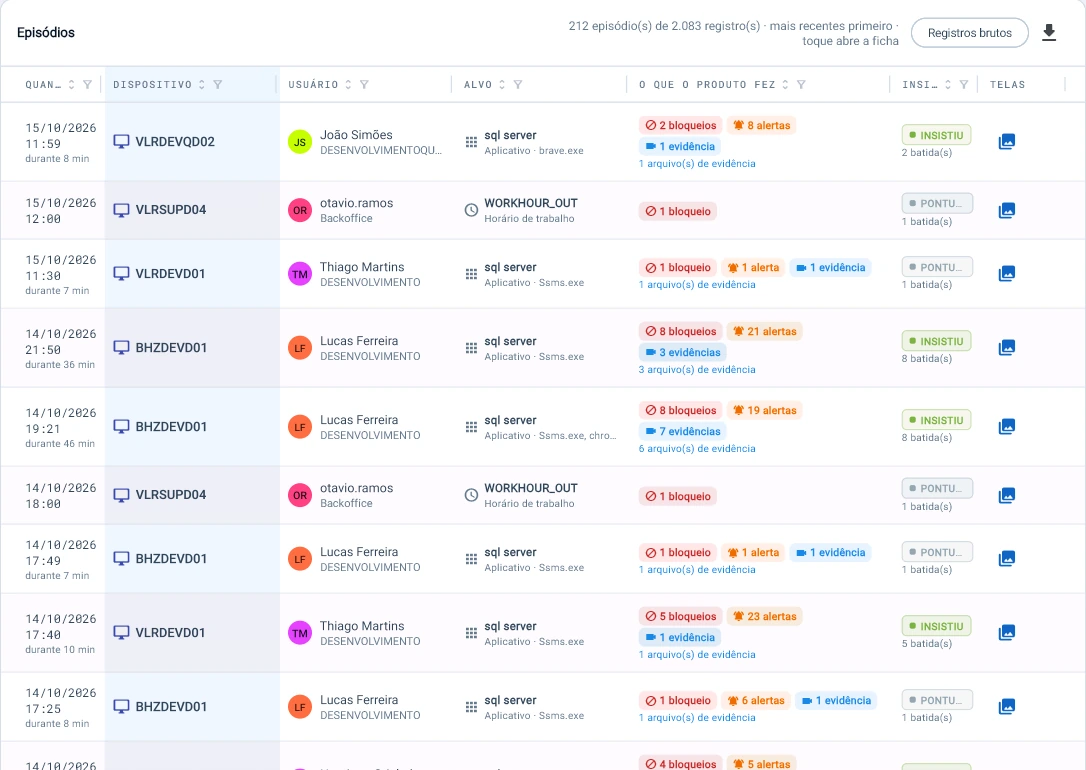
Tz0 console screenshot: 2,083 records become 212 episodes
2,083 records become 212 episodes. Each one says what Tz0 did (block, alert, evidence), whether the person insisted, and links straight to the recorded screens.
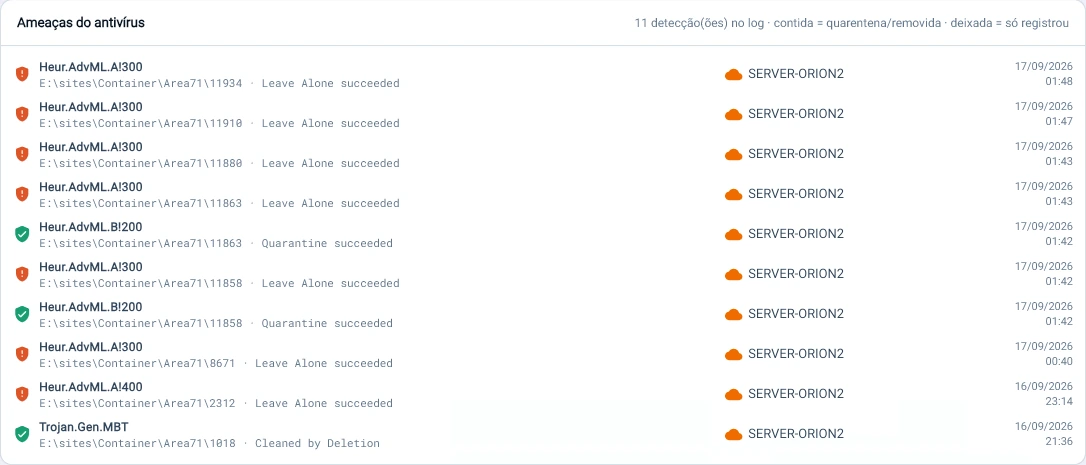
Tz0 console screenshot: The antivirus saw it and let it be
The antivirus saw it and let it be. Of 11 detections on the server, 7 were only logged, without quarantine; Tz0 reads the log and shows each one.

Screens from a real estate in production, not a demo environment. Folder paths that identified people, the internal domain and one public-sector folder were replaced with generic equivalents before publishing; figures, percentages and the interface itself are untouched.

Security score

One score, the minimum and where to start.

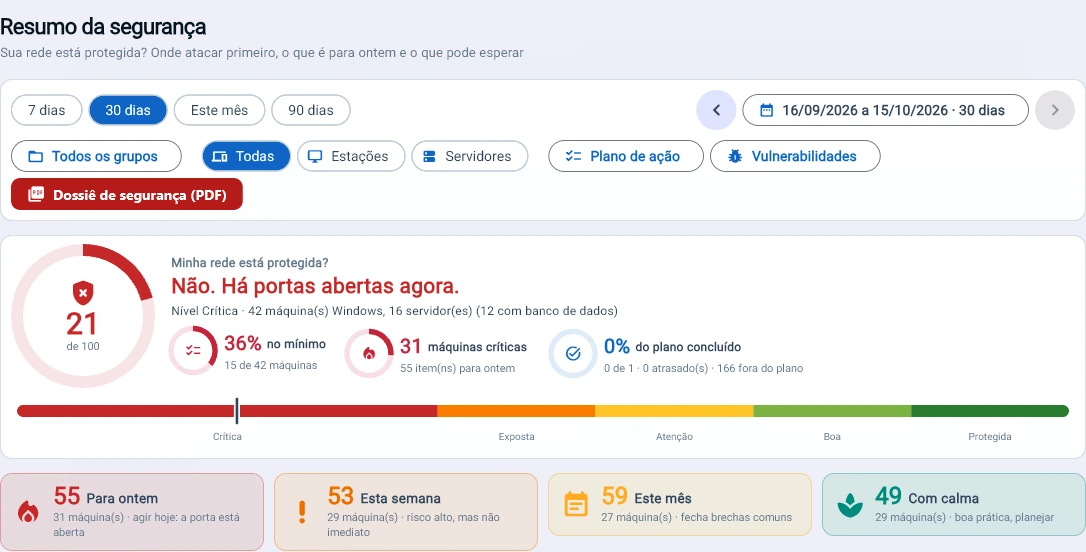
The network summed up in a score from 0 to 100, each layer measured machine by machine and the findings ranked by weight, with the period’s attacks alongside.
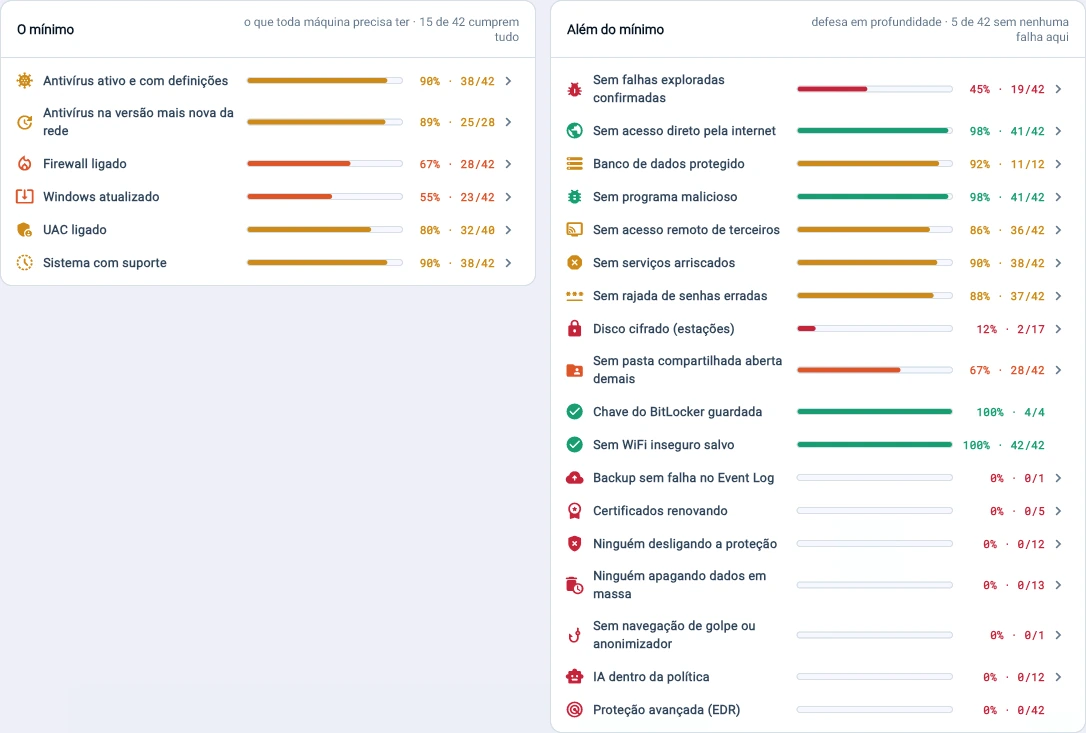
Tz0 console screenshot: The minimum and beyond
The minimum and beyond. Firewall on in 28 of 42 machines, Windows up to date in 23 of 42 and none with advanced protection (EDR): each layer measured, machine by machine.
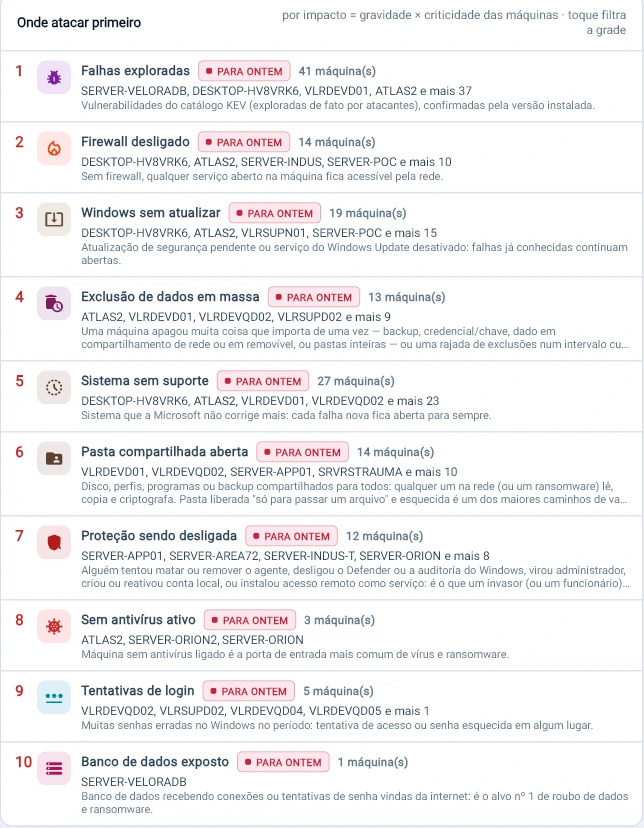
Tz0 console screenshot: Where to start
Where to start. Tz0 ranks the findings by impact: 41 machines with an exploited flaw, 14 with the firewall off and 13 with mass data deletion — all “fix yesterday”.
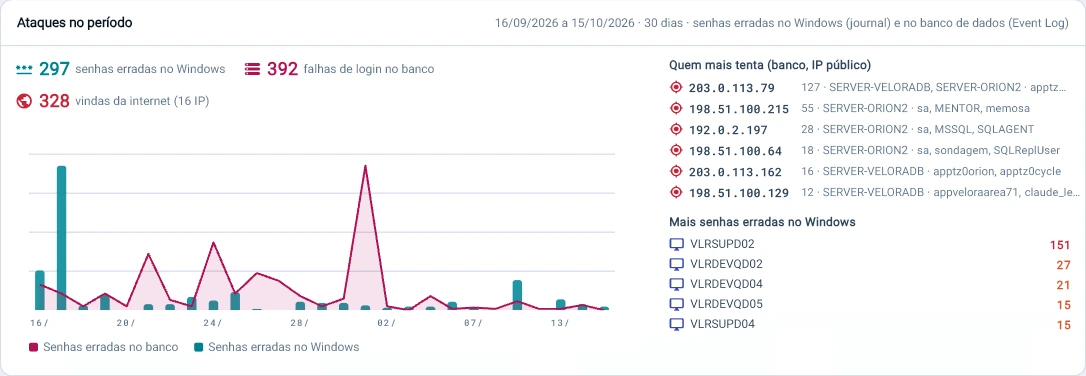
Tz0 console screenshot: Attacks in the period
Attacks in the period. In 30 days, 392 failed database logins and 297 wrong Windows passwords; 328 attempts came from the internet, from 16 IPs.

Action plan

It only closes when the data confirms.

Each open item becomes a task with an owner and a deadline. Marking it done is not enough: the card only reaches Done when the finding disappears from the agent’s data.
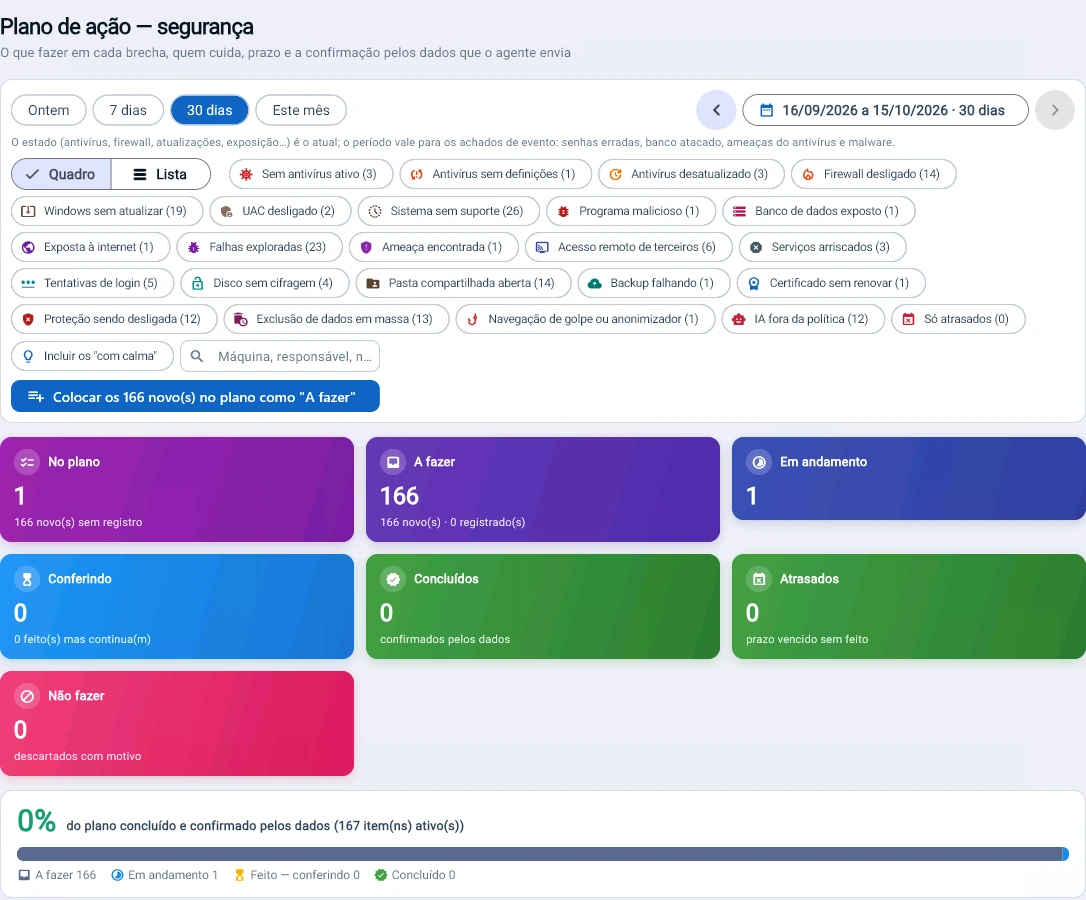
Tz0 console screenshot: Action plan
Action plan. 166 open items become tasks with an owner and a deadline; none counts as done until the finding disappears from the agent’s data.
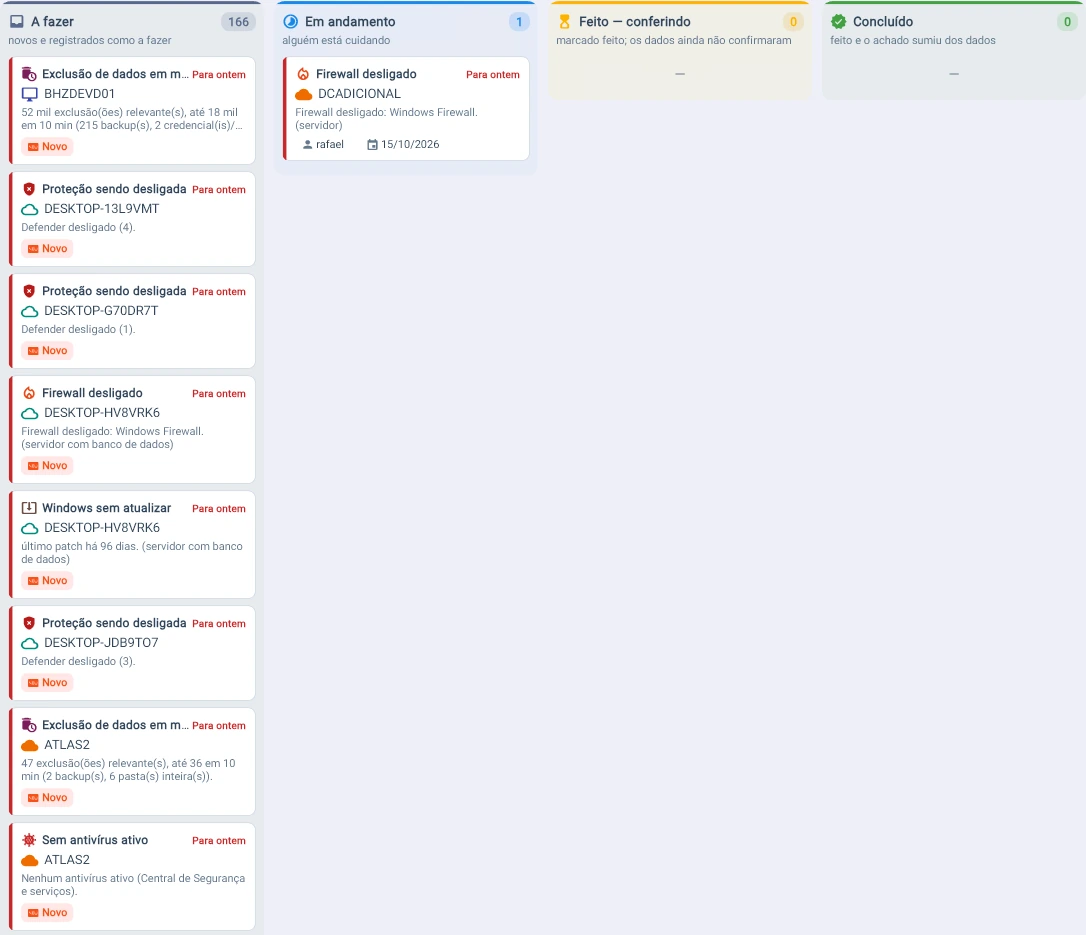
Tz0 console screenshot: Each gap becomes a card with an owner and a deadline
Each gap becomes a card with an owner and a deadline. “Marked done” is not enough: the card only reaches “Done” when the finding disappears from the data.

Privilege

Full power day to day, machine by machine.

Who works as local administrator, which program runs with full power and for how long, with the step each machine is on and the policy to move up to the next.
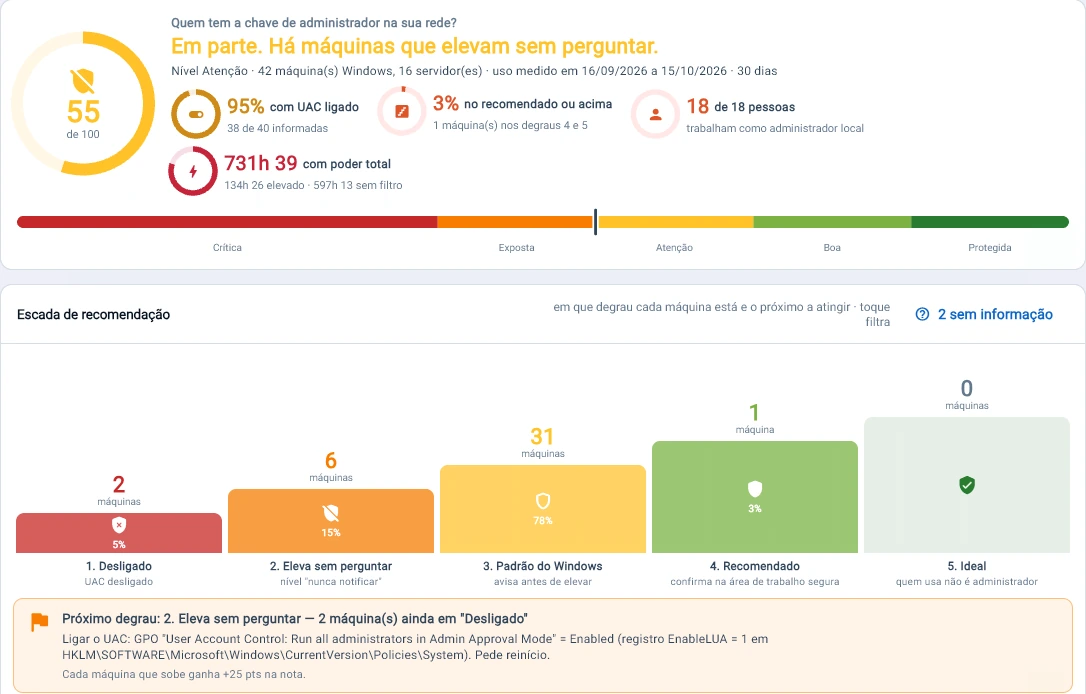
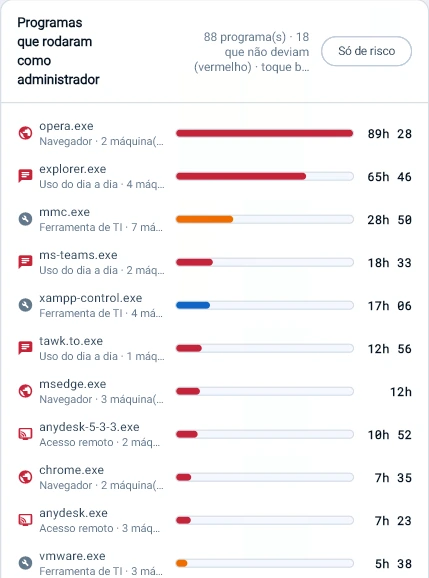
Tz0 console screenshot: Who holds the administrator key
Who holds the administrator key. 18 of 18 people work as local admin, with 731 h of full power in the month; Tz0 shows the step each machine is on and the GPO to move up to the next.
Tz0 console screenshot: Browser as administrator
Browser as administrator. Of the 88 programs that ran elevated, 18 should not have: opera.exe added up to 89 h with full power in the month.
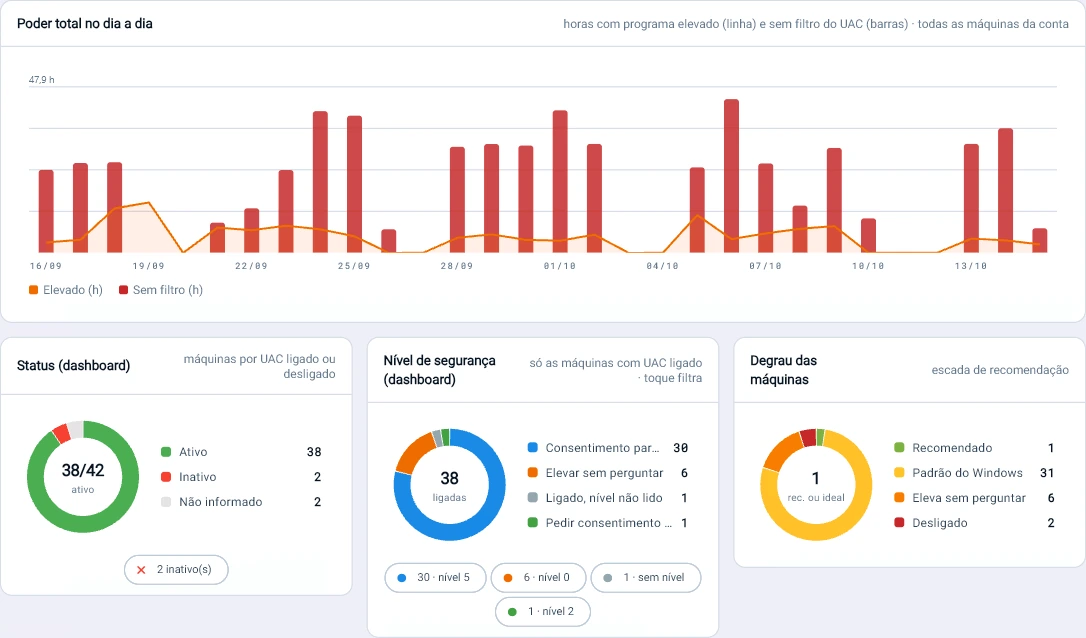
Tz0 console screenshot: Full power day to day: up to 47.9 h per day of programs running without the UAC filter
Full power day to day: up to 47.9 h per day of programs running without the UAC filter.

Working hours

Use outside business hours, with the estimated cost.

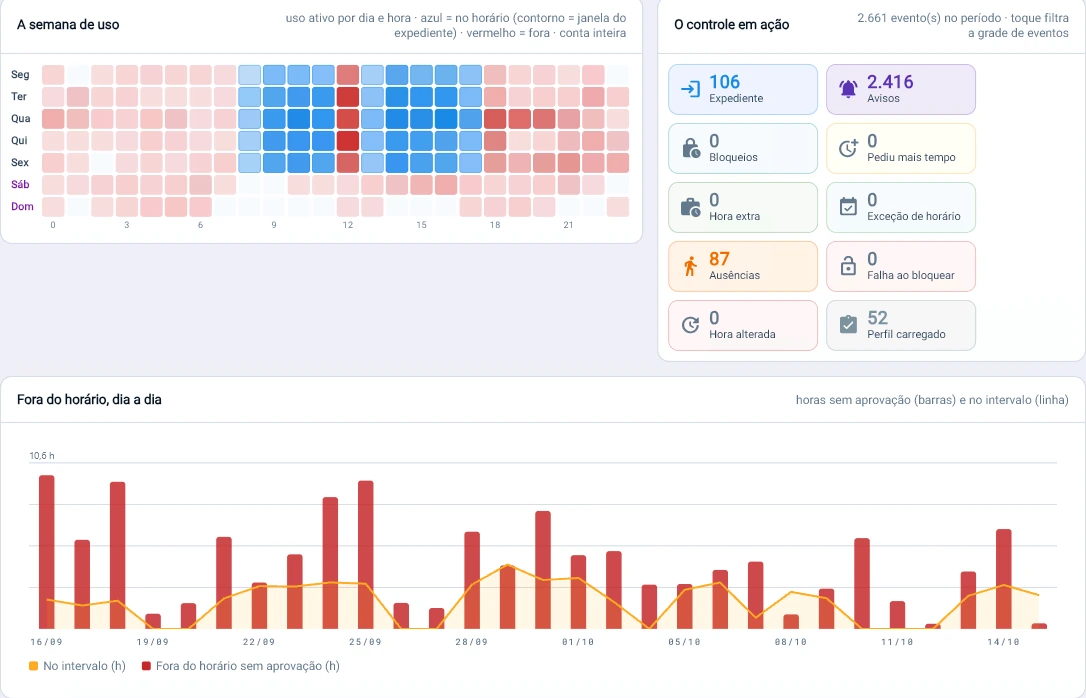
Hour by hour, who arrives early, leaves late or works through lunch without approval. This is the data that backs the conversation about labor risk.
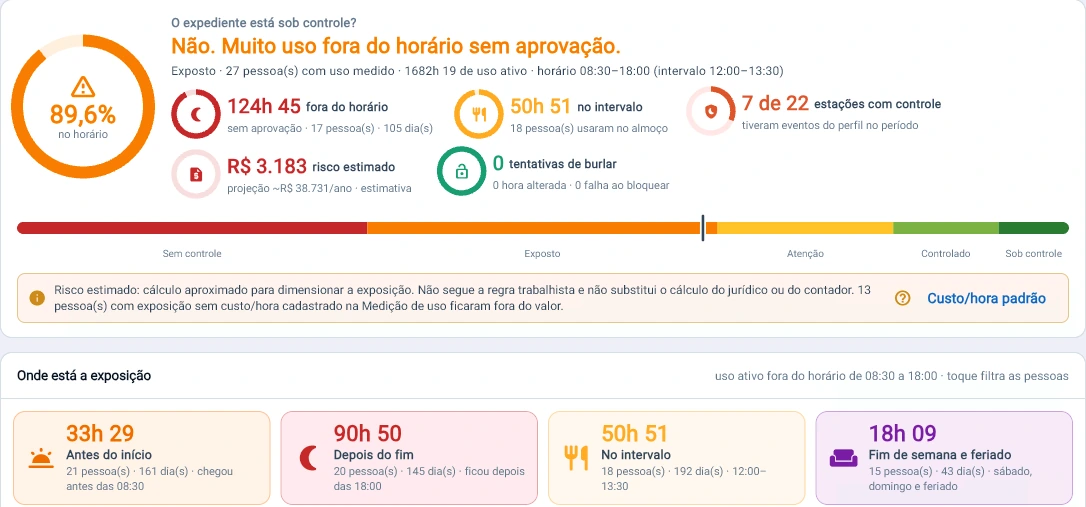
Tz0 console screenshot: Are business hours under control?
Are business hours under control? No: 124 h of use outside business hours without approval in 30 days, 90 h of it after the end of the workday — and Tz0 estimates how much that costs.
Tz0 console screenshot: The week of use, hour by hour: red shows who arrives early, leaves late and works through lunch — up to 10.6 h outside business hours in a single day
The week of use, hour by hour: red shows who arrives early, leaves late and works through lunch — up to 10.6 h outside business hours in a single day.

Changes

Of thousands of changes, the few that count.

Hardware, software, services and startup: Tz0 discards the noise from Windows itself and puts the few changes that need attention up front.
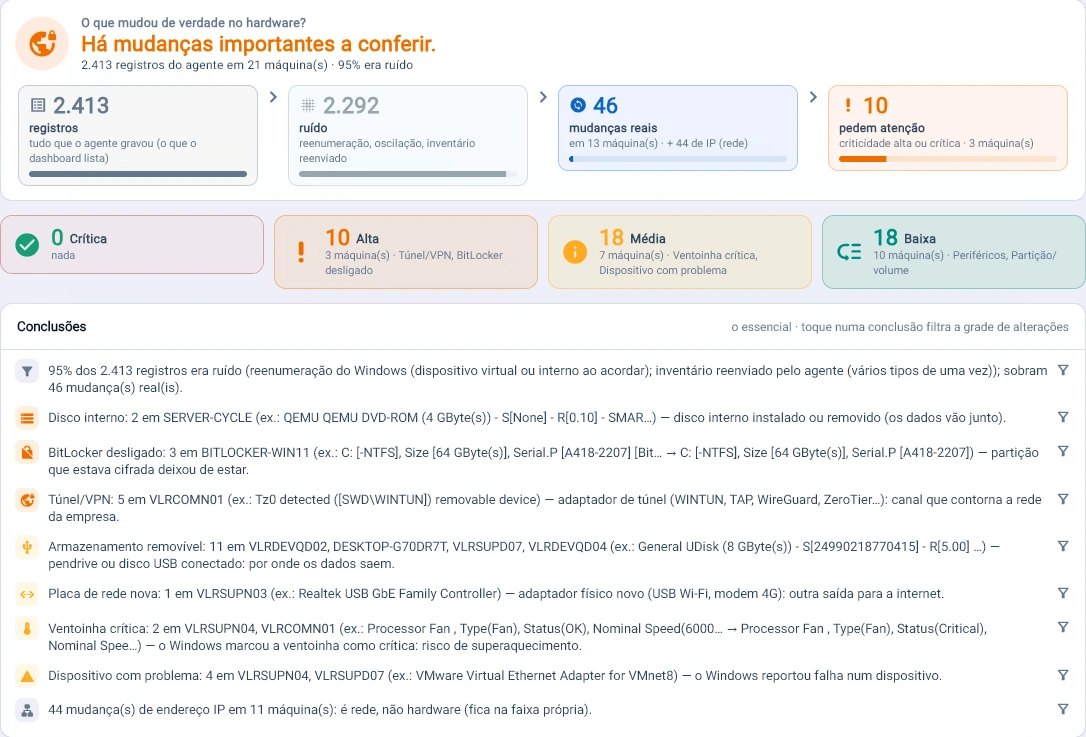
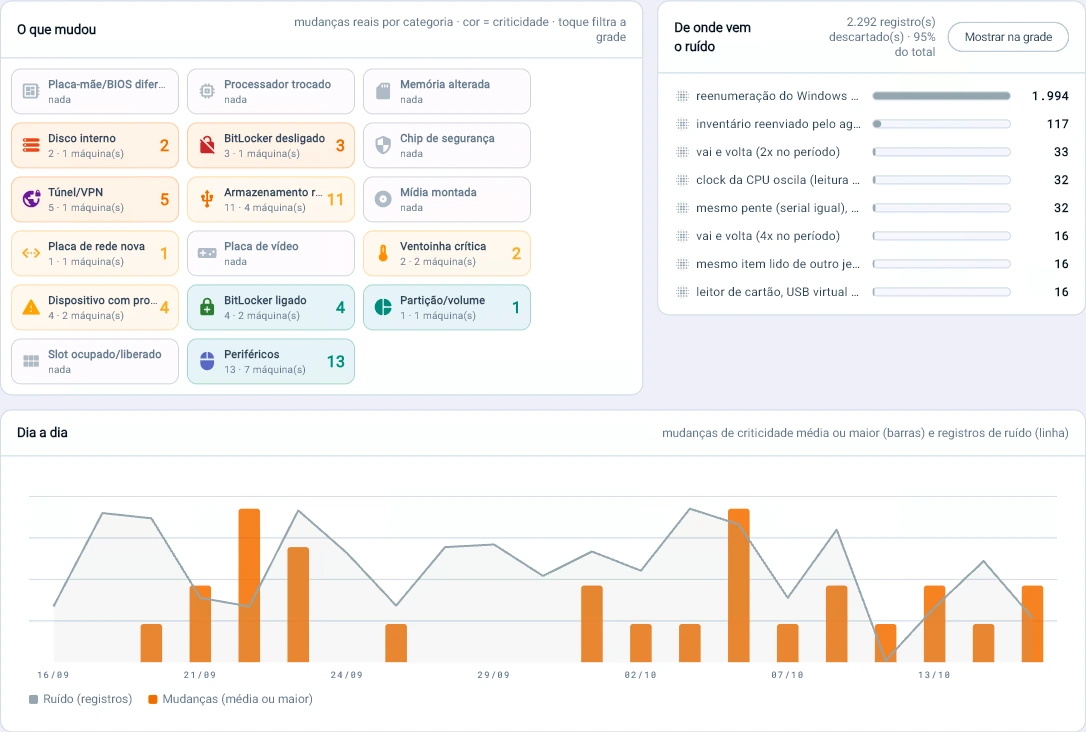
Tz0 console screenshot: What really changed
What really changed. Of 2,413 hardware records in 30 days, 95% was noise; 46 real changes remained and 10 need attention — USB drive, VPN tunnel, BitLocker turned off.
Tz0 console screenshot: Noise out of the way: 1,994 records were just Windows re-enumeration
Noise out of the way: 1,994 records were just Windows re-enumeration. What remains is what matters — 11 USB drives, 5 VPN tunnels, 3 BitLockers turned off.
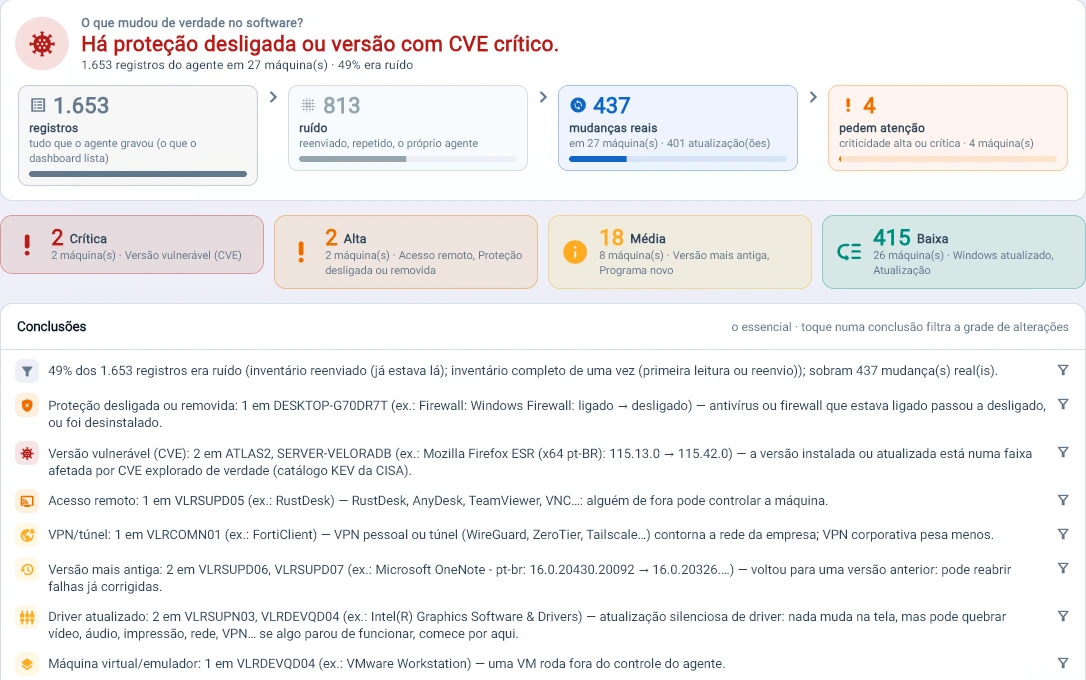
Tz0 console screenshot: Protection turned off or a version with a critical CVE
Protection turned off or a version with a critical CVE. Of 1,653 software records, 437 were real changes and 4 need attention: firewall off, Firefox on an exploited version, RustDesk installed.
Tz0 console screenshot: Updated, but still vulnerable?
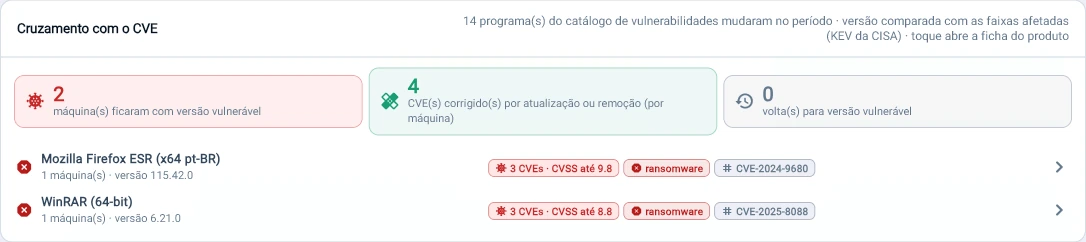
Updated, but still vulnerable? Tz0 checks each change against the CISA catalog: 4 CVEs fixed, 2 machines still on a version used by ransomware (CVSS up to 9.8).
Tz0 console screenshot: Protection service gone?
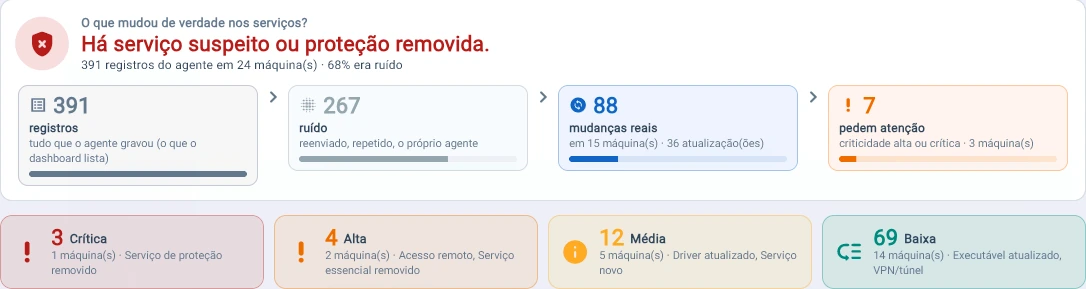
Protection service gone? Of the 391 service records, 88 were real changes and 3 critical: the antivirus service was removed from the machine.
Tz0 console screenshot: Of 391 records, 6 real changes
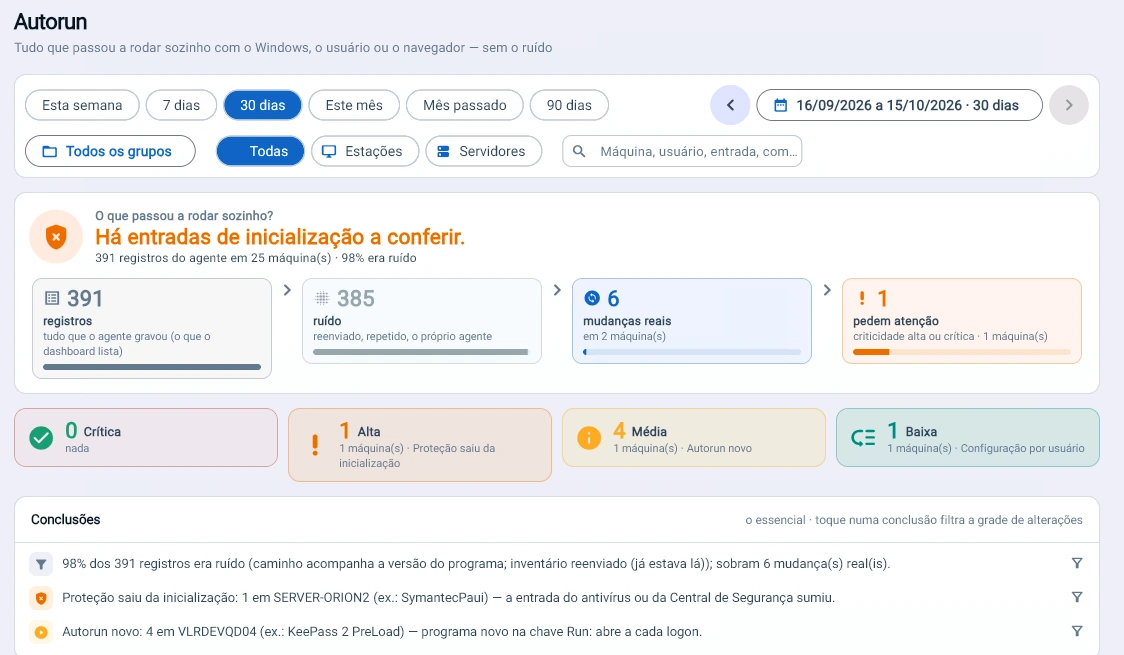
Of 391 records, 6 real changes. Tz0 discards 98% noise and points to what matters: on one server, the antivirus entry disappeared from startup.

Vulnerabilities

Open exploited flaws, and what to update first.

Each machine’s software checked every night against public security standards: the CISA catalog of exploited vulnerabilities, NIST’s affected version ranges, FIRST’s exploit probability (EPSS) and severity from CVSS 3.1 and 4.0. No network scanner and no credentials: only the inventory the agent already collects.

CISA KEV

Has it been exploited? Only flaws seen in real attacks, with CISA's remediation deadline and the ransomware flag.

NIST NVD

Is my version affected? The installed version is compared with the published ranges. When it can't be compared, the finding is marked suspect and never counts as confirmed.

FIRST EPSS

How likely is an attack now? Probability of exploitation in the next 30 days, recalculated daily, with 90 days of history. It breaks the tie on what to fix first.

CVSS 3.1 and 4.0

How severe is it? A 0–10 score and the vector in plain language: over the network, no credentials, no user action, reach into other systems.
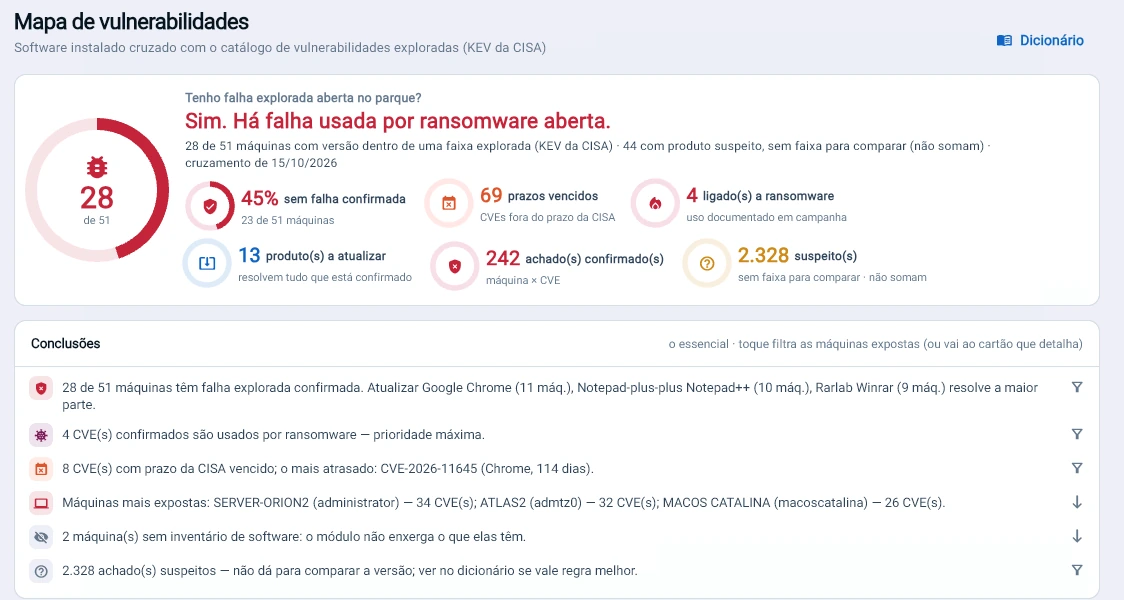
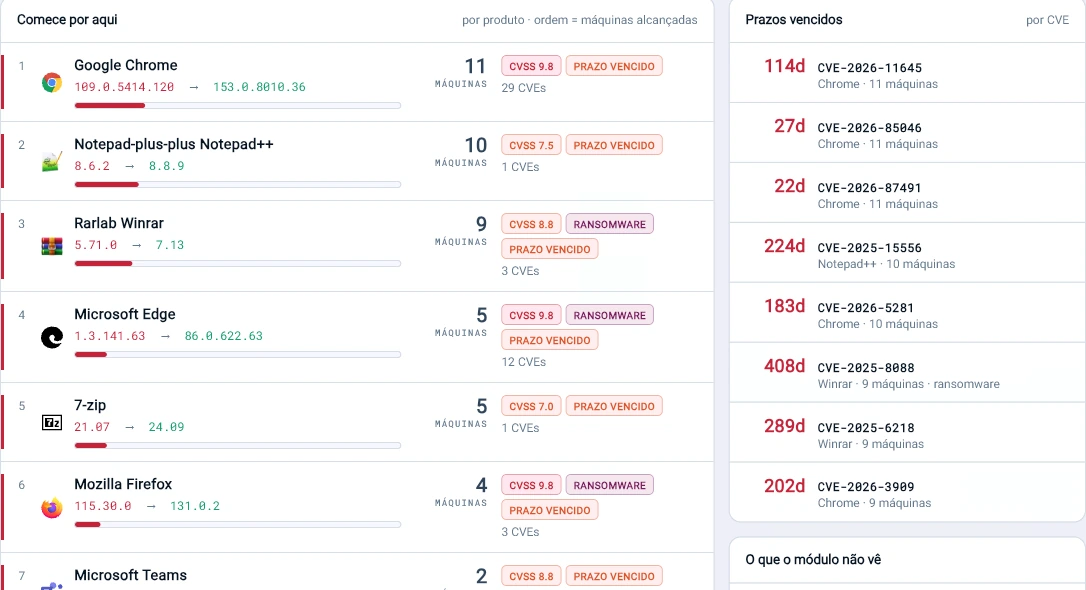
Tz0 console screenshot: Do I have an open exploited flaw?
Do I have an open exploited flaw? Yes: 28 of 51 machines, 4 of them with a CVE used by ransomware. Updating 13 products resolves everything that is confirmed.
Tz0 console screenshot: Start here: updating Chrome closes 29 CVEs on 11 machines
Start here: updating Chrome closes 29 CVEs on 11 machines. And the WinRAR used by ransomware is 408 days past its CISA deadline.
Tz0 console screenshot: Is it improving?
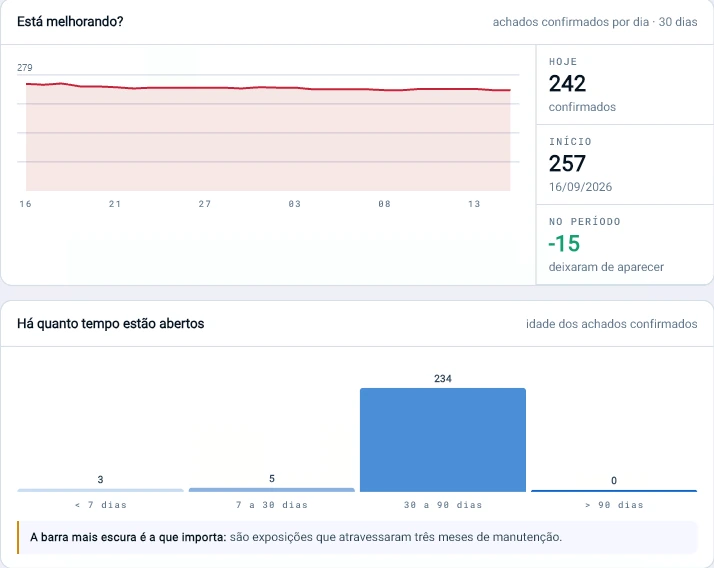
Is it improving? From 257 to 242 confirmed flaws in 30 days. But 234 have been open for more than a month: they went through the maintenance cycle.
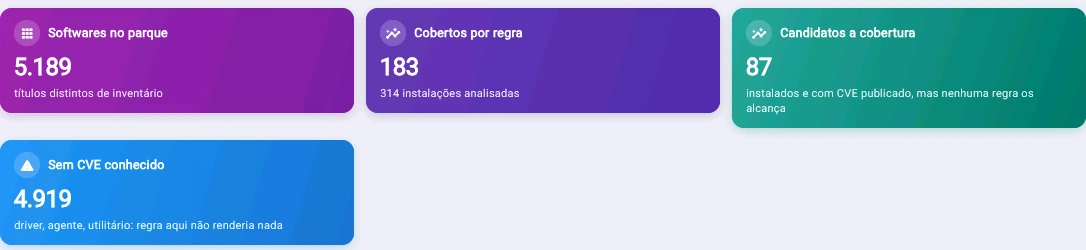
Tz0 console screenshot: Of 5,189 programs in the fleet, 183 have a vulnerability rule and 87 become candidates: Tz0 shows what the analysis does not yet cover, instead of hiding it
Of 5,189 programs in the fleet, 183 have a vulnerability rule and 87 become candidates: Tz0 shows what the analysis does not yet cover, instead of hiding it.

A ready-made queue, with a rule you can explain to the auditor

First what is confirmed by version; then what is past CISA's deadline; then the highest chance of attack in the next 30 days (EPSS); finally the technical severity (CVSS, using 4.0 once NIST has published it). Ransomware use is highlighted at every level. And the action is per product: one update closes all of its CVEs at once, and the distribution module sends the update to the machines.

StandardControlWhat Tz0 provides as evidence
CIS Controls v82.1, 7.1, 7.2, 7.4 and 7.7Software inventory per machine, an explicit priority rule, the fixing version and the daily trend that shows whether flaws are being closed.
ISO/IEC 27001:2022Annex A 8.8 · management of technical vulnerabilitiesInformation from recognized sources (CISA, NIST, FIRST), exposure assessment for each machine and a record of actions.
NIST CSF 2.0ID.RA-01 and ID.RA-05Vulnerabilities confirmed by version and recorded daily; threat (KEV), likelihood (EPSS) and impact (CVSS) in the same queue.
PCI DSS v4.06.3.1 and 6.3.3Risk ranking from industry sources, overdue deadlines and the age of each finding, per machine.

The module produces the evidence these controls ask for; compliance also depends on the company's processes and the auditor's assessment. It ships with the Tz0 server update: the server itself downloads the updated catalog every day, with no agent update and no network scanning. No machine data leaves the network.

Network

Where the fleet connects to.

Each connection with an alert keeps the program’s hash, the destination country and the VirusTotal and Defender results. A question about an indicator of attack becomes a query.
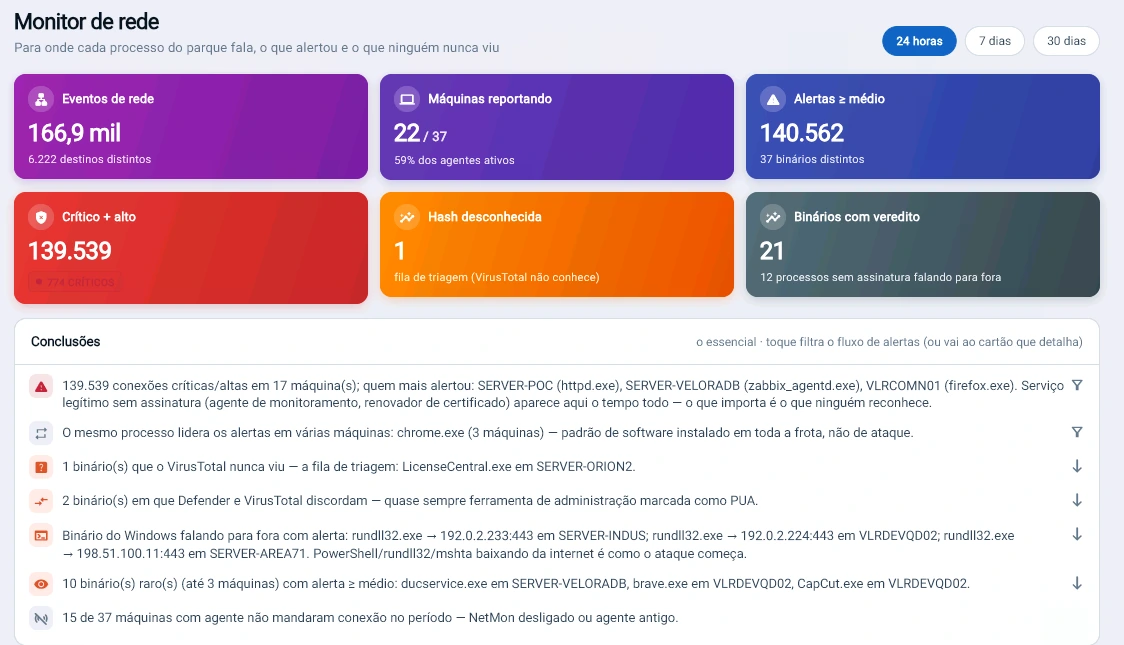
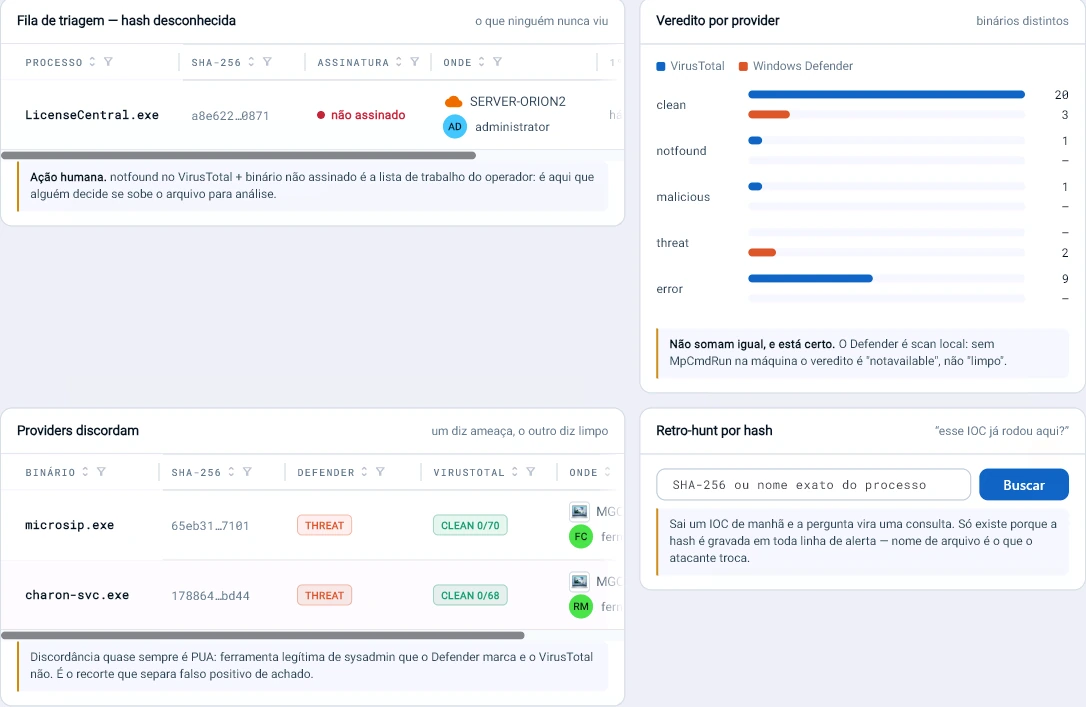
Tz0 console screenshot: 139,539 critical or high connections in 24 hours, and Tz0 separates what matters: rundll32 talking to an external IP and 1 binary VirusTotal has never seen
139,539 critical or high connections in 24 hours, and Tz0 separates what matters: rundll32 talking to an external IP and 1 binary VirusTotal has never seen.
Tz0 console screenshot: An IOC arrives in the morning and the question becomes a query: Tz0 keeps the hash of every connection with an alert and cross-checks VirusTotal with Defender to separate false positives from real findings
An IOC arrives in the morning and the question becomes a query: Tz0 keeps the hash of every connection with an alert and cross-checks VirusTotal with Defender to separate false positives from real findings.
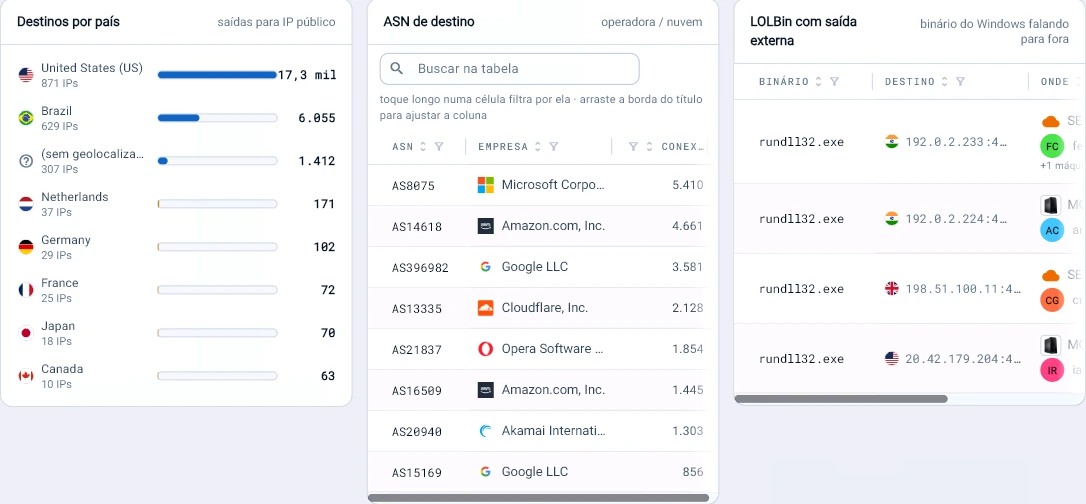
Tz0 console screenshot: Where the fleet connects to: 17.3 thousand connections to the US and 1,412 with no identified country
Where the fleet connects to: 17.3 thousand connections to the US and 1,412 with no identified country. And rundll32, a Windows binary, talking to an external IP, which is how an attack starts.

Wi-Fi

Wi-Fi as seen by the machines themselves.

Networks in range, authentication type and congested channels, read by the agent already on the workstation, with no dedicated sensor.
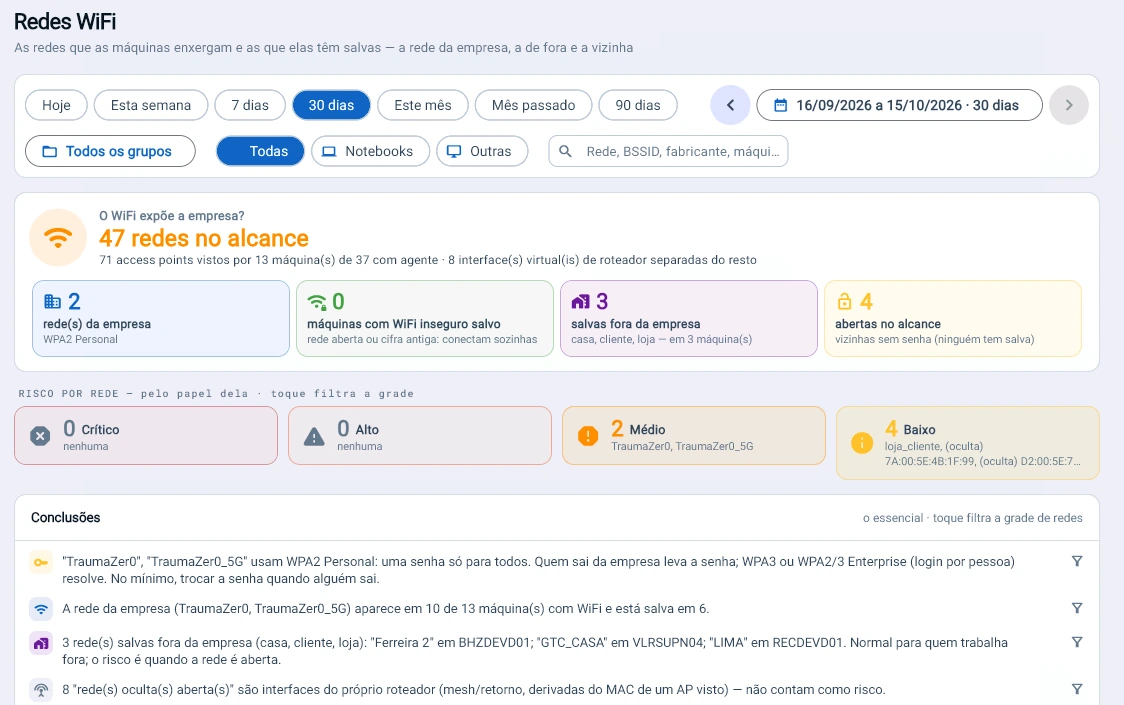
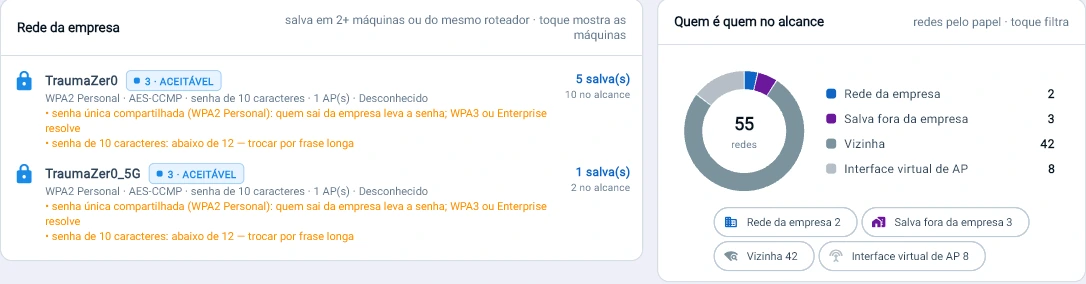
Tz0 console screenshot: The company WiFi uses one password for everyone: whoever leaves takes the password
The company WiFi uses one password for everyone: whoever leaves takes the password. Tz0 reads 47 networks in range of 13 machines and shows what to fix, with no dedicated sensor.
Tz0 console screenshot: A 10-character password, shared by everyone: Tz0 measures the company network without seeing the password and says what to change
A 10-character password, shared by everyone: Tz0 measures the company network without seeing the password and says what to change.
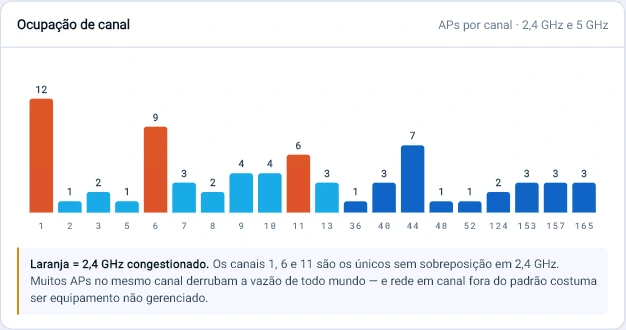
Tz0 console screenshot: 12 access points on channel 1 and 9 on channel 6: the 2.4 GHz band is congested
12 access points on channel 1 and 9 on channel 6: the 2.4 GHz band is congested. Tz0 shows the crowded channel that drags down everyone’s throughput.

Event Log

Of thousands of events, the ones that matter.

The Event Log of every machine read at once: routine hidden, critical first, program crashes explained and silent machines treated as an alert.
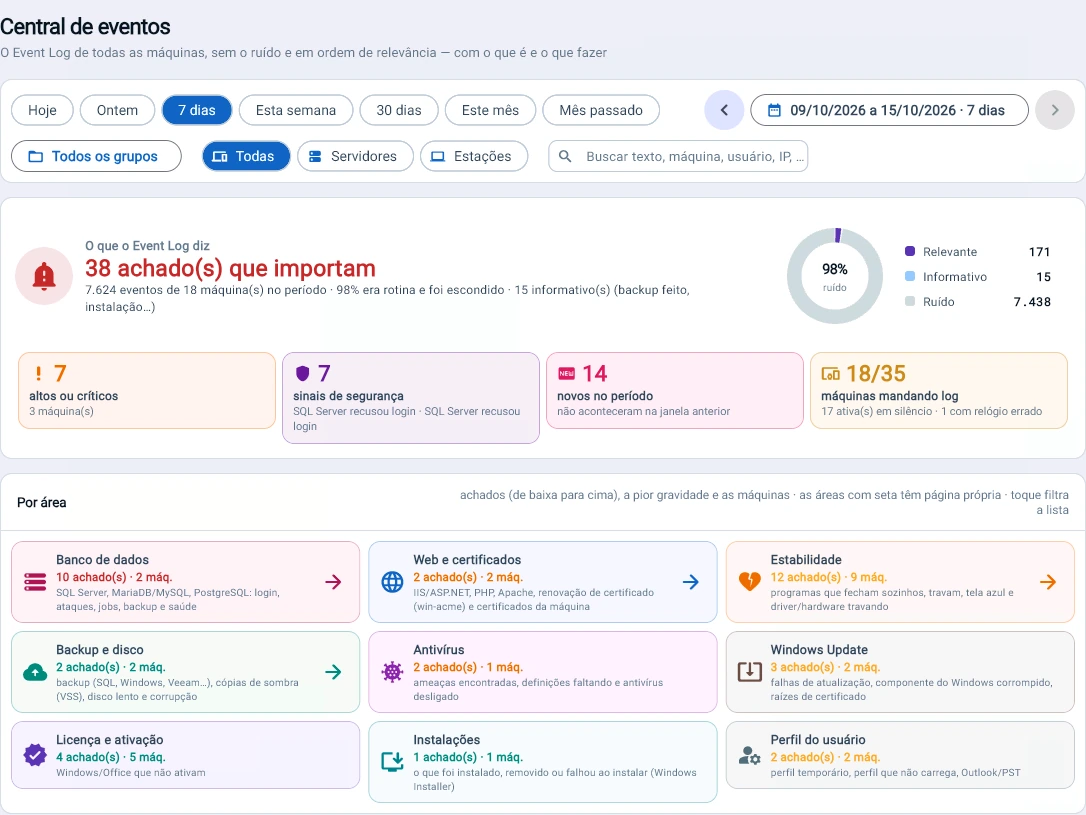
Tz0 console screenshot: Of the week's 7,624 events, 38 matter
Of the week’s 7,624 events, 38 matter. Tz0 reads the Event Log of every machine, hides the 98% that is routine and shows what is critical first, by area.
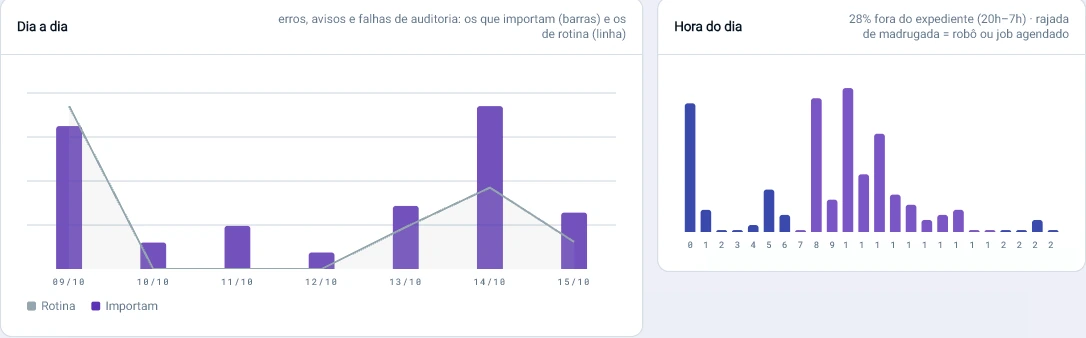
Tz0 console screenshot: When a problem happens tells you what it is: 28% of the findings fall between 20h and 7h, and an overnight burst is a bot or a scheduled job
When a problem happens tells you what it is: 28% of the findings fall between 20h and 7h, and an overnight burst is a bot or a scheduled job.
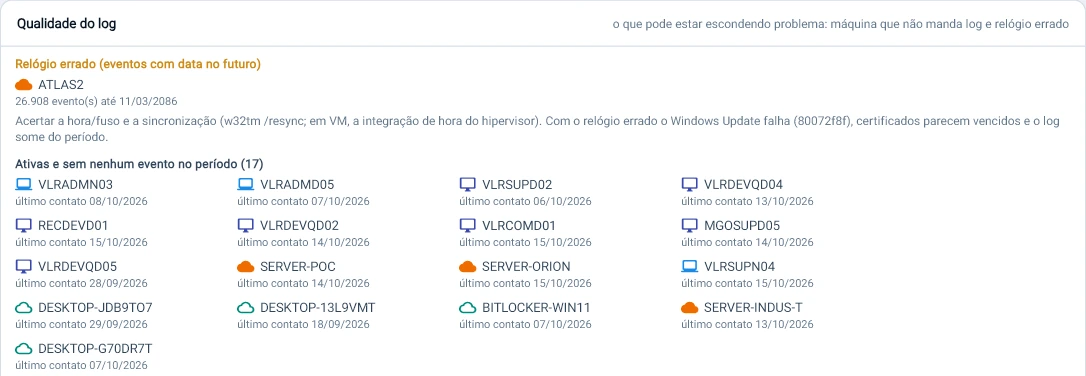
Tz0 console screenshot: Silence is an alert too
Silence is an alert too. 17 active machines sent no events during the week, and one has its clock set to 2086, which makes certificates look expired and Windows Update fail.
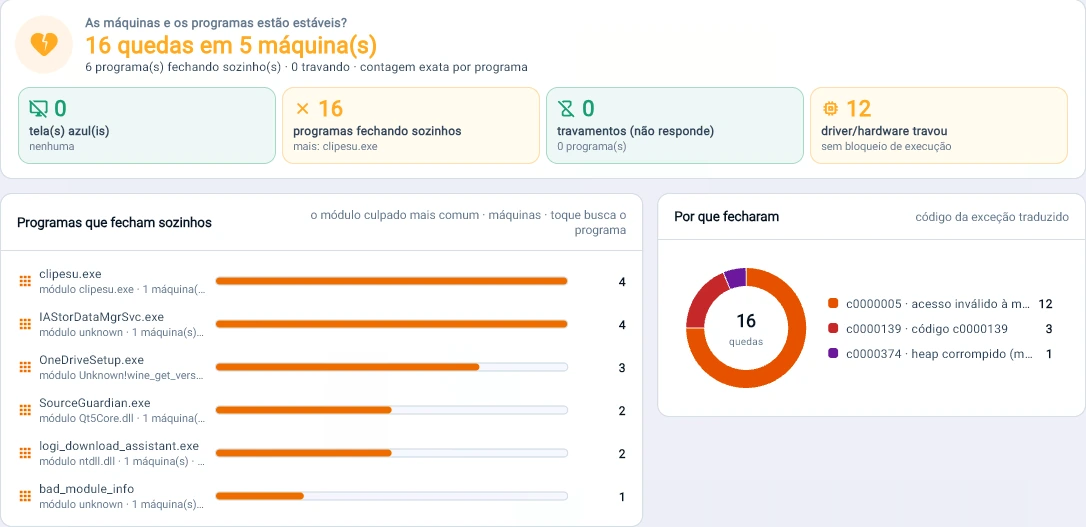
Tz0 console screenshot: 16 crashes on 5 machines in the week: which program closes on its own, on how many machines and why, with the exception code translated
16 crashes on 5 machines in the week: which program closes on its own, on how many machines and why, with the exception code translated.

Database

Databases exposed, without backup or corrupted.

Attempts from the internet, databases without backup and signs of corruption, taken from the log the server already writes.
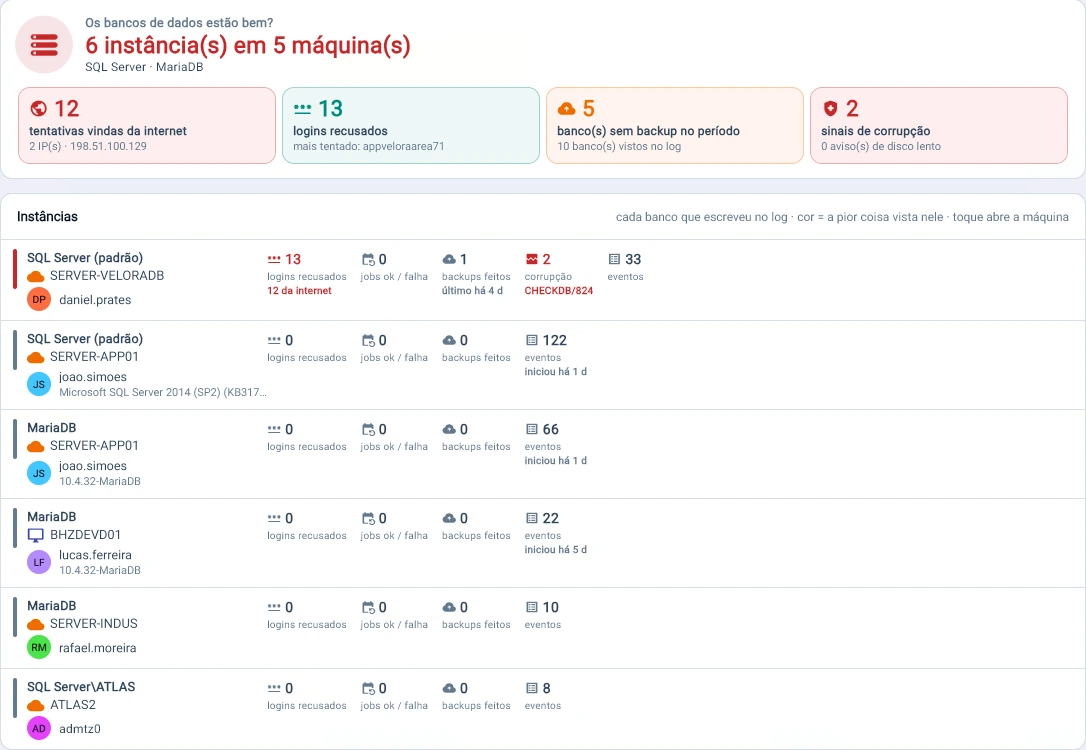
Tz0 console screenshot: Are the databases healthy?
Are the databases healthy? 6 instances, 12 attempts from the internet, 5 databases without backup and 2 signs of corruption, all taken from the log that already exists.
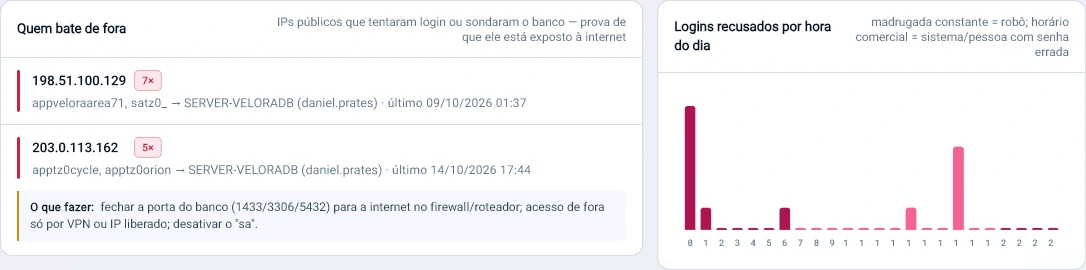
Tz0 console screenshot: Who is knocking on your database from outside
Who is knocking on your database from outside. A public IP tried to get into SQL Server 7 times; the screen already says what to do: close 1433/3306/5432 to the internet and allow them only over VPN.
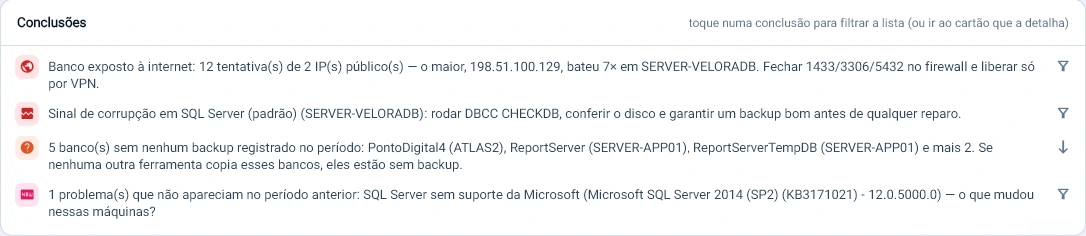
Tz0 console screenshot: The conclusion comes already written: database exposed to the internet, a sign of corruption, 5 databases without backup and a SQL Server 2014 out of Microsoft support
The conclusion comes already written: database exposed to the internet, a sign of corruption, 5 databases without backup and a SQL Server 2014 out of Microsoft support.
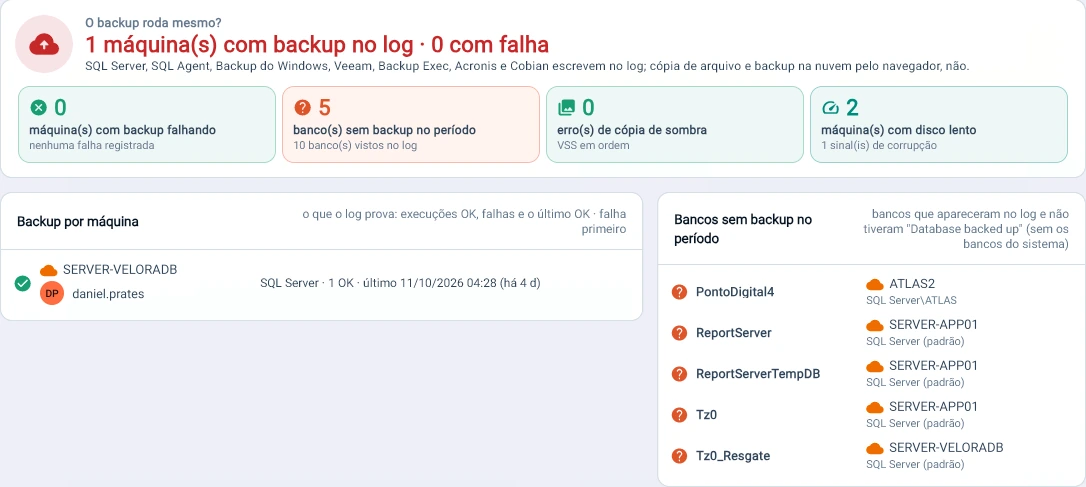
Tz0 console screenshot: Does the backup actually run?
Does the backup actually run? 5 databases appeared in the log with no backup recorded in the week, and Tz0 says which ones and on which server.

Behavior analysis

Who needs attention, and why.

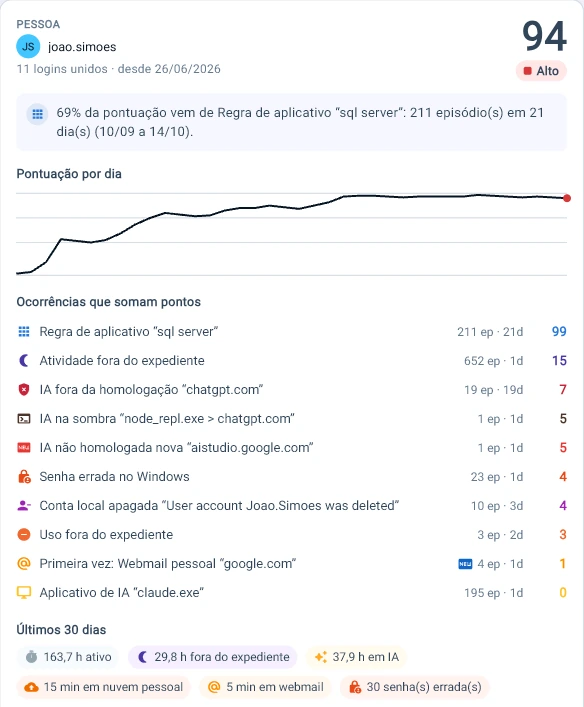
A risk score per person, recalculated every night. Every point is explained by the rule and the occurrence that generated it.
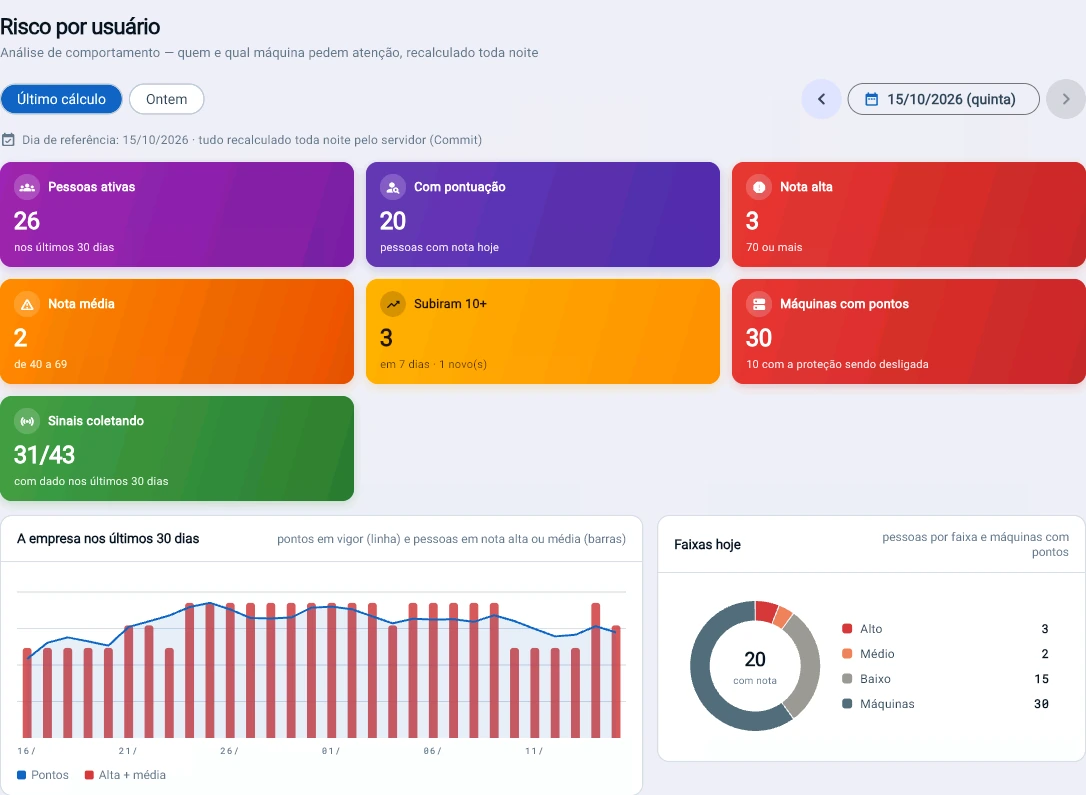
Tz0 console screenshot: Risk per user, recalculated every night
Risk per user, recalculated every night. Of 26 active people, 3 have a high score, 3 rose 10 points in one week and 10 machines had their protection turned off.
Tz0 console screenshot: Every score explains itself
Every score explains itself. For this person, 69% of the points come from a single rule; Tz0 shows each occurrence and how much it weighed.
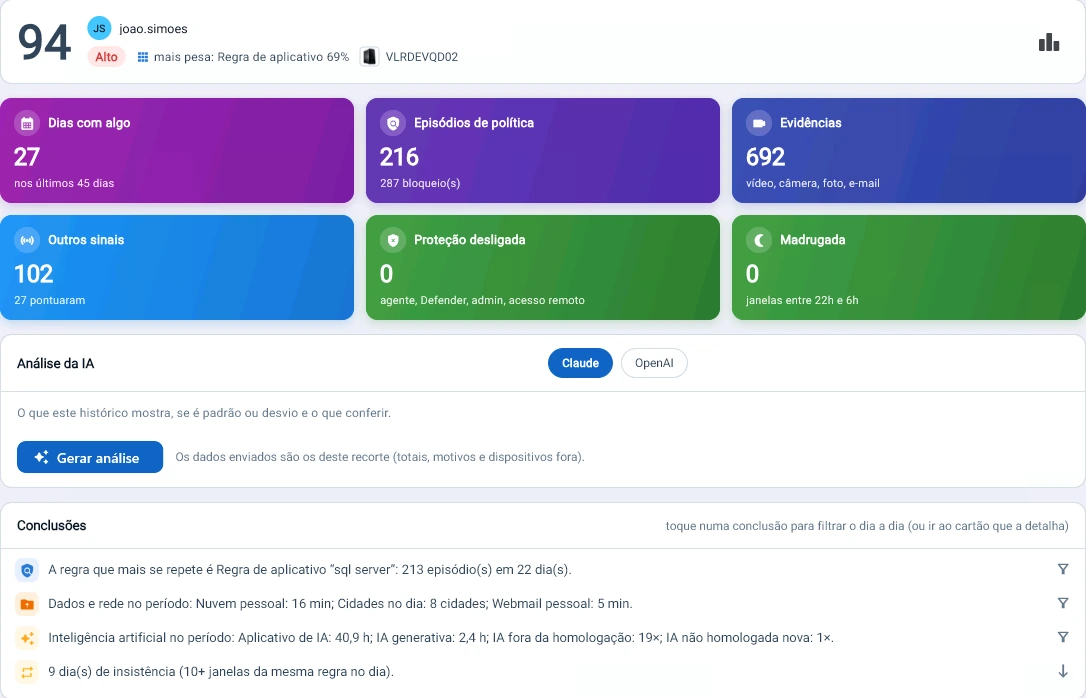
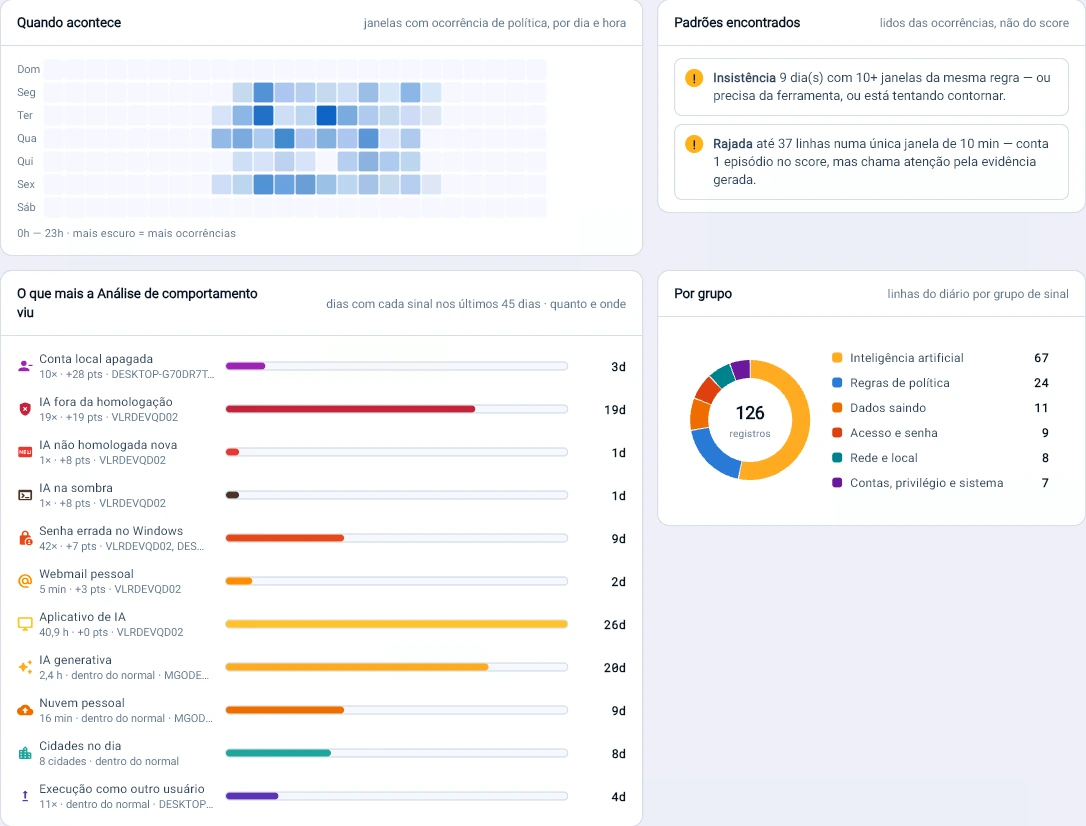
Tz0 console screenshot: The diary of a high score: 27 days with occurrences out of 45, 216 policy episodes and the conclusion already written, including 9 days of persistence on the same rule
The diary of a high score: 27 days with occurrences out of 45, 216 policy episodes and the conclusion already written, including 9 days of persistence on the same rule.
Tz0 console screenshot: A pattern, not an incident
A pattern, not an incident. The map shows when it happens, and Tz0 flags persistence (9 days with 10 or more windows of the same rule) and bursts (37 lines in 10 minutes).

Location

Where the machines are.

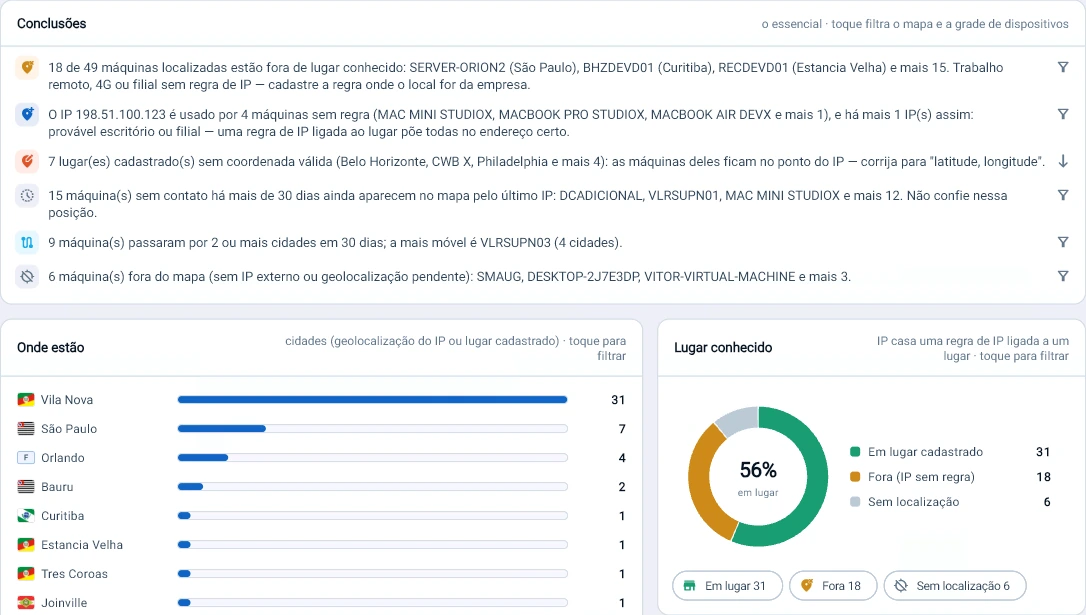
The outbound internet IP says where the machine is; the IP-per-location rule says whether that is the company, a branch or remote work.
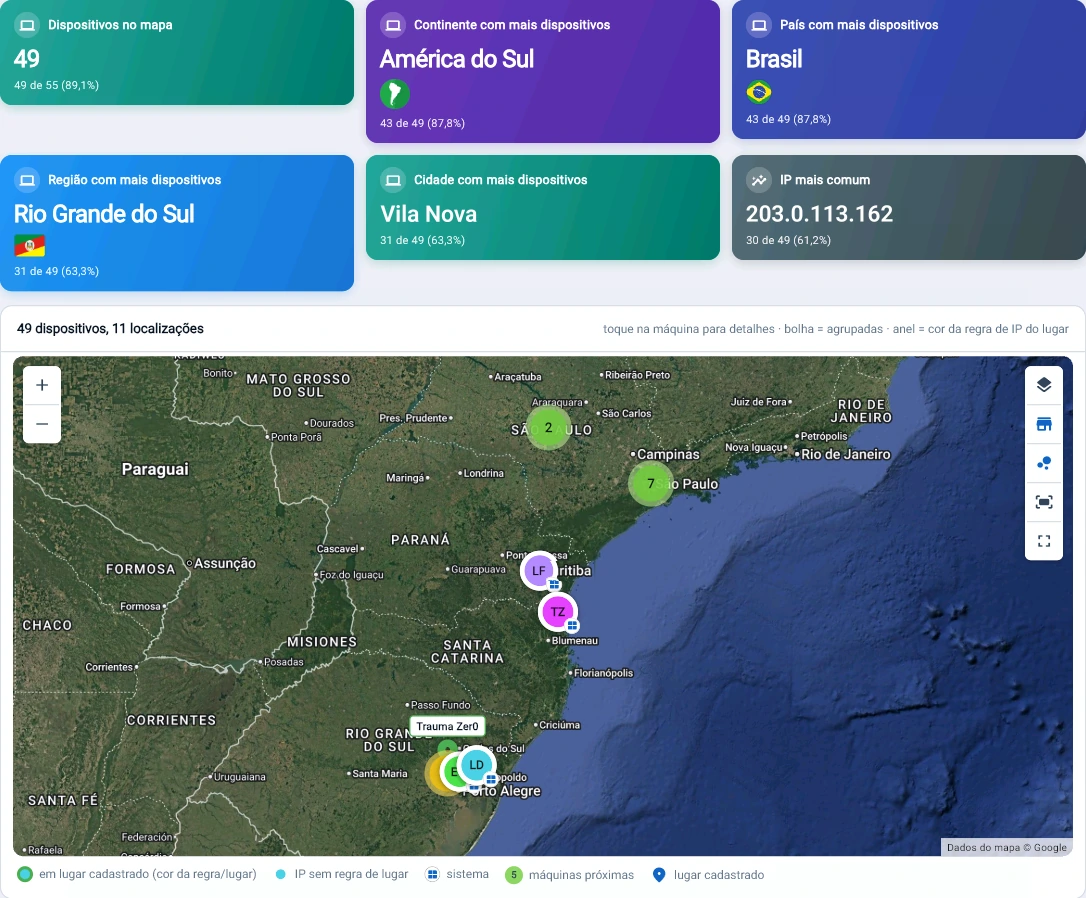
Tz0 console screenshot: 49 of 55 machines on the map, each one at the place where it went out to the internet
49 of 55 machines on the map, each one at the place where it went out to the internet. The external IP says where the machine is; the IP-per-location rule says whether that is the company.
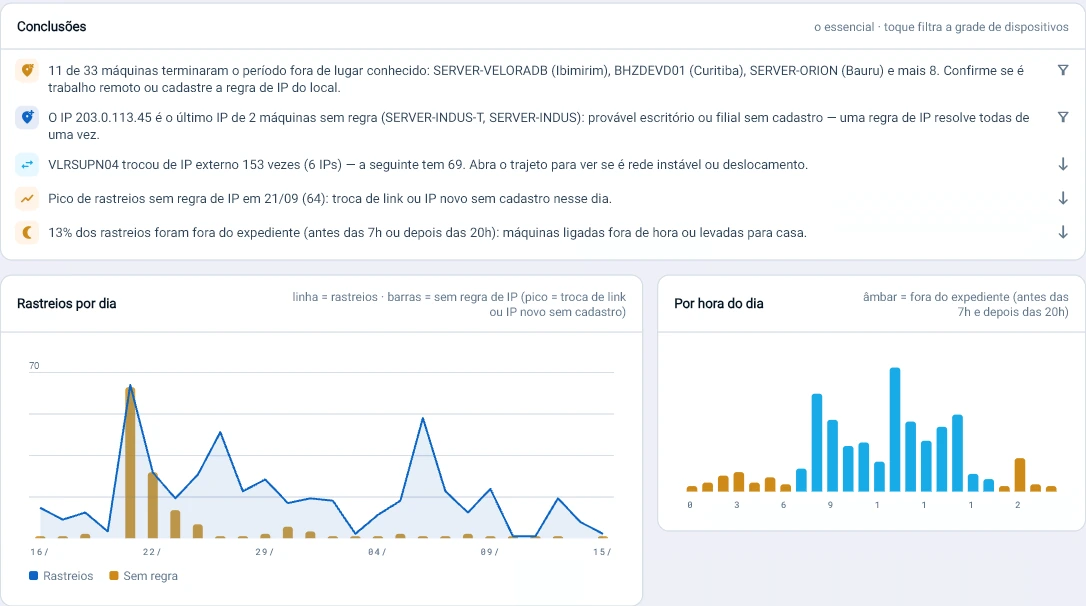
Tz0 console screenshot: 18 of 49 machines work outside a known location
18 of 49 machines work outside a known location. Tz0 flags which are remote work, which are unregistered branches and which 15 machines with no contact for 30 days still pretend to be on the map.
Tz0 console screenshot: 13% of the tracking happened outside business hours
13% of the tracking happened outside business hours. Tz0 separates an unstable network from real travel and shows which machines ended the month away from the company.

What changes in practice

Eight things that stop depending on individual discipline.

The written standard becomes verifiable instead of an expectation.
Personal data does not leave by USB stick, e-mail or public cloud without a record.
Unauthorised software stops showing up in next month’s inventory.
A part swapped in a critical machine raises an alert the same day.
Lost equipment keeps reporting from wherever it is.
The audit receives time-stamped evidence, not a statement.
An authorised exception is documented, with an expiry date and an owner.
The policy holds for people outside the corporate network too.

In the customer’s words

The controls that were missing, inside their own environment.

We are very happy with the product, and our experience so far has been adding to the controls and security we were looking for inside our computing environment.

Translated from Portuguese

Gustavo PriuliGustavo PriuliIT Coordination · Unimed Federação Nordeste Paulista

Included with the module

Three tools in the same package.

A new report does not become a project. We do not build bespoke work for a single customer, but we look at every request: when the need serves everyone, the report goes into the product and reaches all customers in the next update.

Tz0 EIS

Report builder

Ships with the package, not sold separately. It is for people who want to build their own reports outside the browser.

Tz0 TNetX

Development platform

Carries agent communication across segmented topologies and lets the product be extended.

Tz0 Dashboard

Operations dashboard

The state of the estate on one screen, with whatever went off-target at the top. More than 600 ready-made reports, covering every module.

Who works this way

A policy built on Tz0.

We built a security policy entirely on Tz0.

Translated from Portuguese

Advanta
Corporate security policy

Tz0 helps us a great deal in audits, which generally have a lot to do with security.

Translated from Portuguese

Universidade de Caxias do Sul
Academic and administrative estate

Bring us your security standard. We will show you what can actually be enforced.

A 30-minute technical conversation: you describe the environment and the policy you have to meet, we point out what Tz0 Security enforces on its own and what still needs a process.