Trauma Zer0
EN

Platform  /  Tz0 Forensics

Module · digital investigation

Tz0 Forensics

Live forensics on the endpoint

The incident has already happened. Now somebody is going to ask what was taken, by whom and when — and the answer has to stand as evidence, not as suspicion.

Silent, remote collection · evidence kept on your own server
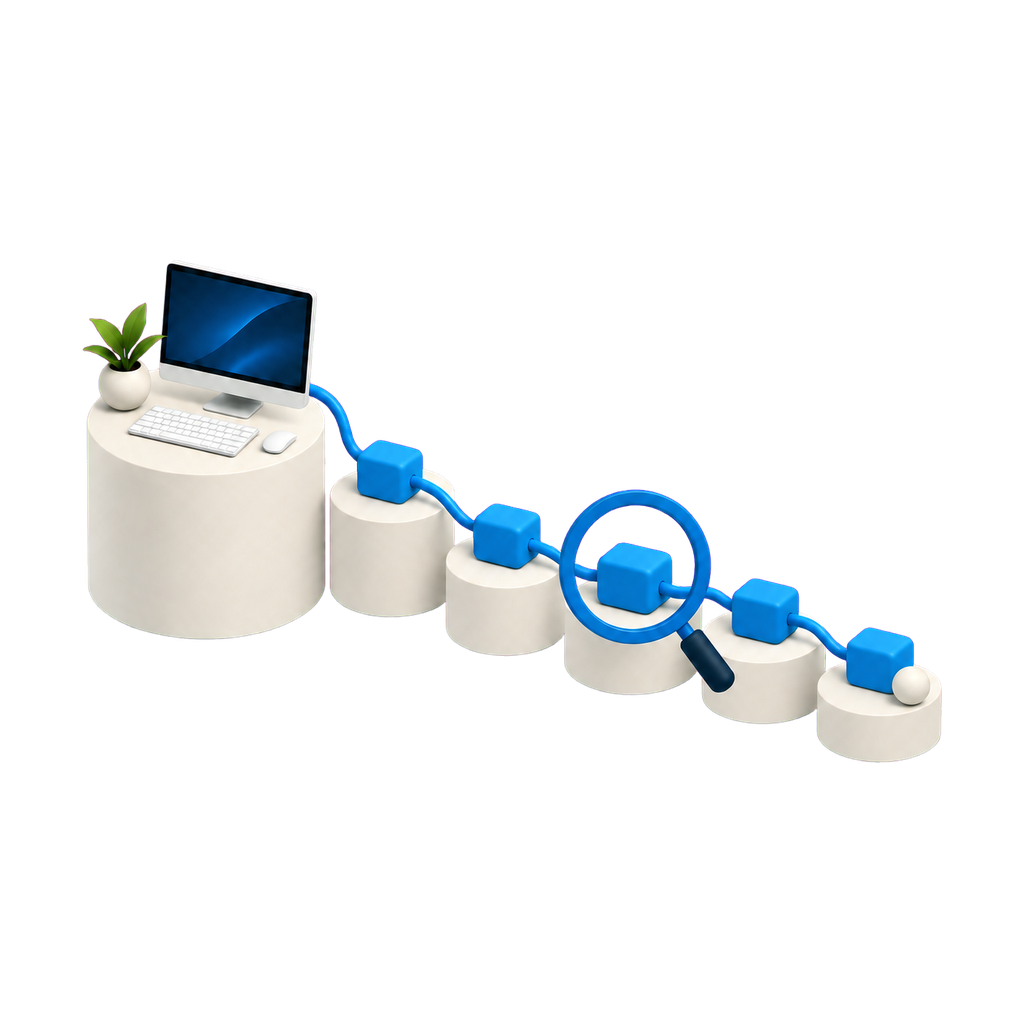
A trail of blocks leaving a workstation, with a magnifying glass over one of them

Chain of events

A single loose event proves nothing.

The value is not in the isolated record, it is in the order: what came before, what came after, and how much time separated the two. It is the reconstructed sequence that turns suspicion into an account that holds up outside the IT department.
tz0.yourcompany.local/forensics/search
Tz0 console screenshot
Tz0 Forensics · web console

Console capture from an estate in production. Machine and person identification replaced; figures untouched.

What the module does

What happened on the machine, reconstructed.

It is the most sensitive module on the platform, and for that reason the one that demands the most process: use defined in policy, with scope and authorisation — not generic surveillance.

Live forensics

Installable tracking that records action on the endpoint: file changes, browsing, resource use and messenger conversations.

Session recording

Second-by-second video during use of financial, accounting or remote access tools, searchable by date, time, user or machine.

Reconstruction of what was deleted

Reconstructs a deleted file and identifies who changed, created or removed a folder.

Real-time alerting

Programmable warning during a fraud event, with screen capture, video and audio attached as evidence.

Evidence discovery

Scheduled analysis of file changes, browsing and conversations, with direct access or a report in the database.

Data recovery

Access to deleted files, e-mail and browsing history by reading disk sectors.

Password reverse engineering

Native reconstruction of passwords from over 300 mechanisms — browsers, FTP and e-mail clients — without brute force.

Evidence that holds up in proceedings

Collection preserved and exportable for use in legal proceedings or an internal investigation.

How it works

From suspicion to exportable evidence.

Every stage preserves the integrity of what was collected — the value of evidence lies in not having been contaminated along the way.

01 Authorise Case opened with scope and owner defined. 02 Collect The agent records on the endpoint, silently. 03 Preserve Evidence kept on the company’s own server. 04 Analyse Search by date, user machine or file. 05 Export Evidence package for the proceedings. Collection is defined by policy and by case. A module with this reach demands a written rule of use before it is switched on.

Console

The whole investigation in the browser.
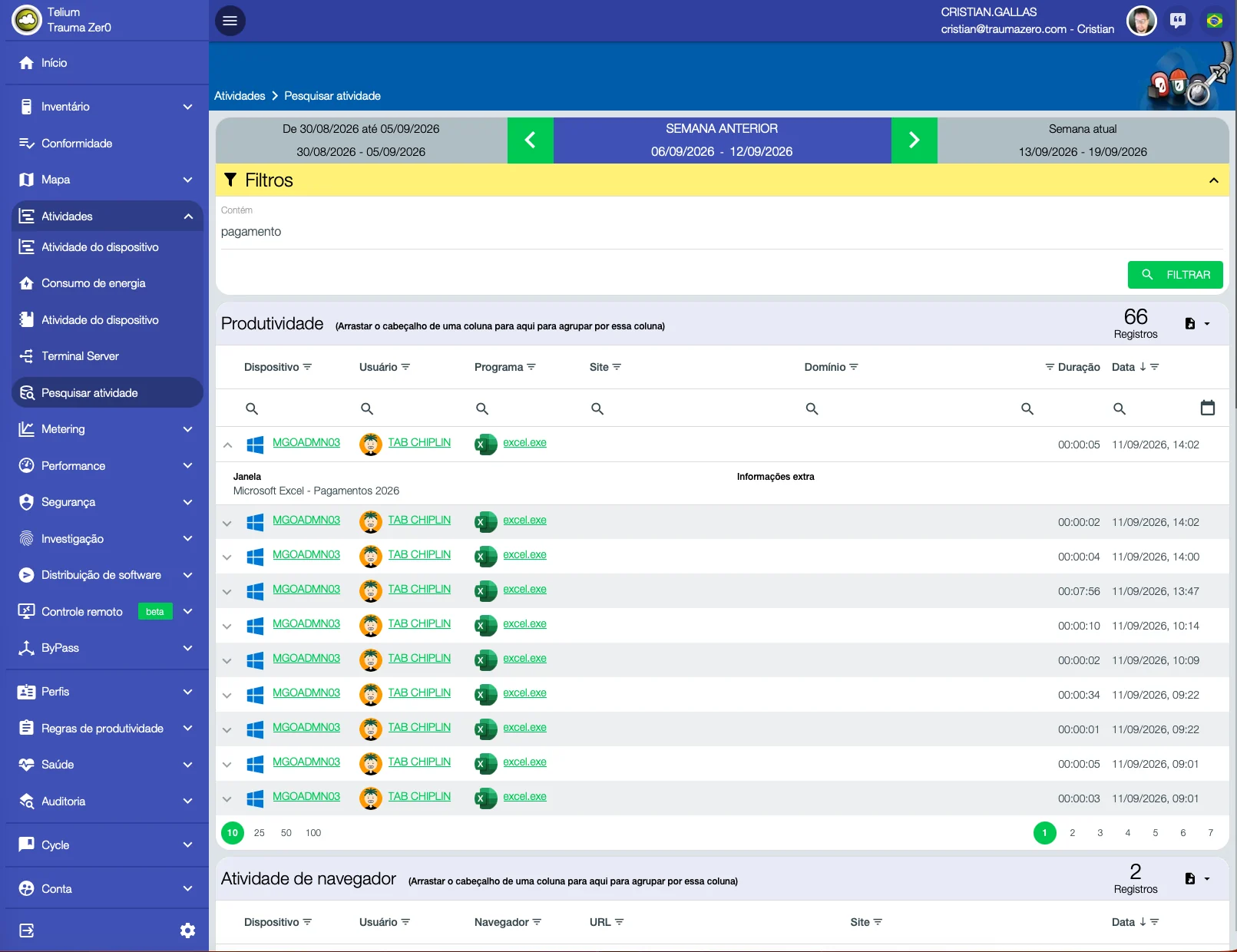
Activity search screen in Tz0 Forensics: searching for the word payment returns 66 records with the device, person, program and window title for each
One word, and the trail surfaces. A search for “payment”: 66 records, each with the machine, the person, the program and the window title — here, “Microsoft Excel — Payments 2026”. The investigation starts from a term, not from a hunch about who to look at.
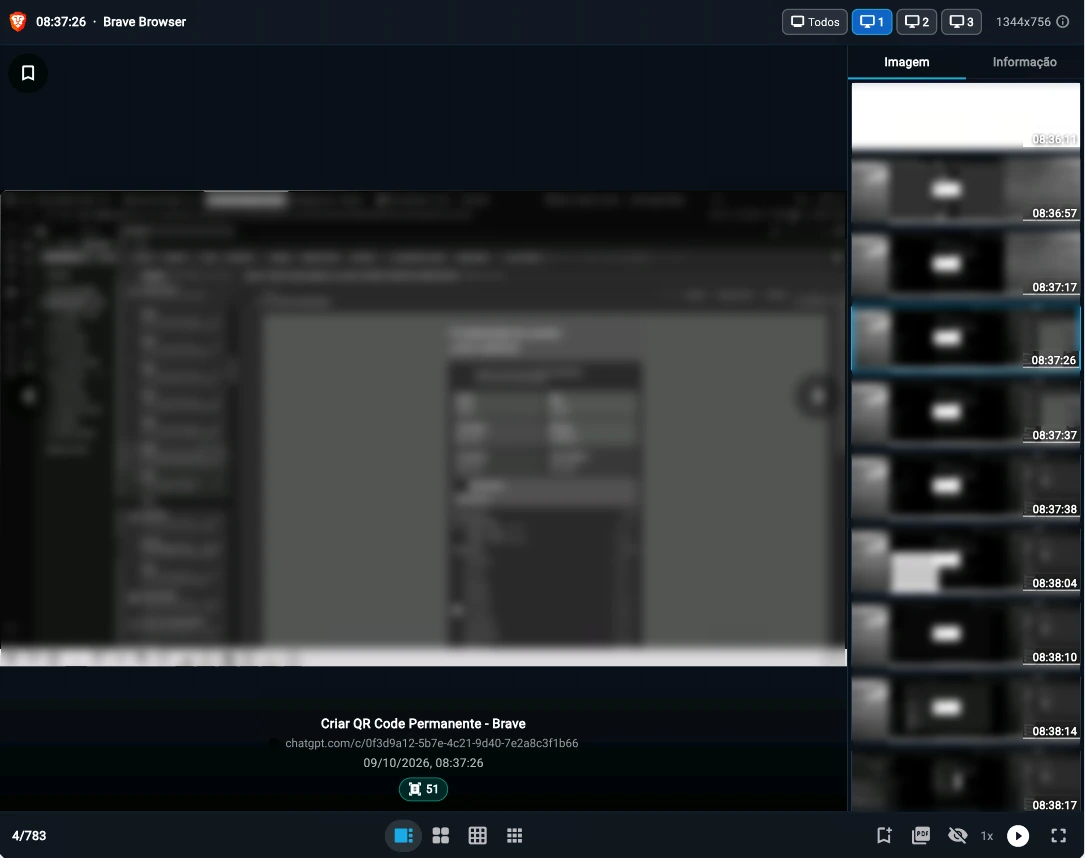
Tz0 console screenshot: Every screen, in order
Every screen, in order. Step through capture by capture, view one monitor at a time and export the excerpt to PDF; the green number shows how many text fragments OCR read on that screen.
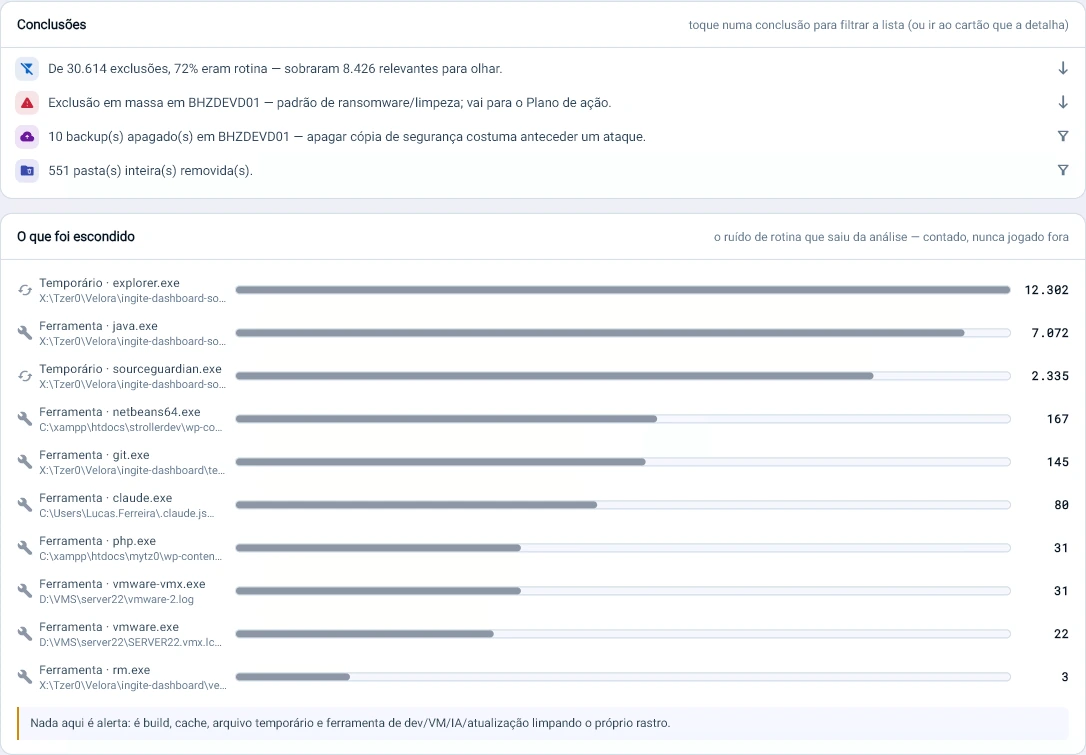
Tz0 console screenshot: Noise out of the way, never out of the count
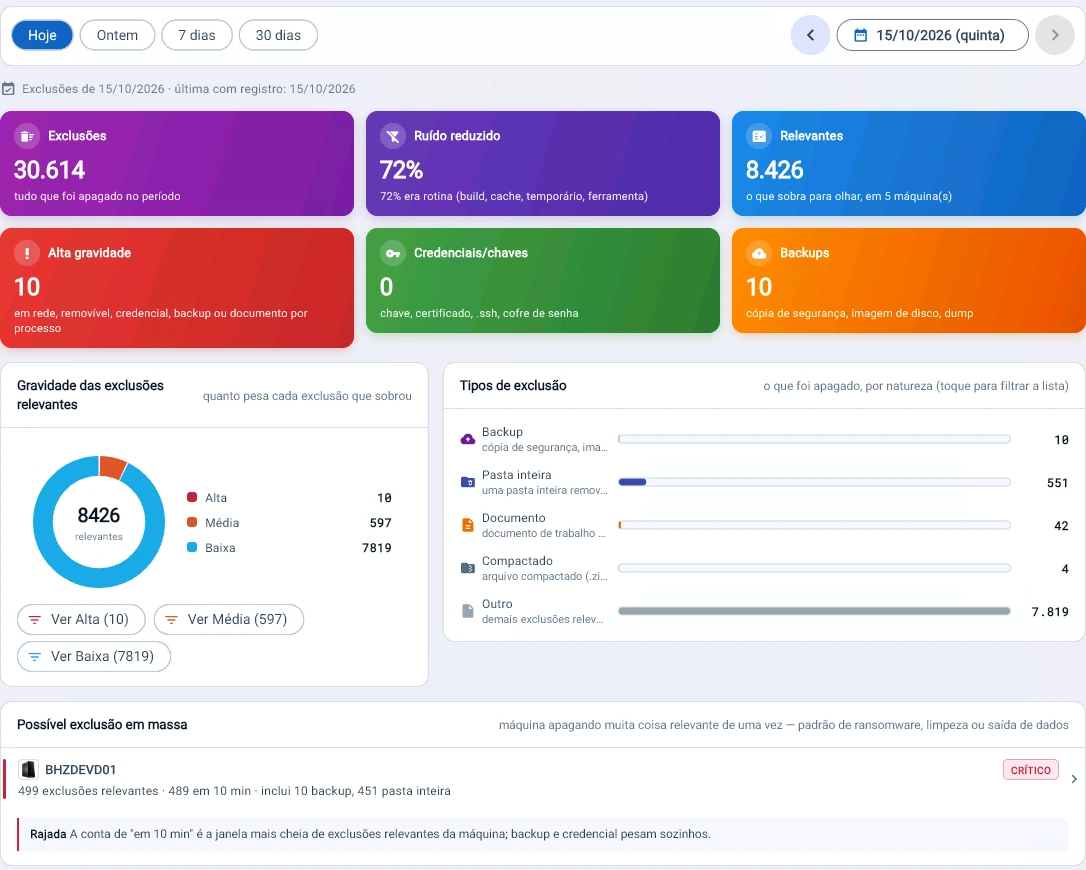
Noise out of the way, never out of the count. 72% of deletions were builds, cache and temp files; they are counted here, and what remains is what matters.
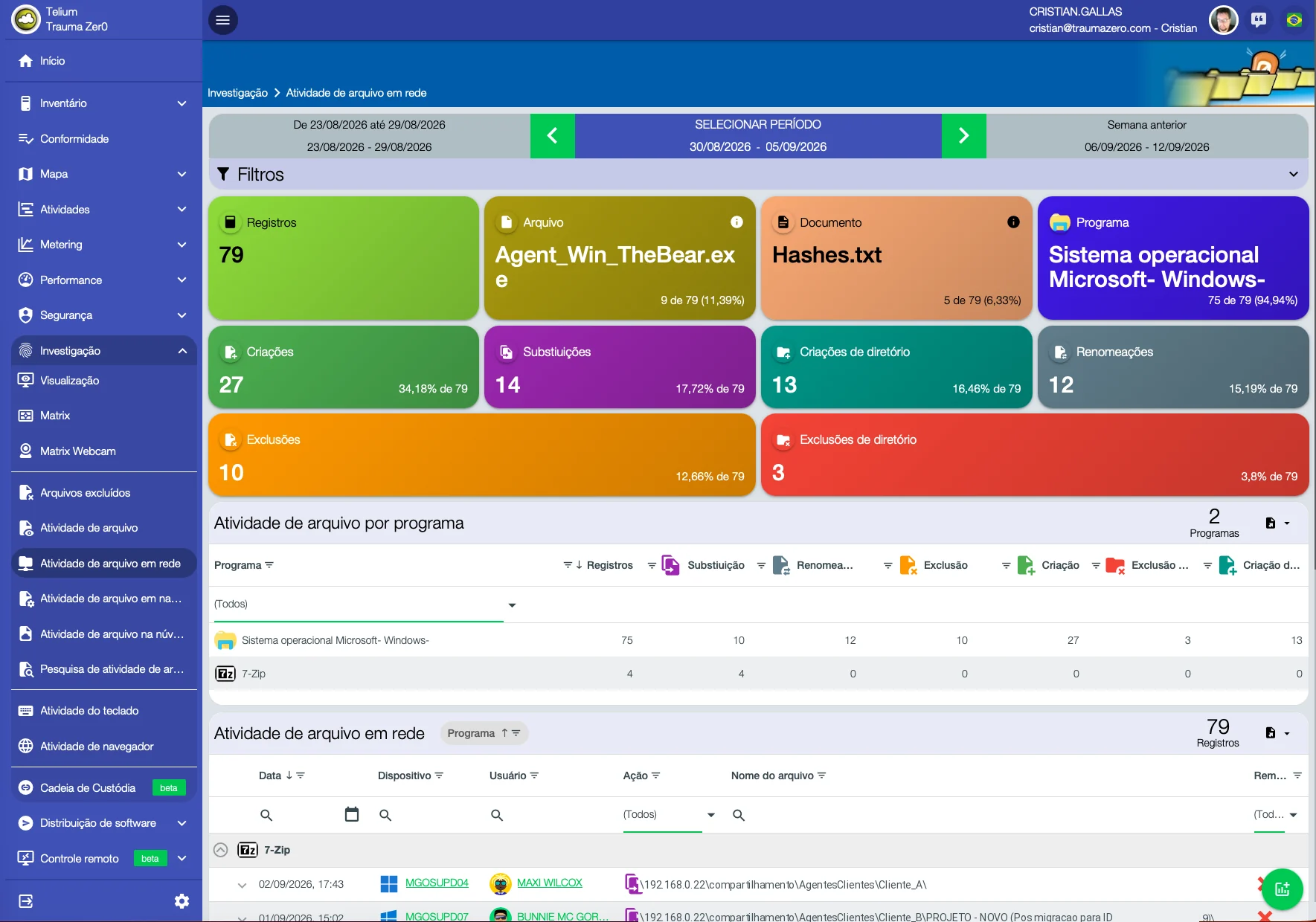
Network file activity screen in Tz0 Forensics, with creations, replacements, renames and deletions in shared folders
And what moved across the network. 79 operations in shared folders during the week — created, replaced, renamed, deleted — each with the machine, the person, the time and the path. What happens on the share stops being invisible.
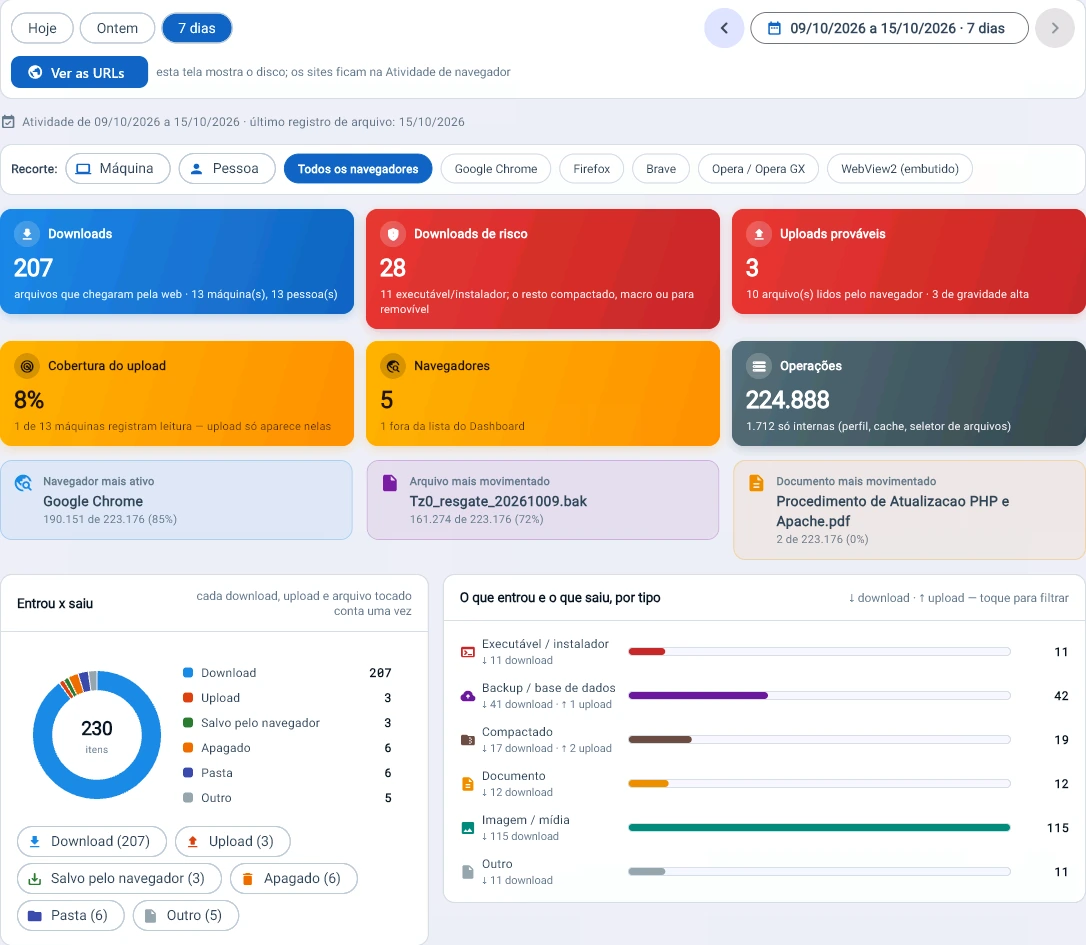
Tz0 console screenshot: What came in and what went out through the browser
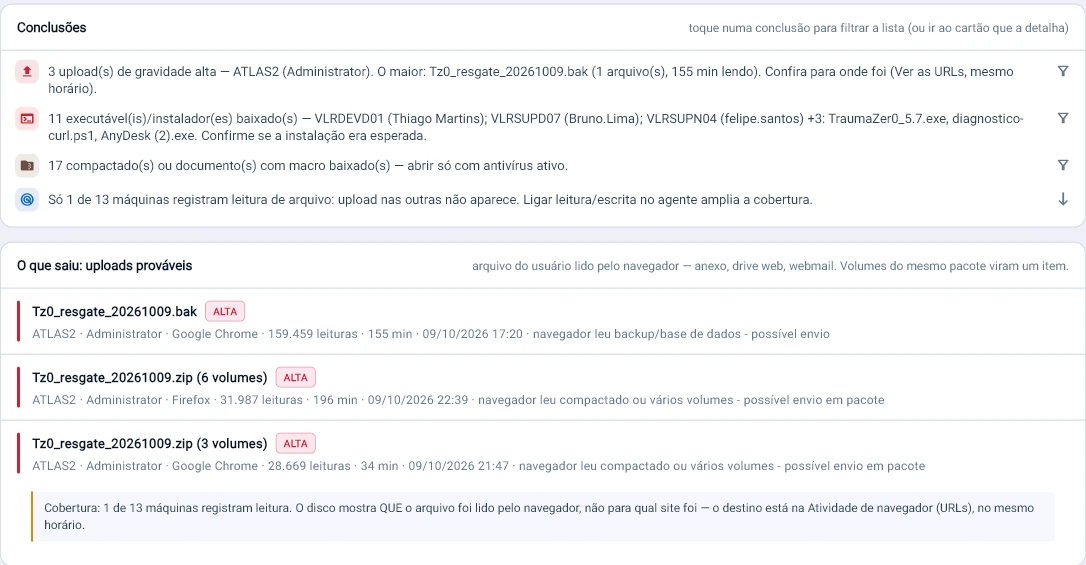
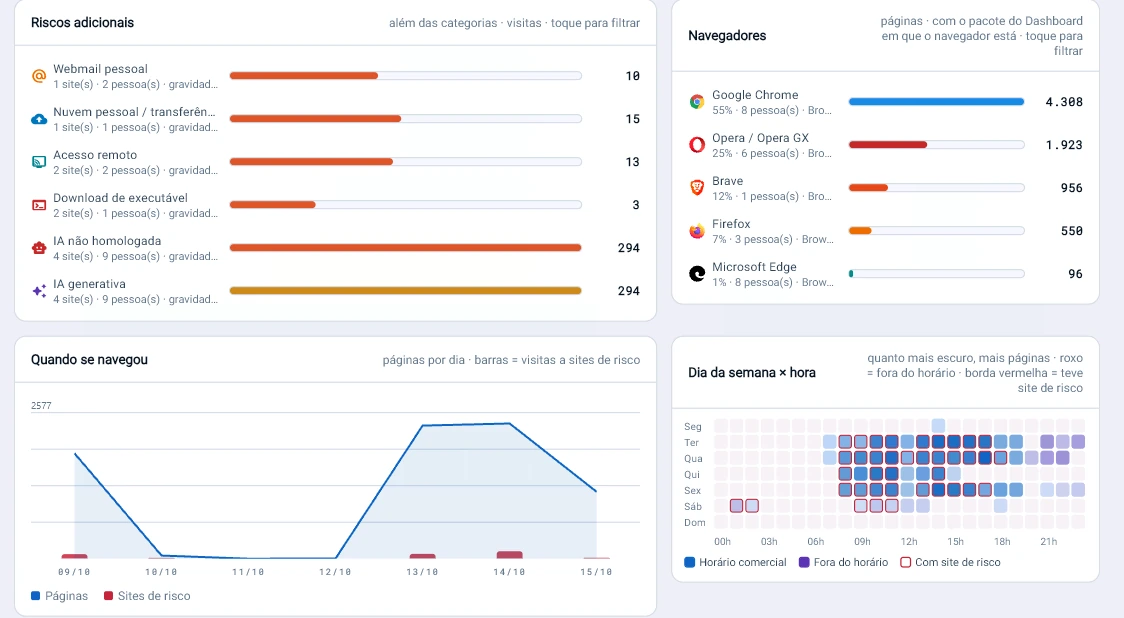
What came in and what went out through the browser. In 7 days, 207 downloads, 28 of them risky, and 3 probable high-severity uploads, including a backup read 161,000 times by the browser.
Tz0 console screenshot: Created, renamed, replaced, deleted
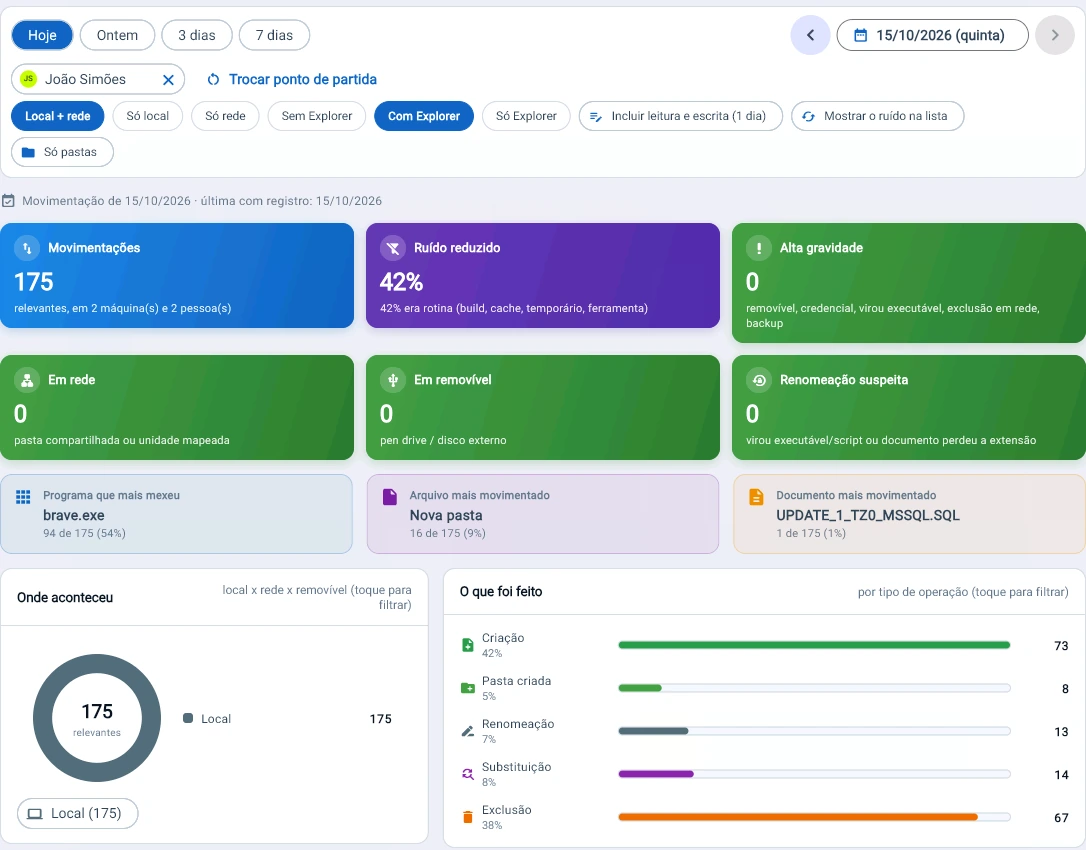
Created, renamed, replaced, deleted. 175 relevant file movements by one person, split by local, network and USB drive, with an alert for files that became executables or lost their extension.
Tz0 console screenshot: An entire backup read by the browser for 155 minutes
An entire backup read by the browser for 155 minutes. Tz0 does not see the destination site from the disk, but it shows the file, the browser and the time — and says to check the URLs from the same moment.
Tz0 console screenshot: Switching browsers does not hide it
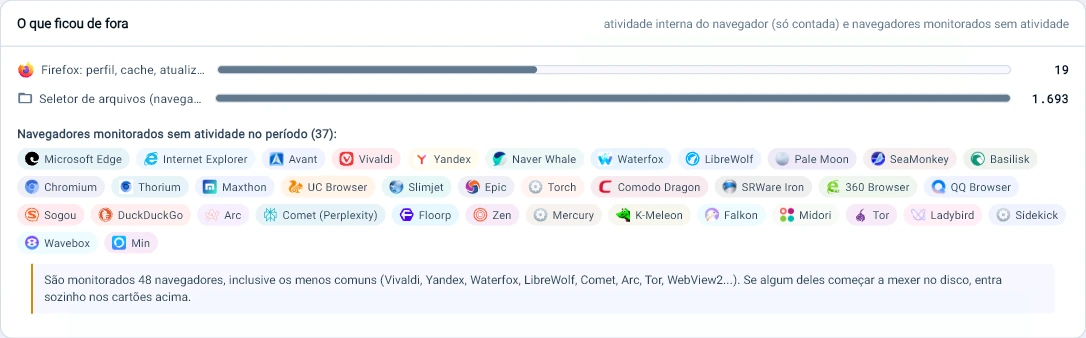
Switching browsers does not hide it. Tz0 tracks 48 browsers, from Chrome to Tor, Arc and Comet; 37 of them did not touch the disk this week.

Screens from a real estate in production, not a demo environment. Anything identifying people, and customer names in network paths, was replaced with generic equivalents before publishing; the session thumbnails were deliberately left unreadable. Figures, percentages and the interface itself are untouched.

Visualization

The day in screens, with the conclusion ready.

Captures from every machine in one panel: peak usage, the session that generated the most screens, the gaps with no use and each machine’s current screen.
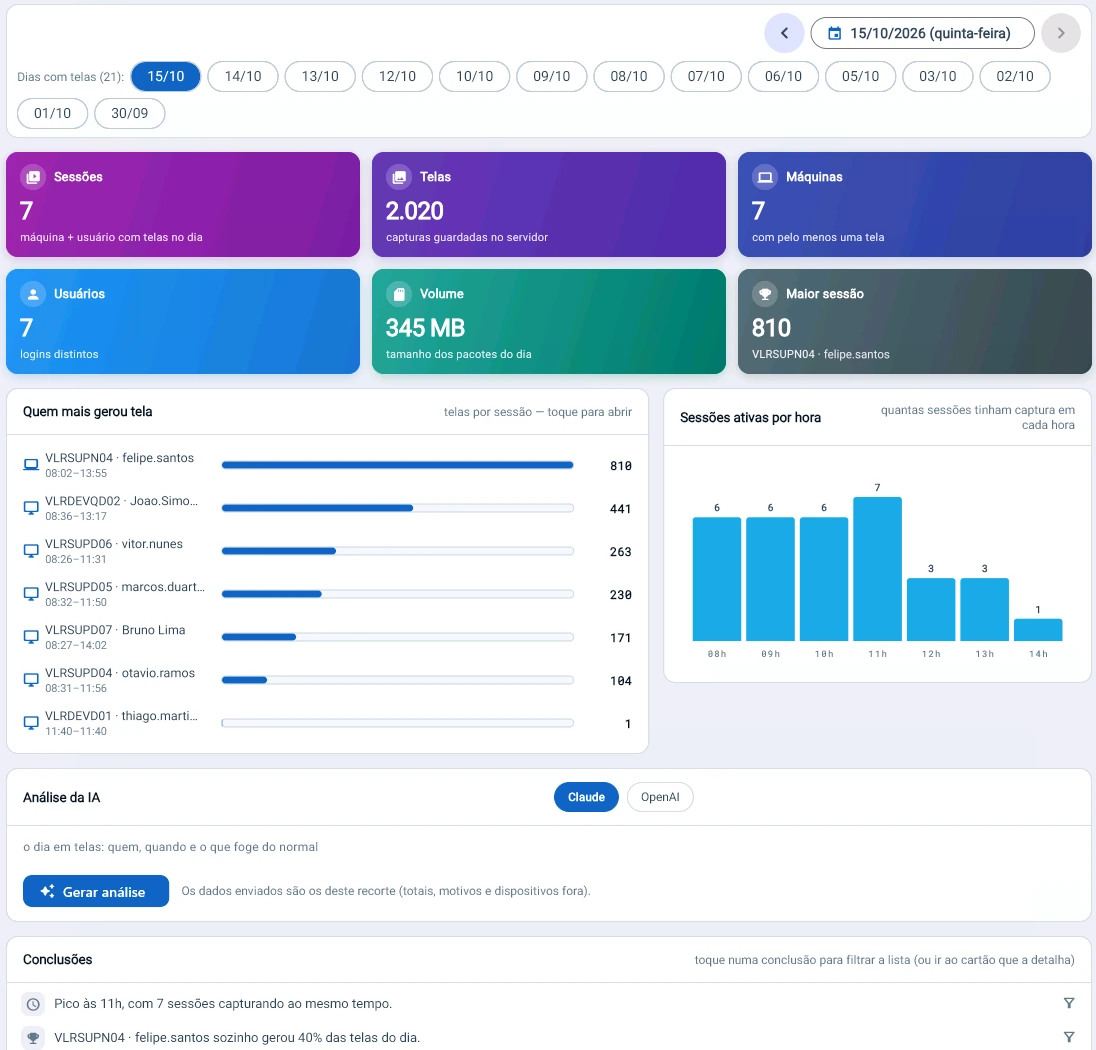
Tz0 console screenshot: A day of screens in one panel
A day of screens in one panel. 2,020 captures from 7 machines, peaking at 11h, and the conclusion ready: a single session generated 40% of the day’s screens.
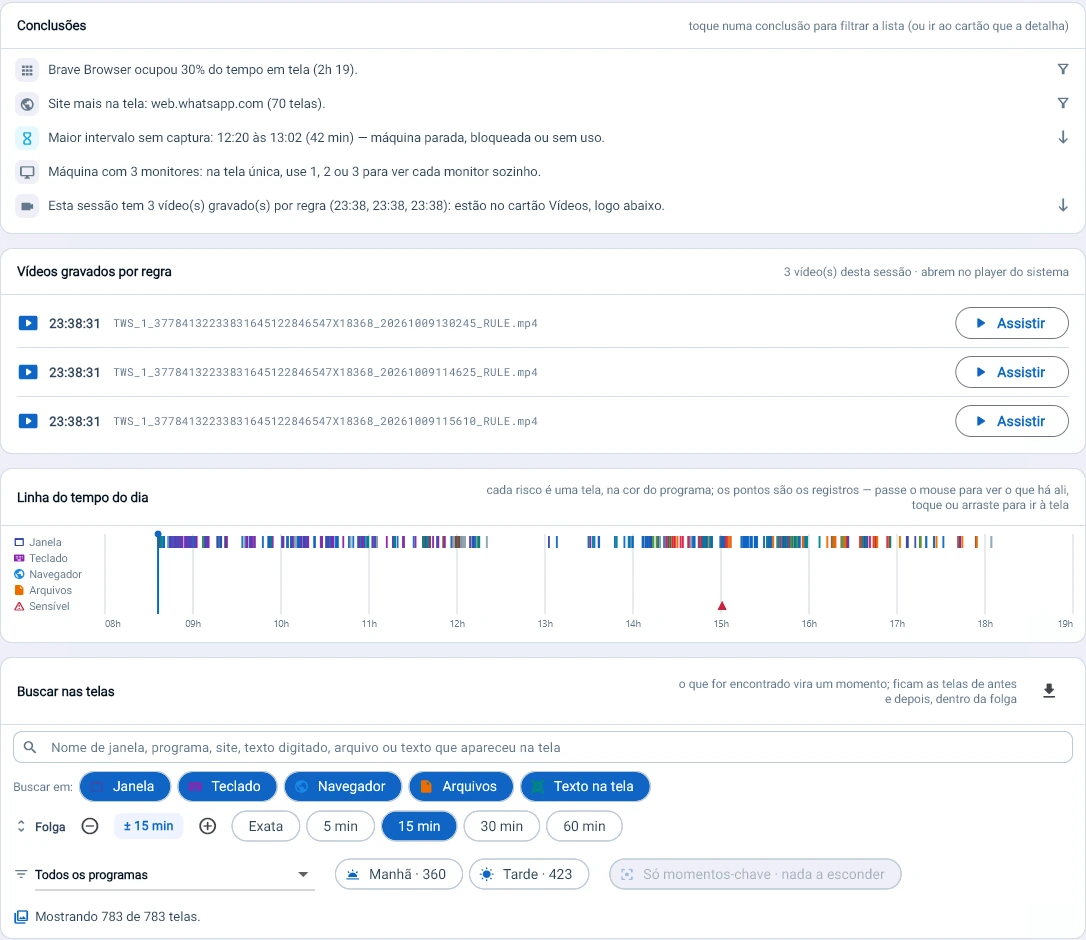
Tz0 console screenshot: The session told in five lines
The session told in five lines. Tz0 points to the site that stayed on screen the longest (70 screens), the 42-minute gap with no use and the 3 videos a rule recorded on its own; search finds the moment and shows the screens from 15 minutes before and after.
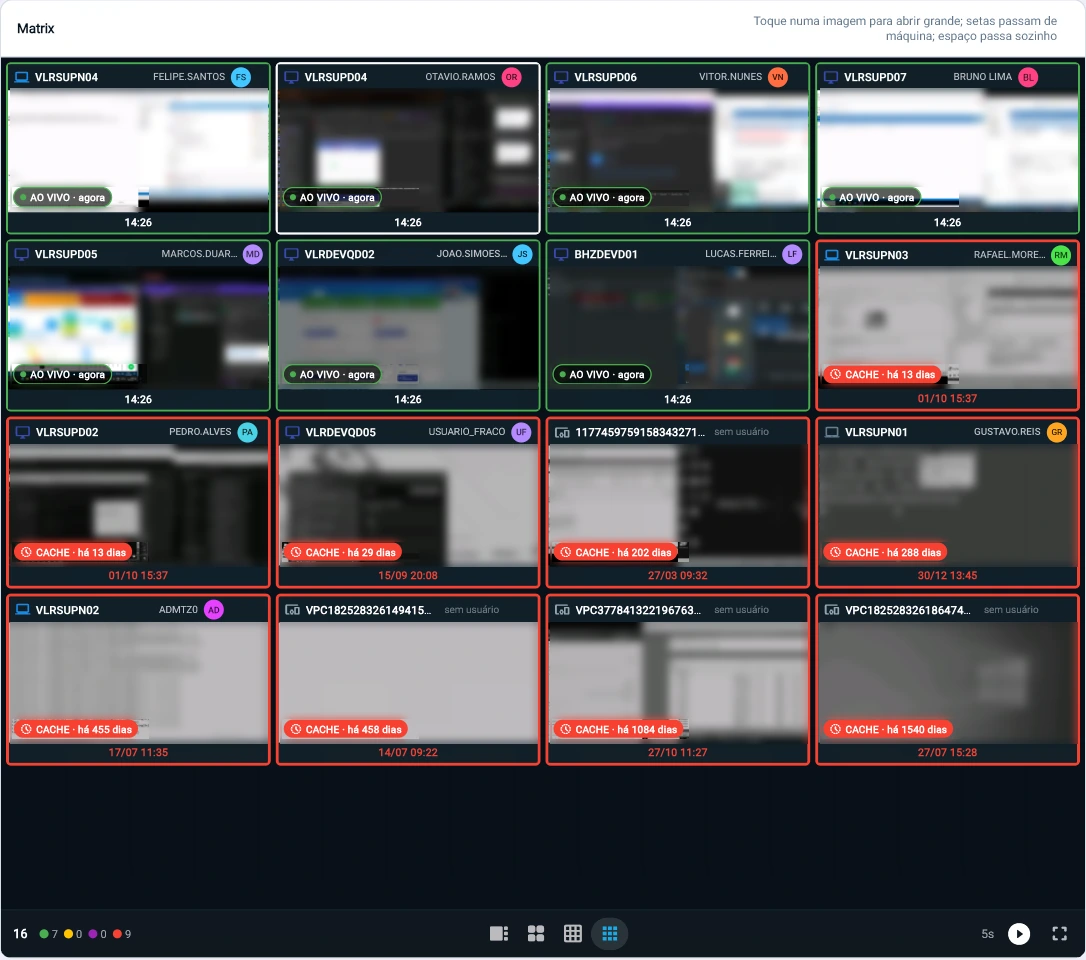
Tz0 console screenshot: Each machine's current screen
Each machine’s current screen. 7 of 16 are live; the other 9 show how many days it has been since an image arrived, from 13 to 1,540.

OCR

Screen text becomes searchable.

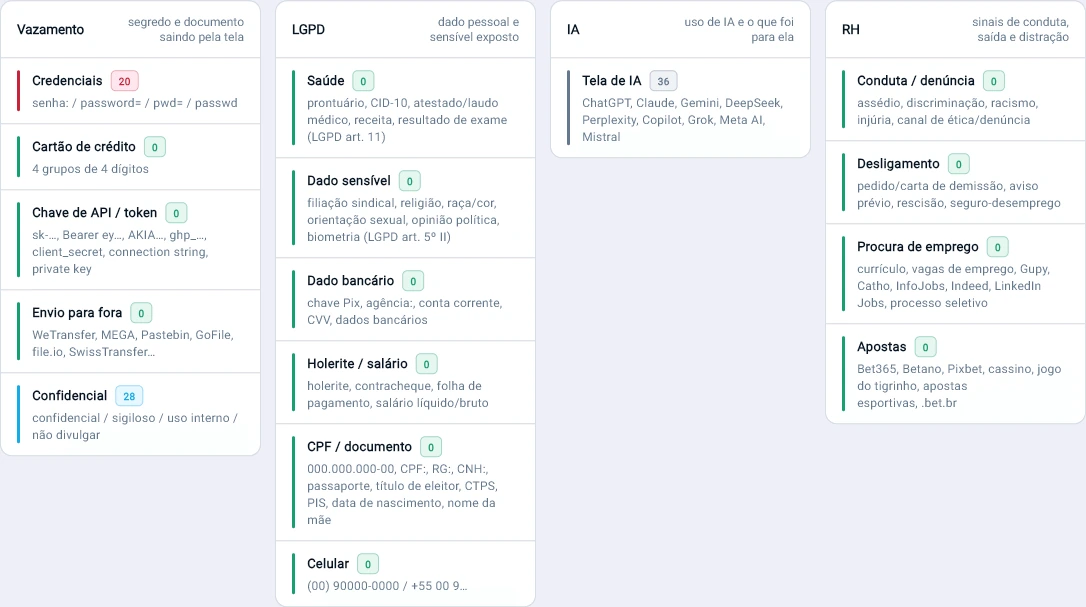
Everything that appeared on screen is read and indexed. Visible passwords, confidential documents, LGPD sensitive data and AI use become ready-made searches.
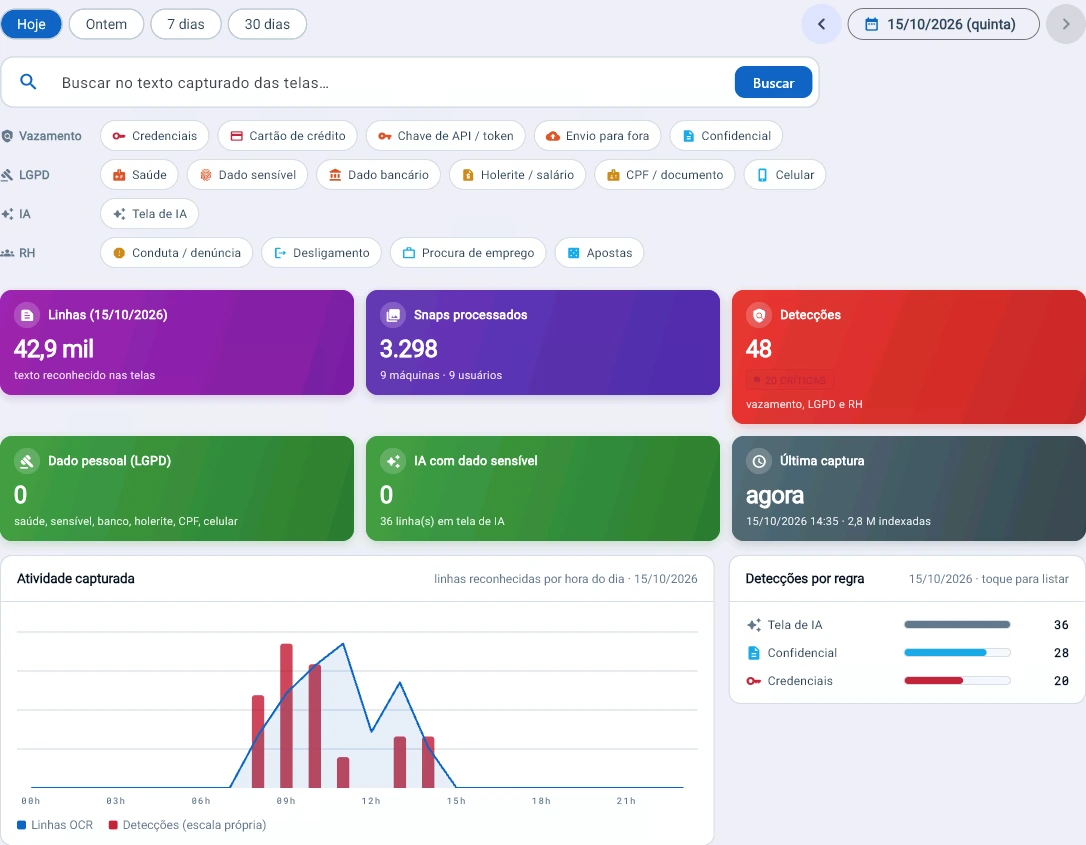
Tz0 console screenshot: What appeared on screen becomes searchable text
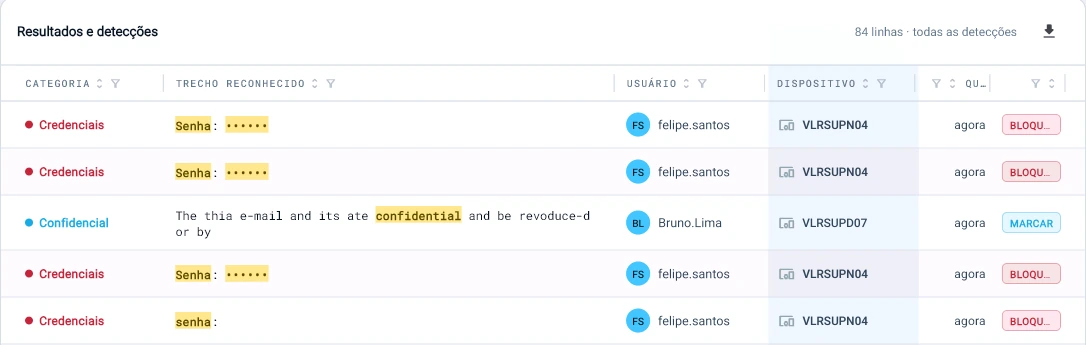
What appeared on screen becomes searchable text. 42.9 thousand lines read across 3,298 screens in a single day, with 48 detections ready: 20 visible passwords, 28 confidential documents and 36 AI screens.
Tz0 console screenshot: Ready-made searches for what matters
Ready-made searches for what matters. Passwords, cards and API keys exposed on screen; CPF, health and LGPD sensitive data (arts. 5 and 11); AI use; HR signals. On this day: 20 credentials, 28 confidential, 36 AI screens.
Tz0 console screenshot: A password found on screen is shown masked
A password found on screen is shown masked. Each detection brings the text read, who, on which machine and the action: block or mark for review.

Cloud

Who is taking files out.

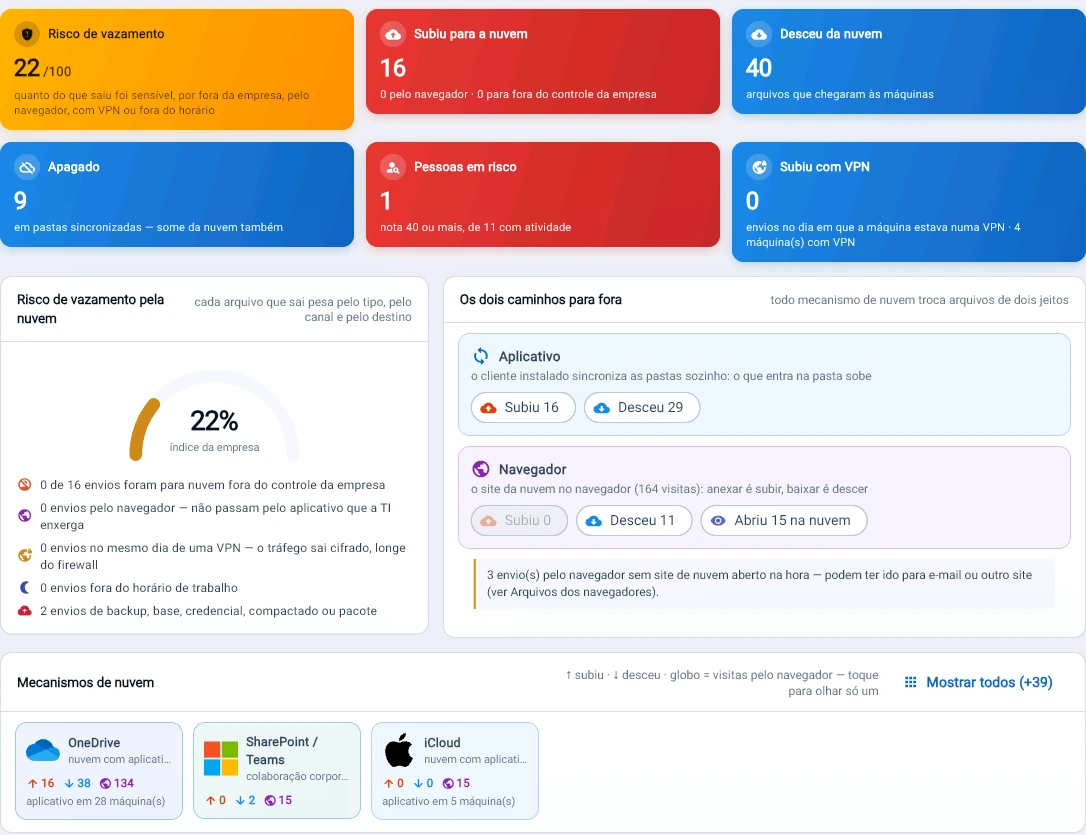
What OneDrive syncs on its own, separated from what the person uploaded through the website, with a risk score per person and VPN on the same board.
Tz0 console screenshot: A score of 22 out of 100 for cloud leak risk
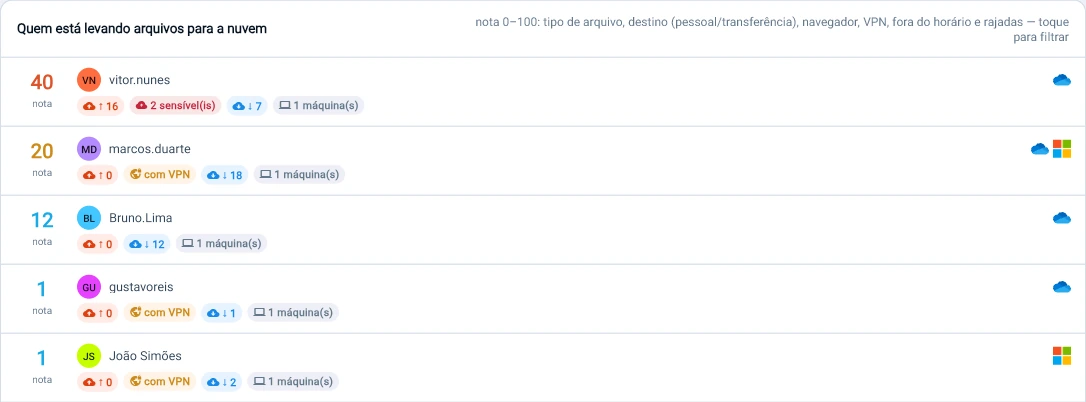
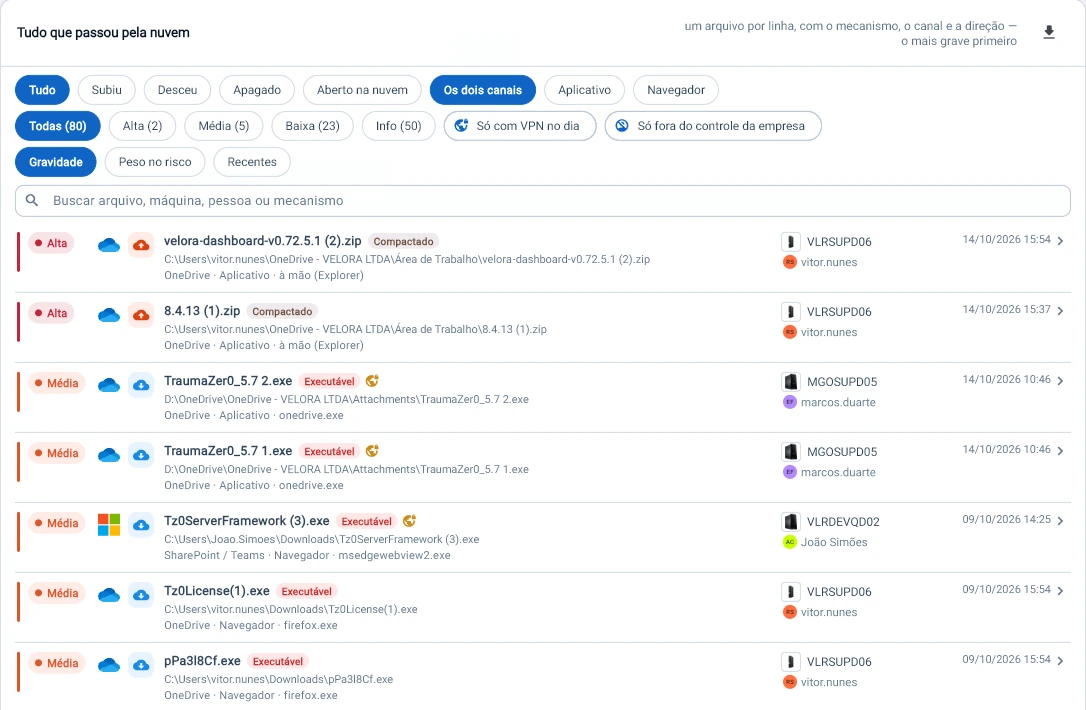
A score of 22 out of 100 for cloud leak risk. Tz0 separates what OneDrive syncs on its own from what was uploaded through the website, points out the person who went past a score of 40 and the 3 uploads that left by another route.
Tz0 console screenshot: Everything that went through the cloud, file by file
Everything that went through the cloud, file by file. 80 files in the selection, 2 of high severity: archives the user uploaded to OneDrive by hand. A filter shows only what left the company’s control.
Tz0 console screenshot: One score per person, with the reason next to it
One score per person, with the reason next to it. The person who uploaded 16 files, 2 of them sensitive, appears first with a score of 40; VPN and uploads outside business hours add points.
Tz0 console screenshot: VPN and cloud on the same board
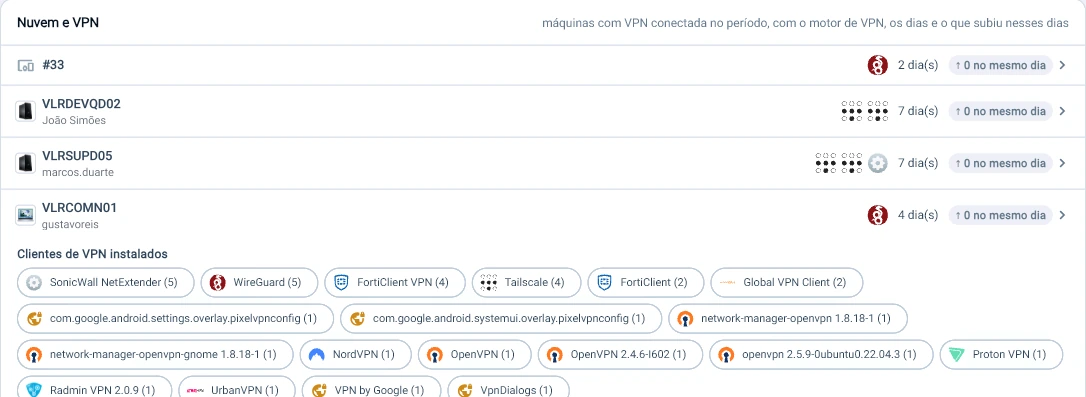
VPN and cloud on the same board. 4 machines turned on a VPN during the week and none uploaded a file on the same day; the fleet has everything from WireGuard and Tailscale to NordVPN and Proton installed.

File search

Where the file was created, where it went, where it disappeared.

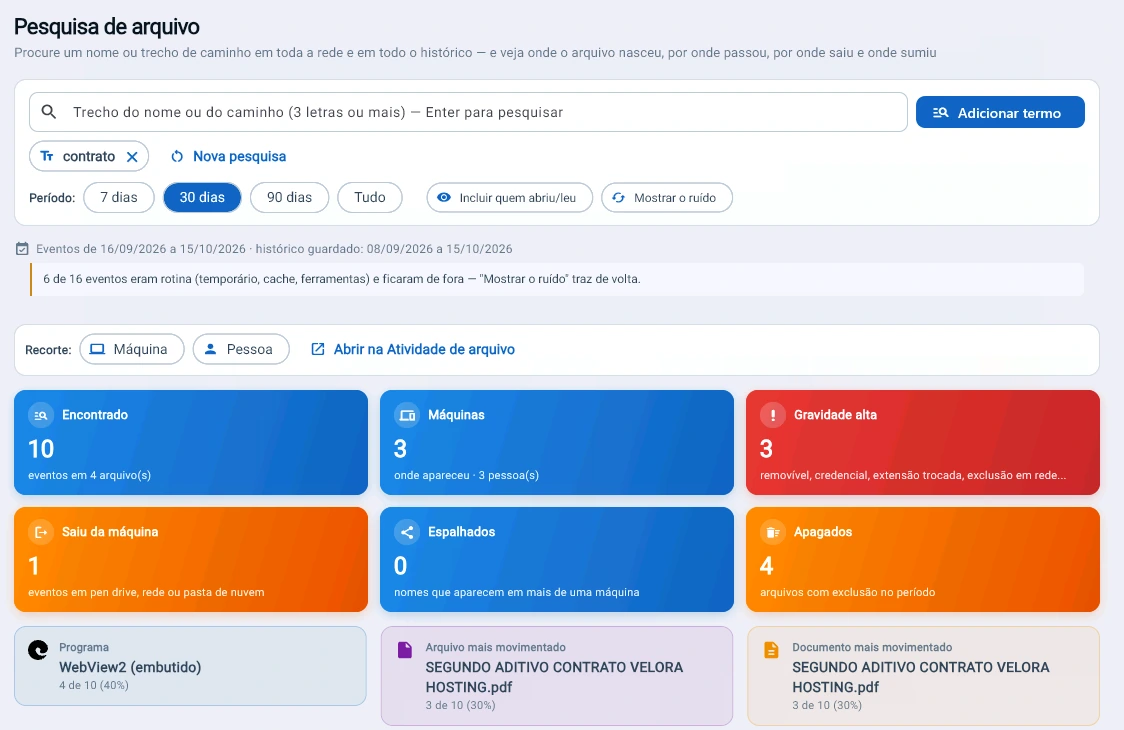
A search term returns the file’s whole path across machines and people, with routine moved out of the way and the conclusion written.
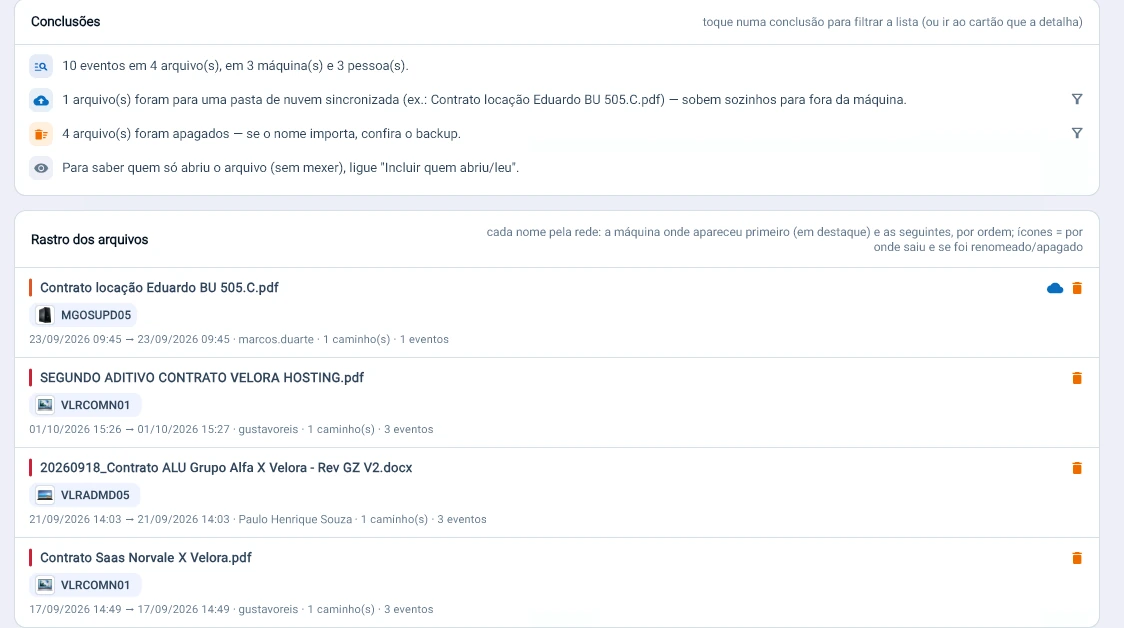
Tz0 console screenshot: Search for “contract” and see the whole path
Search for “contract” and see the whole path. 10 events across 4 files, 3 machines and 3 people: 3 of high severity, 1 left the machine and 4 were deleted. 6 of the 16 events were routine and moved out of the way on their own.
Tz0 console screenshot: The product writes the conclusion: 1 file went to a synced cloud folder and is uploaded off the machine automatically; 4 were deleted, check the backup
The product writes the conclusion: 1 file went to a synced cloud folder and is uploaded off the machine automatically; 4 were deleted, check the backup. The trail points to the machine where each name first appeared.

Keyboard activity

What was typed, where and when.

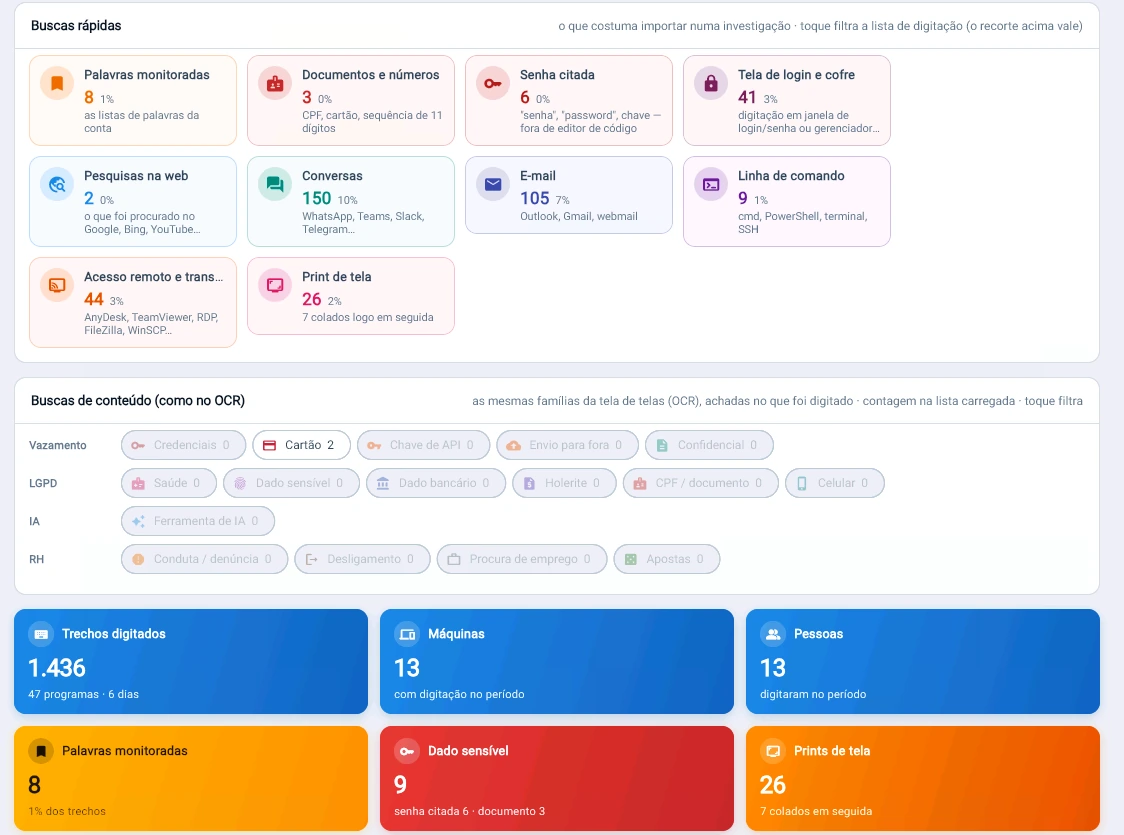
Typed snippets by program, with ready-made searches for passwords, login screens, screenshots pasted right after and typing outside business hours.
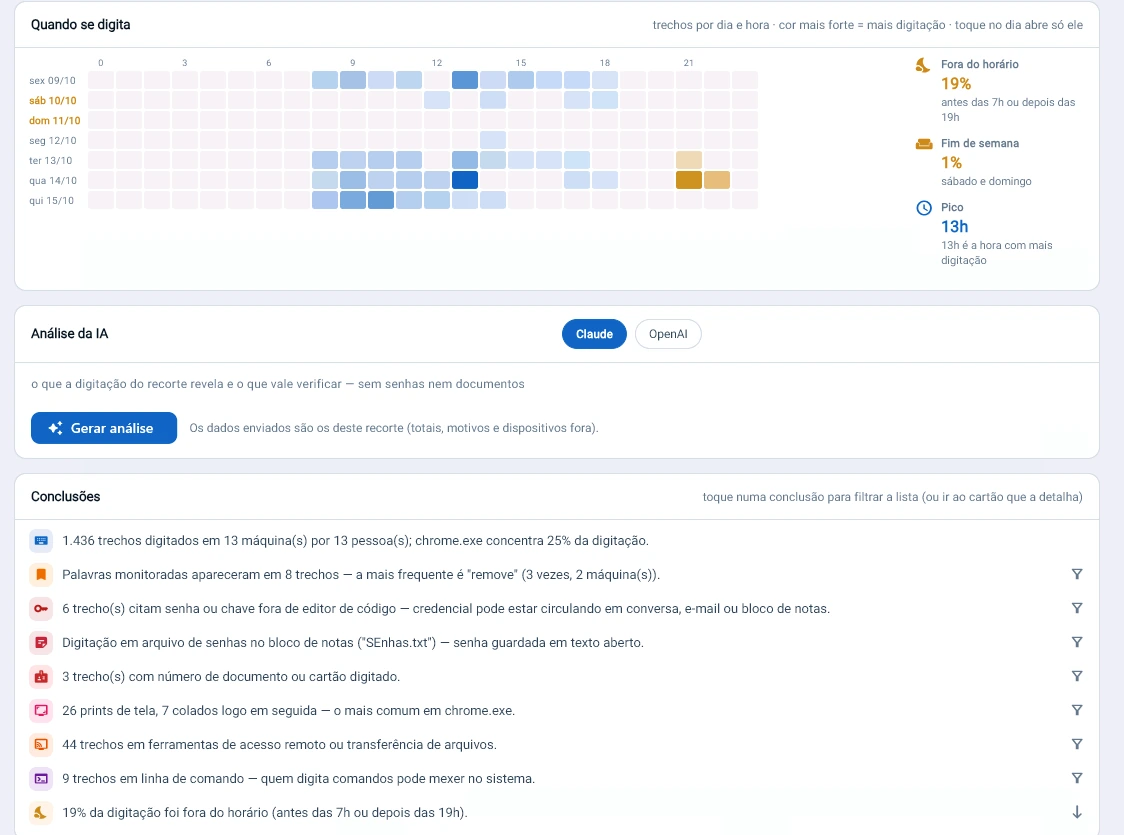
Tz0 console screenshot: The product reads the typing and points out the risk
The product reads the typing and points out the risk. 6 snippets mention a password outside a code editor; a list of passwords was typed into an open text file. 19% of the typing happened before 7h or after 19h.
Tz0 console screenshot: Ready-made searches for investigators
Ready-made searches for investigators. In 6 days, 1,436 snippets typed in 47 programs: 6 mention a password, 41 were typed on a login screen or vault and 26 were screenshots, 7 of them pasted right after.

Artificial intelligence

Text going into and out of AI tools.

Text typed or pasted into AI tools, checked against sensitive data.
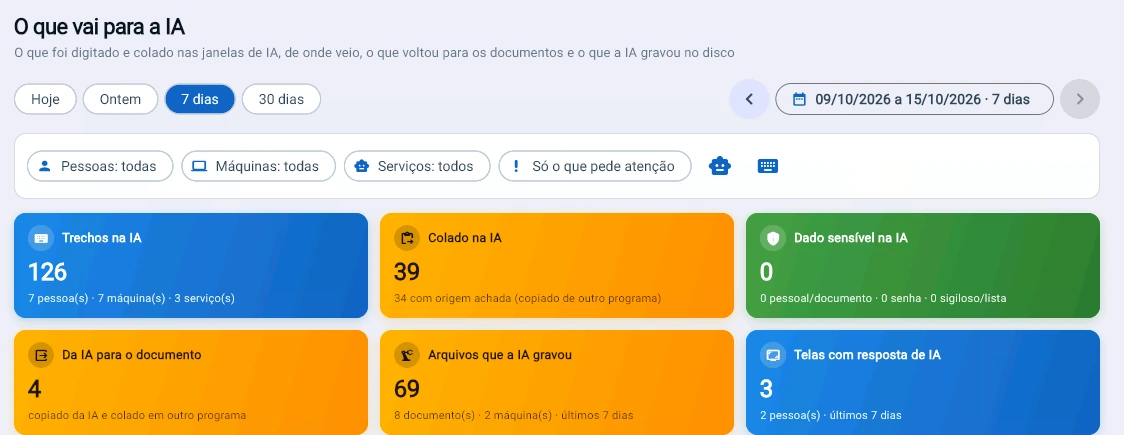
Tz0 console screenshot: What goes into AI, and what comes back
What goes into AI, and what comes back. In 7 days, 126 snippets typed into AI tools, 39 pasted from other programs, none with sensitive data; 4 times the AI’s text was pasted into a document.

Browsing

Everything browsed, in a single report.

Pages, sites, categories and risk per person in a report exported to PDF with one click.
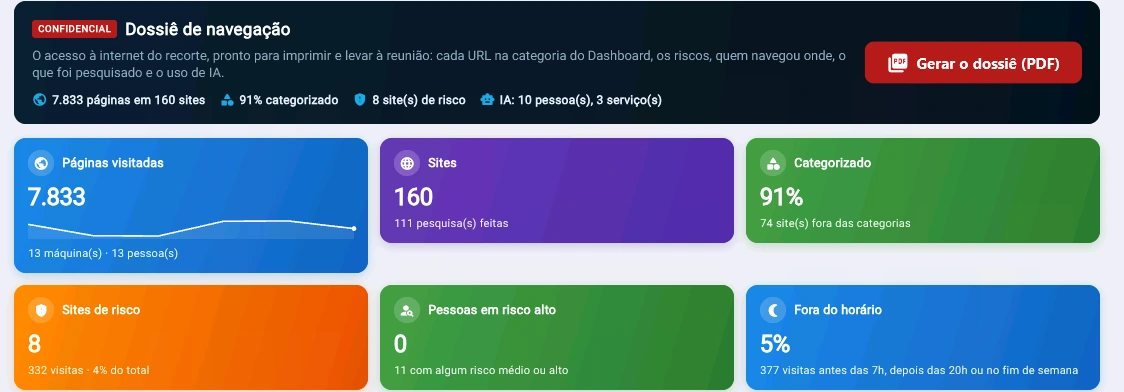
Tz0 console screenshot: A browsing dossier ready for the meeting
A browsing dossier ready for the meeting. 7,833 pages across 160 sites, 91% categorized, 8 risky sites with 332 visits and 5% of access outside business hours. One click generates the PDF.
Tz0 console screenshot: Risk beyond the category: in 7 days, 294 visits to unapproved AI, 15 to personal cloud, 13 to remote access and 3 executable downloads
Risk beyond the category: in 7 days, 294 visits to unapproved AI, 15 to personal cloud, 13 to remote access and 3 executable downloads. The map marks the hour when each risk happened.
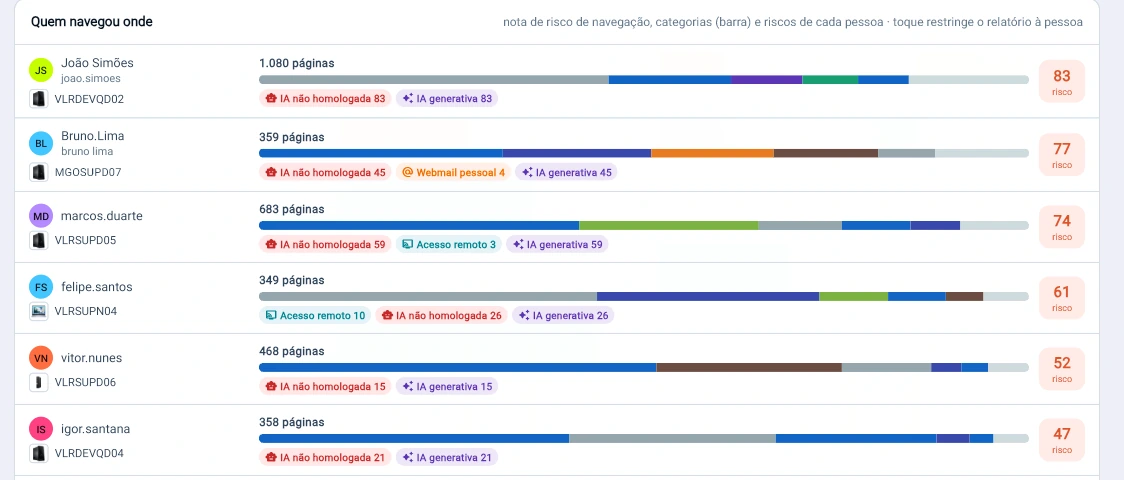
Tz0 console screenshot: One risk score per person, with the reason next to it
One risk score per person, with the reason next to it. The highest, 83, comes from 83 visits to unapproved AI out of 1,080 pages.

Chain of custody

From plan to forensic report, sealed.

Each investigation becomes a case with a closed cycle. Each step enters a hash chain, and the delivered package goes out with the hashes so the recipient can verify it.
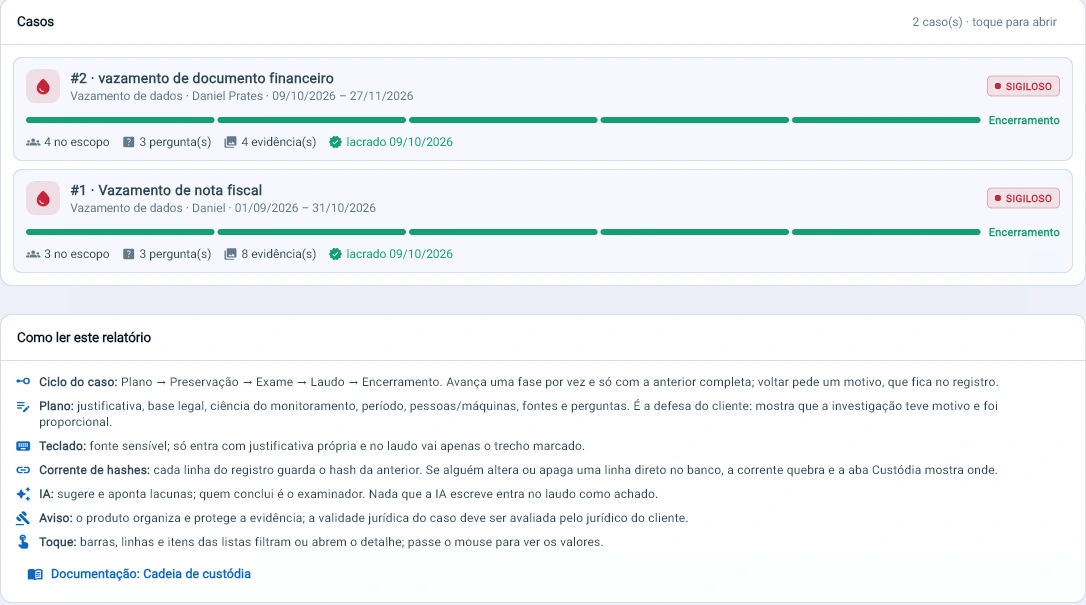
Tz0 console screenshot: Each investigation becomes a case with a closed cycle: plan, preservation, examination, report and closure
Each investigation becomes a case with a closed cycle: plan, preservation, examination, report and closure. Each step enters a hash chain, and nothing the AI writes enters the report as a finding.
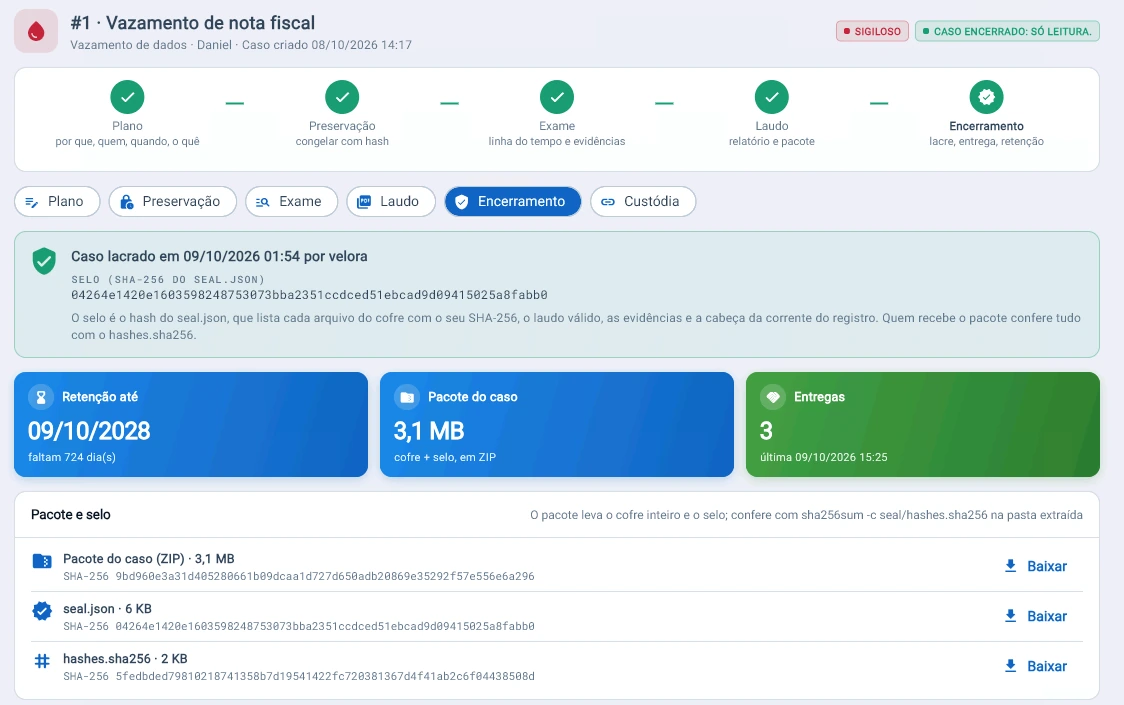
Tz0 console screenshot: Case closed, sealed with SHA-256
Case closed, sealed with SHA-256. The seal covers every file in the vault, the report and the evidence; the 3.1 MB package goes out with hashes.sha256 for the recipient to verify, and is kept until Oct 9, 2028.
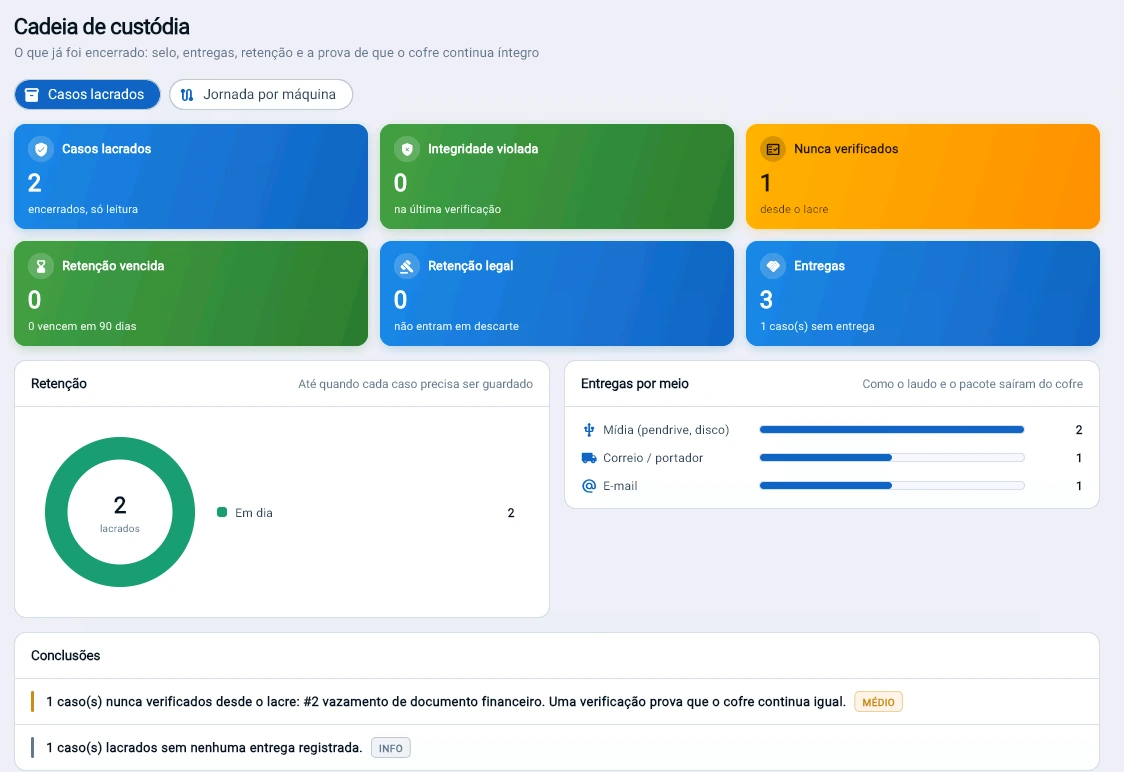
Tz0 console screenshot: Proof that the vault is still intact: 2 sealed cases, 0 with integrity violated
Proof that the vault is still intact: 2 sealed cases, 0 with integrity violated. The panel itself warns that 1 case has never been verified since it was sealed and that 1 has no delivery recorded.

What changes in practice

Eight things that stop being one person’s word against another’s.

What was copied, changed or deleted is on the record.
A deleted file can be reconstructed.
A session in a financial system has video, not just a log.
The fraud alert arrives during the event, not afterwards.
Evidence comes out as a package that holds up in court.
The investigation does not depend on the machine sitting on the examiner’s desk.
Collection runs without alarming the person under investigation.
The scope of the investigation is documented from the moment it is opened.

Included with the module

Three tools in the same package.

A new report does not become a project. We do not build bespoke work for a single customer, but we look at every request: when the need serves everyone, the report goes into the product and reaches all customers in the next update.

Tz0 EIS

Report builder

Ships with the package, not sold separately. It is for people who want to build their own reports outside the browser.

Tz0 TNetX

Development platform

Carries agent communication across segmented topologies and lets the product be extended.

Tz0 Dashboard

Operations dashboard

The state of the estate on one screen, with whatever went off-target at the top. More than 600 ready-made reports, covering every module.

Who works this way

Investigation with evidence preserved.

We built a security policy entirely on Tz0.

Translated from Portuguese

Advanta
Corporate security policy

Chose Trauma Zer0 from thirteen players in the segment, after a proof of concept with five finalists.

TecBan
Banking terminal network

Before switching it on, define the rule. We help with both.

A 30-minute technical conversation: you describe the risk scenario, we point out what Forensics collects and what policy needs to exist first.