In many companies, Java got into the fleet without asking anyone’s permission. It came bundled with a development tool, with the client of an old system, or with an installer someone downloaded during a support call.
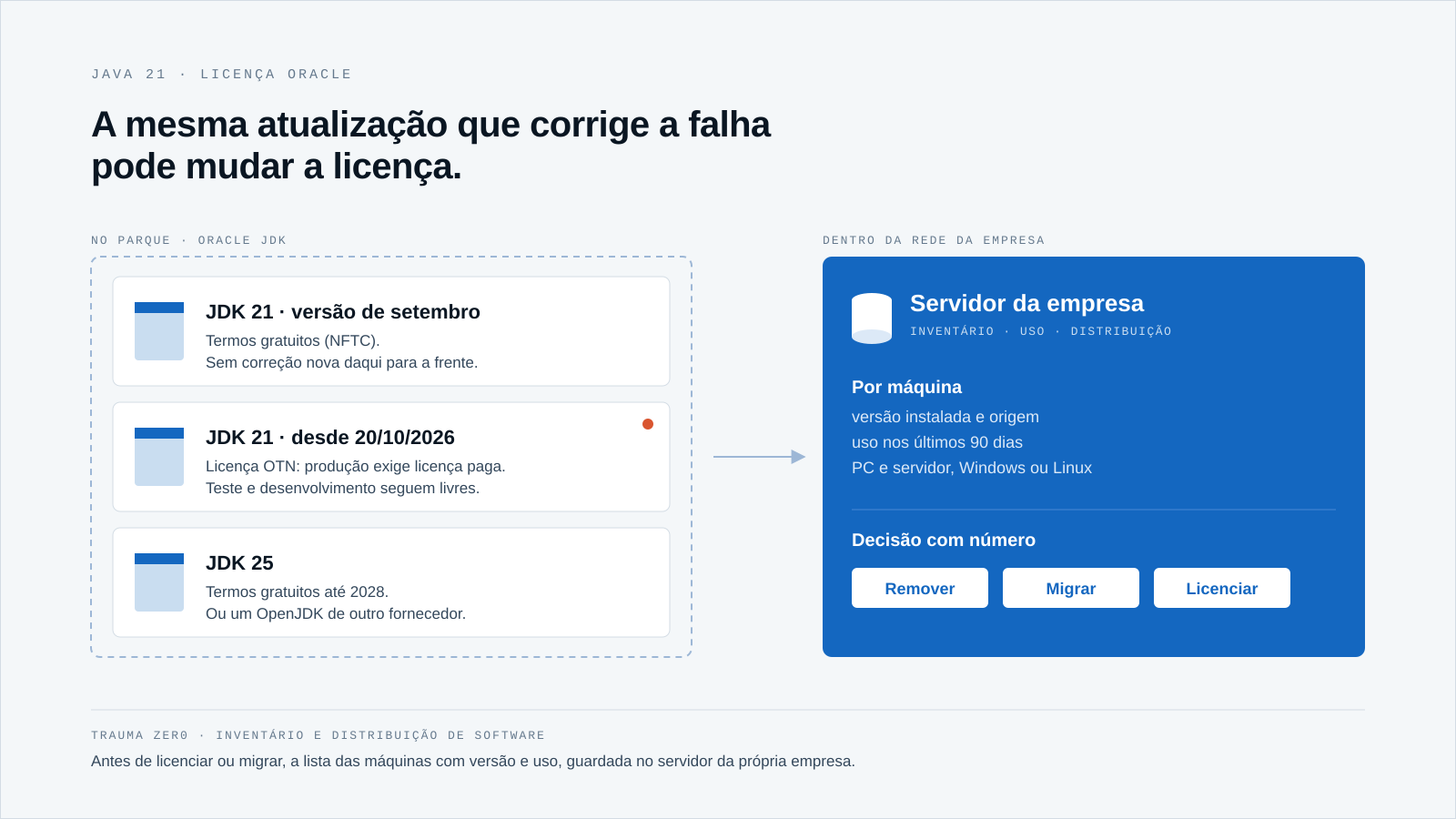
Since October 20, 2026, that story has become more expensive to ignore. Oracle JDK 21 updates stopped shipping under the free terms and moved to a license that requires a paid subscription for production use.
The question IT has to answer now is not whether to pay. It is more basic than that: which machines have Oracle JDK 21 installed, which version, and who actually uses it.
What changed on October 20
Oracle gave notice on August 14, on the official Java blog: JDK 21 updates released through September 2026 would remain under the free terms (NFTC, No-Fee Terms and Conditions). Starting with the October Critical Patch Update, they would move to the OTN license.
The OTN license still allows personal use, development, testing and demonstration. To run the new versions in production, Oracle points to the Java SE Universal Subscription, which since 2023 has been counted by the company’s total number of employees, not by the number of machines running Java.
Anyone who wants to stay on a free Oracle JDK has to move to JDK 25, which Oracle keeps under the free terms until 2028. The other way out is to switch to an OpenJDK distribution from another vendor.
The detail that catches many teams: the license applies per release. A machine that stopped at the September release is still covered by the free terms, but it no longer gets fixes. The same machine, once it receives the October release, is running Java under the paid license.
The automatic update that protects a machine can be the same one that changes its license.
Why Java is so hard to find
A Java audit is not a distant possibility. In Azul’s 2026 State of Java survey of 2,039 professionals on five continents, 21% said they had already been through an Oracle Java audit. The same survey shows 81% have migrated, are migrating or plan to migrate at least part of their Oracle Java to another OpenJDK distribution.
Azul sells an OpenJDK distribution, which is worth keeping in mind when reading the numbers. But migrating or subscribing requires the same first step: knowing where Java is. And it hides in four ways.
Installed by people outside IT
Developers, data analysts, visiting contractors. Oracle JDK is downloaded straight from the website, with no ticket, and stays there after the project ends. Tz0 Inventory lists every program installed on each machine, with version, date and source, and shows what entered the fleet in recent weeks.
Several versions on the same machine
It is common to find Java 8, 17 and 21 side by side, each left behind by a different system. Each version has its own license rule, and the one that counts is the one in use. In the inventory, each version shows up as its own line, machine by machine.
Inside another program
Many applications ship their own Java in the installation folder. That case has to be checked with the application vendor, who usually answers for the license of what it bundled. It is worth getting that answer in writing, before the audit.
On the server, out of sight
Application servers, integration machines, scheduled jobs. Production Java lives on servers more than on users’ desks. The Tz0 Inventory agent is the same on desktops, laptops and servers, Windows or Linux, and everything lands in the same picture of the fleet.
Three numbers before any decision
With that picture in hand, the decision gets smaller than it looked. Three numbers are usually enough:
- Installed: how many machines have Oracle JDK, which version, and how many have already received releases published after October 20.
- Used: how many opened Java in the last 90 days. A machine with no use is a candidate for removal, not for licensing.
- In production: which servers and machines run business systems on top of it, rather than just testing or development.
Tz0 Inventory shows the hours of use for each program and machines grouped by usage range over the last 90 days, program by program. That is the difference between negotiating with the vendor’s list and negotiating with yours.
If the audit letter arrives, the same module matches what is installed against what was purchased and produces the report for the vendor audit, with no last-minute scramble. The logic is the same as in any software license audit: installed is not the same as used.
Standing still has a cost too
The most tempting way out is to freeze JDK 21 at the last free release. That option has an expiry date: every month without updates is a month with known flaws left open, on a developer’s machine or on the server that runs the ERP.
Tz0 Deploy shows exposure to known vulnerabilities in machine-days and points to the riskiest package. With that number on the table, freezing stops being an invisible saving and becomes a measured risk.
This script is familiar. At the end of support for Office 2021, the date was public and the list of affected machines was not. Java is no different.
If the decision is to move to JDK 25 or to an OpenJDK, the change has to reach every machine, including the one that was switched off that day. Tz0 Deploy installs and uninstalls silently, with a scheduled window per target and bandwidth control, and shows who installed, who failed and what was rescheduled.
The same module flags programs running in different versions across the fleet, natural candidates for standardization, and lets you remove in bulk whatever sits outside the approved catalog. Test before removing: an old system sometimes depends on a specific version.
How Trauma Zer0 helps
- Nobody knows where Oracle JDK is → software inventory with version, date and source in Tz0 Inventory, on desktops, laptops and servers → the list comes from the console, not from a questionnaire sent to every department.
- License calculated on what is installed → hours of use and 90-day usage ranges per program → only the Java someone actually uses goes into the count.
- Vendor audit letter → installed matched against purchased, with an audit-ready report → the answer goes out with your own numbers, dated.
- Version change across hundreds of machines → silent install and removal, scheduled windows, bandwidth control and verification in Tz0 Deploy → the migration reaches every machine, including those that were switched off.
- Frozen version with known flaws → exposure in machine-days and the riskiest package in Tz0 Deploy → the team sees the risk that freezing is piling up.
All of this runs installed on the customer’s own infrastructure. The software list of every machine, which is exactly what an audit asks for, stays on the company’s own server and does not go to the cloud.
If the letter arrived tomorrow, which list would you send?
Oracle’s change comes with a written date and rule. What most companies lack is the other half: the list of machines, with version and use, built before anyone asks for it.
Explore Tz0 Inventory and Tz0 Deploy and book a demo built around your fleet. If you would rather test it in your real environment, request a Trauma Zer0 evaluation.