The refresh budget was closed last year, with one price per machine on the spreadsheet. The price arriving now is a different one.
Memory got more expensive, and PCs followed. Anyone who planned to replace a quarter of their workstations this year is redoing the math.
The most common answer is to postpone. Postponing without criteria, though, only swaps a visible cost for one that shows up later, as tickets, downtime and risk.
What Gartner projects for 2026
In February 2026, Gartner estimated a 130% surge in combined DRAM and SSD prices by the end of the year. That would raise PC prices by 17% over 2025 and cut worldwide shipments by 10.4%. Source: Gartner press release, 02/26/2026.
Memory would reach 23% of a PC bill of materials, up from 16% in 2025. For vendors, that means less room to absorb the increase.
The point that matters to anyone running a fleet is a different one: Gartner expects PC lifetime to grow by 15% for business buyers by the end of 2026.
The same release warns that delayed upgrades raise concerns about security vulnerabilities and about the difficulty of managing older devices.
Two caveats. This is a global market projection, not a measurement of any particular fleet, and it dates from February; the year’s numbers may move. Use it to size the pressure, not to predict your purchase.
Extending lifetime without looking at the machine is a bet
If the refresh cycle goes from four years to five, the decision stops being “which ones do we replace this year” and becomes “which ones can last another year”.
Purchase date is not enough to answer that. Two machines from the same lot, bought on the same day, reach year five in very different conditions.
One spent its life on spreadsheets and email. The other runs heavy software, keeps dozens of tabs open and has lived at its memory limit since year two.
Replacing both on the same day wastes budget. Keeping both for another year, without looking, pushes the second one into the ticket queue.
Age is not wear
Age is the easiest data point to get and the least precise one for this decision. What matters is how the machine behaves under real work.
Three signals usually separate the machine that can last another cycle from the one that cannot:
- Memory that sits near its limit during peak hours, forcing the system to work through the disk.
- Disk that is full or slow, which shows up as delays to open, save and start.
- Processor saturated for long periods, not for a few seconds at a time.
Note the word “periods”. An isolated peak says nothing. A curve over weeks shows whether the bottleneck is routine or accident.
There is also the other side: the machine that is barely used. When memory gets expensive, an underused device stops being a detail. It can be reassigned to someone who needs it, instead of buying a new one.
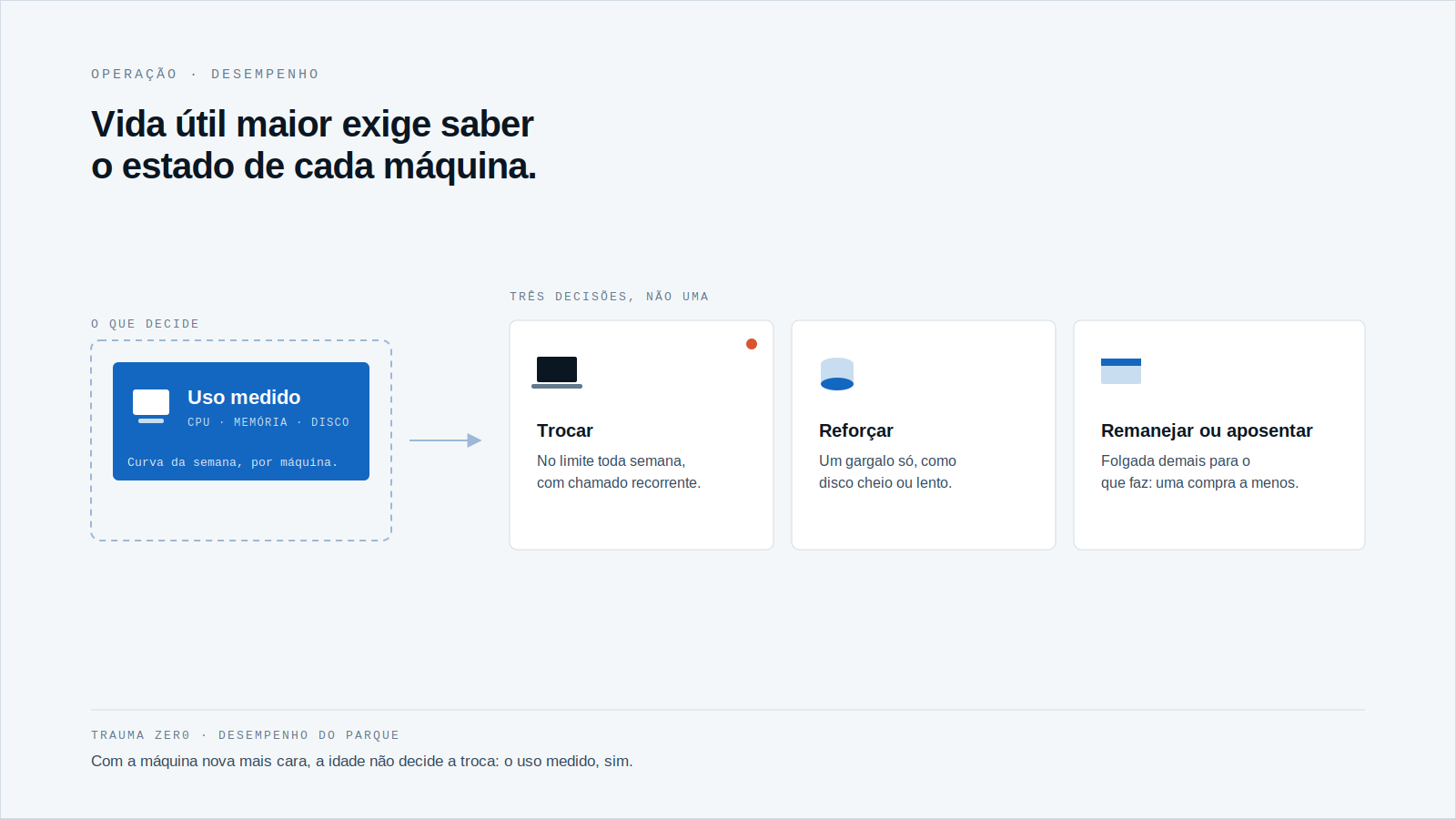
Three decisions instead of one
With each machine’s data in hand, “replace or not” splits into three paths.
Replace
For the workstation that sits at its limit every week and already produces recurring tickets. Here the purchase, however expensive, pays for itself in productivity.
Reinforce
For the one with a localized bottleneck, such as a full or slow disk, and everything else in order. Fixing the weak point can buy another year.
Retire or reassign
For the one that is too idle for what it does. If a machine barely works, it may serve another department, and one purchase disappears.
Across thousands of workstations, the sum of these three decisions looks very different from a single rule by age. It is the difference between buying everything and buying what is needed.
When the new machine costs more, knowing which one really needs replacing is worth more.
How Trauma Zer0 handles this decision
The Tz0 Performance module tracks the performance and health of each machine over time, not only when someone opens a ticket.
According to the module page, it records each device’s CPU, memory and disk hour by hour, so what you see is the weekly curve, not a momentary peak. Each machine gets a rating from “very good” to “critical” for CPU, memory and disk separately.
An agent on each machine sends the data to the Trauma Zer0 server, which is installed on the customer’s own infrastructure. The page says this works on the company network, at home or on the road, and that only the difference travels over the local network.
Administration is through a web console, from the whole fleet down to a single machine. The module suggests actions, such as downgrading, reinforcing the disk or retiring underused equipment, and the decision stays with whoever runs the fleet.
Bottleneck hours become action items with an owner and a deadline. An item only moves from “done” to “completed” when the data confirms the improvement.
The page does not detail supported operating systems, agent requirements or data retention; confirm those points before planning. And to know how many workstations exist and what is installed on them, the equipment list comes from Tz0 Inventory.
Before the next budget round
If the refresh is going to be extended, it is worth reversing the usual order: first look at what each machine delivers, then decide what to buy.
Anyone who faced this question with other deadlines knows the script. It was the same with the Windows 10 ESU, where the decision was also machine by machine, and with the end of support for Office 2021, where the list of affected machines was the missing piece.
With memory expensive, the same goes for hardware: the date is public, the state of your machines is not.
If you want to see how this works on your own fleet, request a Trauma Zer0 evaluation.